30-Day Content Calendar With AI in One Afternoon
Build a 30-day content calendar with AI in one afternoon: one narrative, four weekly themes, a reusable brief and one batching session for a month of posts.
Start with a single narrative
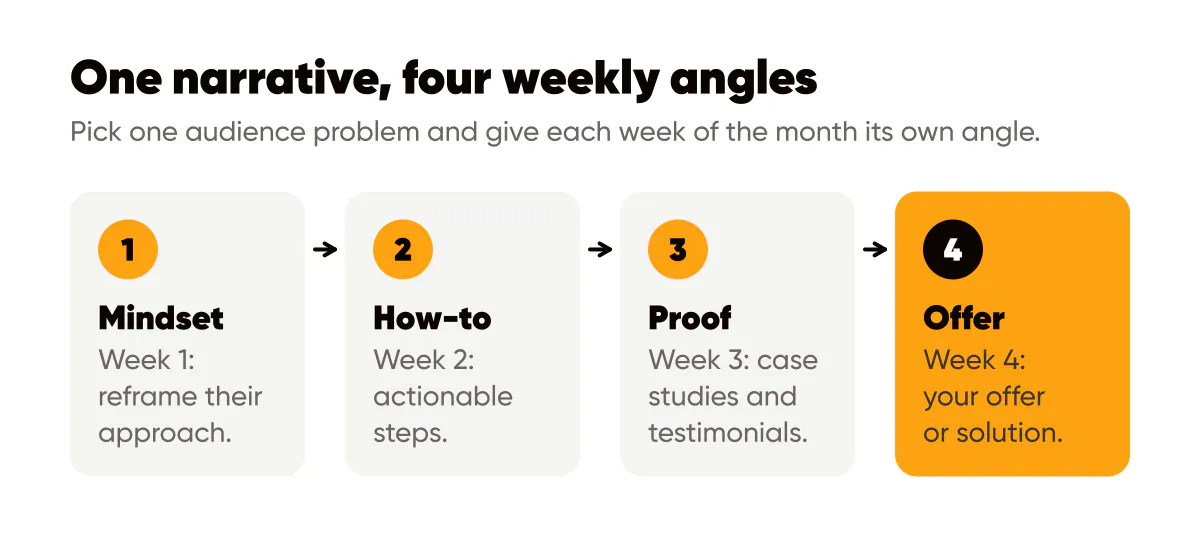
Pick one audience problem and break it into 4 weekly angles: mindset, how-to, proof, and offer. This keeps every post coherent, and a saved brief keeps the voice the same from week to week. The key is choosing a problem your audience thinks about daily, not something abstract or theoretical.
For example, if you're targeting solopreneurs, don't pick "time management" as your theme. Instead, narrow it to "creating content without burning out" or "batching social posts efficiently." The more specific your narrative, the easier it becomes to generate 30 variations that feel fresh but cohesive.
Once you've locked in your core problem, map out your four weekly themes. Week 1 focuses on mindset shifts, helping your audience reframe their approach. Week 2 delivers how-to content with actionable steps. Week 3 showcases proof through case studies and testimonials. Week 4 presents your offer or solution. This structure ensures variety while maintaining thematic consistency.
Write your brief once
Write a reusable brief once: what the business does, who it is for, how it sounds and what you usually ask people to do, the same approach our one-page content brief walks through. Keep your brand colours and your standard call to action in the same document so every post points the same way.
If you work with a general chat model, turn the brief into a prompt you reuse. A structure that works: "Write a social media caption for [business] aimed at [audience] who want [goal]. Use a [tone] voice, include one specific, practical point, and end by asking them to [action]." Swap in a different angle, pain point or outcome for each post, and you still design each image yourself.
An AI social media post generator like Creobee skips the prompt. It saves your business description, audience and tone on your account, lets you pick a content mix for the month, and hands back up to 30 posts at a time, spread across your content pillars. Each one is a finished 1080 by 1350 image with its headline and your logo, designed with the rest of the batch as one feed, and the caption comes with it. That removes the blank page and the design step in one go.
Schedule for momentum, not burnout
Your posting schedule should match your audience's behavior patterns, not generic best practices. Here is a starting framework to test against your own numbers, not a rule:
- Post educational pieces on Mondays and Thursdays when people are seeking fresh insights to start their week or push through midweek.
- Drop proof and testimonials midweek when engagement peaks and people need social validation for decisions they're considering.
- Save offers for Fridays when purchase intent is highest and people are planning their weekend purchases.
- Use weekends for behind-the-scenes content that builds connection without requiring immediate action.
Batch-create all 30 posts in one session using the same batching workflow that keeps a content engine running, then schedule them using your preferred tool. An AI content calendar generator that returns finished posts in calendar order saves the step of turning each idea into a design. This front-loads the work so you're not scrambling daily. Set aside 2-3 hours monthly to generate your entire calendar, then let automation handle the rest. This approach prevents burnout while maintaining consistent output.
Track what works and iterate
After your first month, review which angles performed best. Did mindset posts get more saves? Did how-to content drive more comments? Use this data to adjust your next calendar. Maybe you'll discover your audience loves proof content, so you'll dedicate two weeks to case studies instead of one.
Keep a simple log: one row per post with its weekly theme, the date it went out, and its saves, shares and comments from Instagram's insights. A spreadsheet is enough. If you make the posts in Creobee, each one already carries the content pillar it was planned under, and marking a post as posted counts it toward your weekly target, so the log is mostly a matter of copying the numbers across once a week.
Over a few months that log becomes an evergreen content library of posts worth repeating or remixing. The goal isn't perfection on the first calendar. It's a system that gets a little smarter every month.

Put it into practice
Turn this into posts designed for your feed
Paste your website. Creobee reads what you sell, then plans, writes and designs your posts about it as one feed in your logo and colors, captions included, and on Autopilot it posts them for you.
How the AI content calendar generator works