How to Write Instagram Captions That Get Read
How to write Instagram captions people finish on a phone: a curiosity-gap hook, short story beats with line breaks, and one clear call to action, with examples.
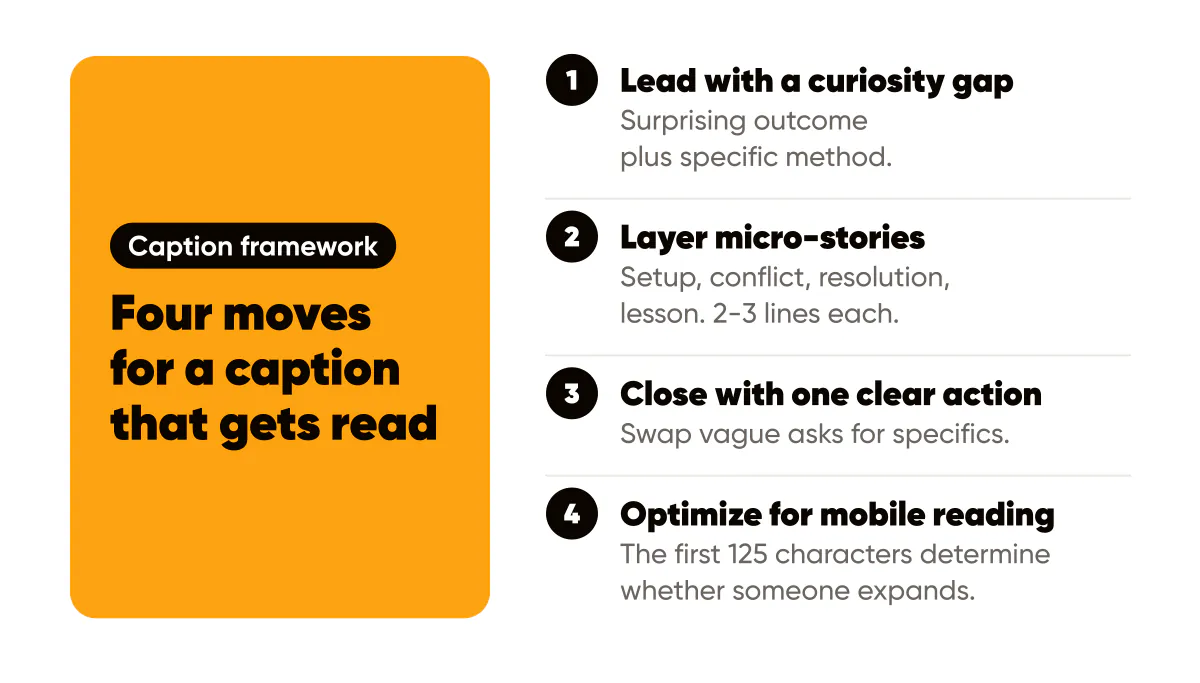
Lead with a curiosity gap
Start with a bold claim, then immediately signal the payoff. Example: "I doubled replies without posting daily. Here's the 3-line script." The curiosity gap works because it promises specific value: readers know exactly what they'll learn if they keep reading. When you paste the finished caption, run it through the free Instagram caption line break tool so the spacing survives.
The formula is: Surprising outcome + specific method = engagement. "I grew my following" is vague. "I grew my following by replying to 10 comments daily" is specific. "I grew my following by replying to 10 comments daily using this exact script" creates curiosity about the script itself.
Your opening line should make people think "I need to know how they did that." It should feel achievable but surprising. Too easy and it's boring. Too difficult and it feels unattainable. The sweet spot is "I could do that, but I never thought of it that way."
Layer micro-stories
Break the caption into 2-3 lines per story beat. White space keeps readers scrolling instead of bouncing after the hook. Each paragraph should advance the story or deliver value, creating momentum that pulls readers through to the end.
Structure your caption like a story: Setup (the problem), Conflict (what you tried), Resolution (what worked), Lesson (the takeaway), the same shape used in the caption frameworks built for AI drafts. But keep each section short: 2-3 lines max. Mobile readers scroll fast, so dense paragraphs lose them.
Use line breaks strategically. After your hook, add a break. After each story beat, add a break. Before your CTA, add a break. White space gives readers mental breathing room and makes long captions feel more digestible. It's the difference between a wall of text and an engaging read.
Add emojis sparingly to break up text and add visual interest. One emoji per paragraph maximum. Too many feels unprofessional. Use them to highlight key points or add personality, not as decoration.
Close with one clear action
Swap vague asks for specifics: "Comment 'guide' for the swipe file" beats "Let me know what you think." Track saves to gauge topic-market fit. Specific CTAs work because they remove friction: readers know exactly what to do, and the CTA examples guide has more phrasing to swipe.
Your CTA should match your goal. Want comments? Ask a specific question or request a keyword. Want saves? Tell them what to save it for. Want clicks? Make the link value clear. Vague CTAs get vague results. Specific CTAs get specific actions.
Test different CTA formats: questions vs. commands, emoji vs. no emoji, single action vs. multiple options. Track which drives the most engagement. Usually, one clear action outperforms multiple options because it reduces decision fatigue.
Track saves as a quality signal. If people are saving your posts, the topic resonates. High saves + low comments might mean the content is valuable but the CTA isn't compelling. High comments + low saves might mean it's engaging but not reference-worthy. Use this data to refine both content and CTAs.
Optimize for mobile reading
Most Instagram reading happens on mobile, so optimize for small screens. Keep lines short (40-60 characters), use plenty of white space, and make your hook visible without expanding. The first 125 characters determine whether someone expands your caption or keeps scrolling. Pair that opening with one of these hook formulas built for the same scroll-stopping job.
Test your captions on your phone before posting. Does the hook grab attention? Is it easy to scan? Does the CTA stand out? Mobile optimization isn't optional. It's essential for engagement.

Put it into practice
Turn this into posts designed for your feed
Paste your website. Creobee reads what you sell, then plans, writes and designs your posts about it as one feed in your logo and colors, captions included, and on Autopilot it posts them for you.
How the AI Instagram post generator works