Product Launch Checklist for Social Media: 5 Steps
A product launch checklist for social media in five steps: warm the audience, add honest urgency, point everything at one link, run launch day, then follow up.
Prime the audience with outcomes
Share mini-case studies and behind-the-scenes posts five days before launch. Give them one consistent cue, like the same "coming soon" line and the same colors on every post. The goal is building anticipation through proof, not promises. Show what's possible rather than just describing it.
Your pre-launch sequence should tell a story: Day 5 shows the problem your offer solves. Day 4 shares a mini case study of someone who achieved the outcome. Day 3 reveals behind-the-scenes of creating the solution. Day 2 shows social proof or testimonials. Day 1 announces the launch with urgency. Each post builds on the last, creating momentum, similar to the full 14-day launch sequence.
Give your launch sequence its own visual identity. Consistent colors, fonts, and a recurring "coming soon" label help followers recognize launch content immediately. This visual consistency builds anticipation and makes your launch feel intentional, not rushed.
Stack urgency without hype
Publish inventory updates and first-come bonuses using countdown visuals. Authentic scarcity beats gimmicks every time. If you're offering early-bird pricing, show the countdown. If you have limited spots, update availability daily. Real constraints create real urgency.
The key is being specific. "Limited time" is vague. "48 hours left" is specific. "Only 10 spots remaining" is specific. "First 50 customers get bonus access" is specific. Specificity builds trust because it's verifiable, the same discipline behind good product launch hooks. Vague urgency feels manipulative.
Make urgency visual by putting the real number on the image, like "48 hours left" or "6 spots left". It should be prominent but not overwhelming. The goal is creating a sense of opportunity, not panic. When done right, urgency feels like helpful information, not pressure.
Redirect attention to one link
Align bio links, pinned posts, and story CTAs to a single landing page. Mixed destinations kill conversion on launch day. When people are ready to act, make the path obvious. One link, one destination, one clear action.
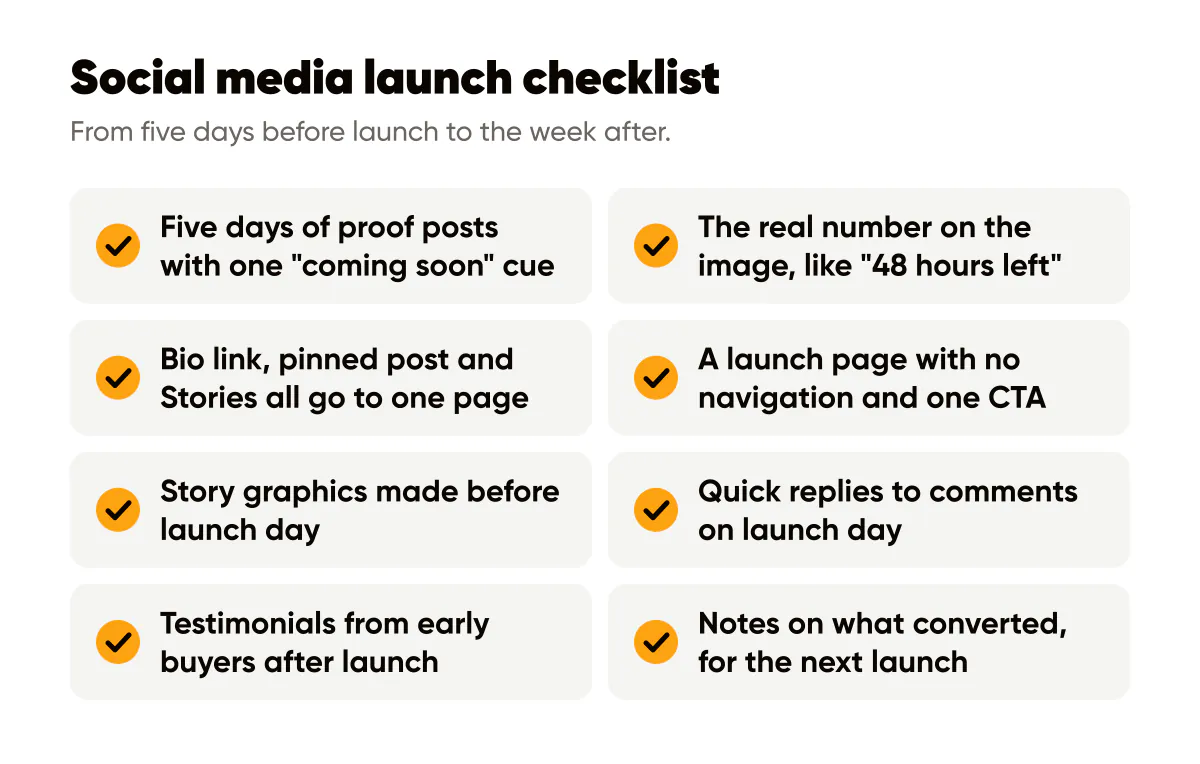
Update your bio link to point directly to your launch page. Pin your launch announcement post. Use Instagram Stories with swipe-up links (or link stickers) that all go to the same place. Every touchpoint should reinforce the same destination. Confusion kills conversion.
Create a dedicated launch landing page that's optimized for conversion. Remove navigation, reduce distractions, and focus on one clear CTA. Use the same colors, fonts and headline style on this page as in your social content, creating a seamless experience from feed to purchase.
Launch day execution
On launch day, post consistently but don't spam. Share your announcement post, then support it with Stories throughout the day. Respond to comments quickly. Engagement signals to algorithms that your content is valuable. Prepare a few simple Story graphics ahead of time that repeat the same message, so you are not designing under pressure.
Monitor your analytics in real-time. Which posts are driving the most clicks? Which CTAs are converting best? Adjust your messaging based on what's working. If one angle resonates more, double down on it. Launch day is about optimization, not just broadcasting.
Post-launch follow-up
After launch, don't go silent. Share results, thank early customers, and create FOMO for those who missed out. Post testimonials from early buyers, the kind of social proof posts that keep working after launch day. Share behind-the-scenes of fulfilling orders. Keep the momentum going with content that reinforces the value of your offer.
Use this data to improve your next launch. What messaging resonated? What visuals converted best? What objections did you hear? Document everything so your next launch is even stronger. Each launch should build on the last, creating a compounding effect over time.

Put it into practice
Turn this into posts designed for your feed
Paste your website. Creobee reads what you sell, then plans, writes and designs your posts about it as one feed in your logo and colors, captions included, and on Autopilot it posts them for you.
How the AI Instagram post generator works