Predis AI vs Canva for Instagram: Which Is Better?
Predis AI vs Canva for Instagram: a generator that posts from a brief, or an editor with an AI layer. A fair look at speed, brand, formats, price and fit.
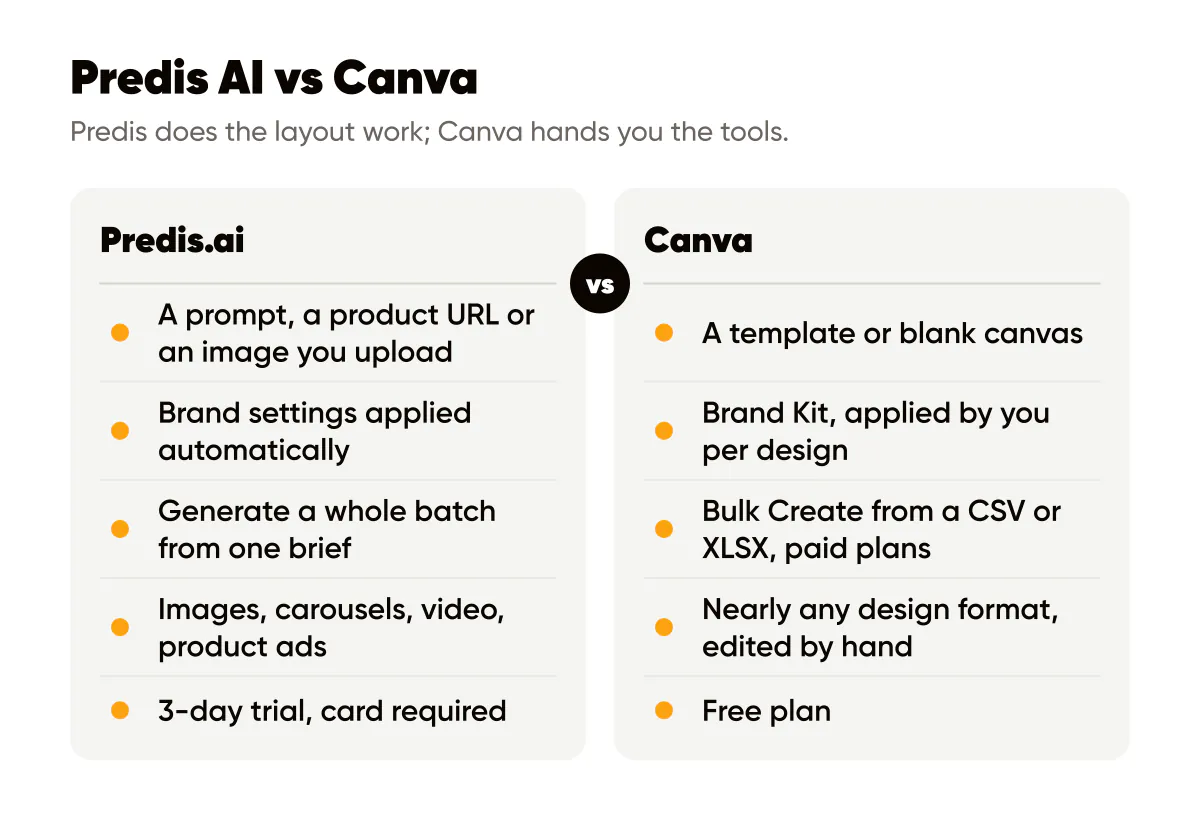
Predis AI is better if you want posts generated for you from a brief, with brand settings applied automatically and video in the same tool. Canva is better if you want to design each post yourself and need one editor for every format you make. The real difference is not quality, it is who does the layout work: Predis does it, Canva hands you the tools. If you are here because neither quite fits, I build Creobee, a Predis AI alternative and a Canva alternative for static feed posts, and I cover it briefly at the end.
The short answer, by situation
Creobee competes with both, so I have skin in this. I use Canva every month for one-off graphics, and I have read Predis's site closely enough to know where it is strong. Here is how I would decide for a small business:
- Pick Predis if you want a month of posts, carousels and short video produced from one description, and you would rather review than design.
- Pick Canva if you enjoy layout, want exact control, and make more than social posts (flyers, presentations, menus).
- Pick neither if you only want static branded feed posts and do not want to open an editor or manage credits. There is a short section on that at the end.
How each one actually works
Predis: a generator with a scheduler attached
You set your brand once: colors, tone and logo. Predis says it applies them across every format in every campaign. Then you give it an input, which can be a text prompt, a product URL, or an image you upload, and it produces the visual, the headline, the body copy and the call to action together. Posts land in a content calendar, and from there you download them in the right aspect ratio or schedule them.
Everything runs on credits. As of September 30, 2026, Predis's pricing page lists a social post at 15 credits and 8 seconds of standard video at 200. Core includes 1,300 credits a month. The plan card says that makes about 325 images or 33 videos, while the credit table on the same page works out to about 86 posts; Predis says credits depend on the model you pick.
Canva: an editor with an AI layer on top
Canva starts from a template or a blank canvas. Magic Studio is the AI layer: Magic Write drafts copy, Magic Design proposes layouts, and Brand Kit holds your logo, colors and fonts so you can apply them. You still place, resize and check every element. On paid plans, Bulk Create fills one template from a spreadsheet, and Content Planner schedules finished designs on Pro.
The result can be anything you can picture. The cost is that every post is an open canvas, and each one is a small set of decisions.
Predis AI vs Canva at a glance
| Predis.ai | Canva | Creobee (mine, for reference) | |
|---|---|---|---|
| What it is | Post generator with a calendar | Design editor with Magic Studio AI | Batch generator for static branded posts |
| You start with | A prompt, product URL or image | A template or blank canvas | A short description of your business |
| Copy | Written with the visual | Magic Write drafts; you place it | Headline and caption for every post, with a varied mix across the batch |
| Brand consistency | Applied automatically from brand settings | Brand Kit, applied by you per design | Each batch designed as one feed in one style, your logo and colors |
| Formats | Images, carousels, video (Core: up to 30 sec), product ads | Nearly any design format, edited by hand | Single 4:5 image posts only |
| Making many posts | Generate a batch from one brief | Bulk Create from a CSV or XLSX, paid plans | Up to 30 per batch from one brief |
| Scheduling | Scheduling and publishing on every plan; AI Auto Posting from Rise | Content Planner on Pro | Autopilot and Pro plans |
| Price model | Credits per month; Core $24/mo billed yearly or $32 monthly | Free plan plus paid plans, see Canva's pricing page | $19/mo for 30 posts, monthly, no annual plan |
| Free start | 3 days, card required, charged when day 3 ends | Free plan | First 3 posts, no card |
| Learning curve | Low to start, credit math to learn | Familiar editor, but every post is manual | Describe the business, pick a style; no credit math, each plan is a number of posts |
Predis figures are from Predis's pricing page as read on September 30, 2026. Canva's pricing page would not load for me, so I do not quote a price; check Canva's pricing for your region.
Speed: making a month of posts
Take an imaginary florist who wants 20 feed posts for next month. Here is what each route looks like.
In Canva, the fast path is Bulk Create. You design one template and apply your Brand Kit. You write 20 headlines in a spreadsheet (Magic Write can draft them, you still edit), upload it as a CSV or XLSX, connect the text elements to the columns, preview, and generate 20 designs. Canva allows up to 300 rows, so volume is not the limit. The limits are that Bulk Create is on paid plans only, and that one template produces 20 posts that look like one template. If you want variety, you design three templates and run it three times. Then you check each design for headlines that overflow or wrap badly, and schedule them in Content Planner.
In Predis, you describe the month and generate. The visuals, headlines and captions come out together, already in your colors with your logo. Your work is reviewing the batch and deciding what to keep. For the florist, 20 static posts cost 300 of Core's 1,300 credits at the 15-credit rate in Predis's credit table. Add four 8-second standard videos and that is another 800, which leaves 200 for second attempts. That credit budget is the thing to watch: video is where Predis shines and also where the credits go.
Predis wins on speed if you accept its layouts. Canva wins on control once your template is set up, and costs you the design time up front.
Brand consistency
This is where the two tools differ most in practice. Predis applies your brand settings for you, so post 1 and post 20 share colors and logo without you thinking about it. Canva's Brand Kit is a set of assets you apply. If you are disciplined and always start from your own template, Canva can be perfectly consistent. If you start each post from a new template because it looks nice, the feed drifts. I have watched my own account drift this way, and I wrote about the pattern in Canva vs AI generators for social posts.
A third way to get there is to take the decision away entirely. In Creobee, which I build, you pick a style and your brand color once, and every post in the batch is designed in them with your logo placed for you, so there is no template to forget and no kit to reapply. Whatever you use, the practical rule is the same: fix three things and never change them for a month. Logo position, one headline font, and a palette of two or three colors. The tool matters less than the rule.
Formats: video and carousels
Both handle carousels. Predis generates them on every plan; in Canva you design each slide, which is slower but lets you build exactly the story you want.
Video is Predis's clear advantage for a busy owner. Core includes a video maker up to 30 seconds, and the homepage leads with video ads, UGC-style ads and product ads from a URL. If you sell products and want short video every week without editing it, Predis is the stronger pick. Predis also lists Shopify and WooCommerce integrations and product post generators.
Canva's advantage is breadth. The same editor makes your feed posts, your price list, your event poster and your slide deck, and that is worth a lot if social is only part of what you design.
Scheduling
Predis schedules and publishes on every plan; Core reaches up to 10 channels. What starts on Rise is Auto Posting, where Predis's AI makes up to two posts a day for you to review before they go out. Rise is 55 dollars a month on annual billing or 79 billed monthly, as of September 2026. Canva's Content Planner schedules posts on Pro. If you already schedule in Meta's own tools or another scheduler, you may not need either feature, and that changes the value of both paid plans.
Price model
The two tools charge for different things. Canva has a free plan and paid plans, and the paid features that matter here (Bulk Create, Content Planner) are not on the free plan. Predis has no free plan; every plan starts with a three-day trial that takes a card and charges it when day three ends, and payments after that are non-refundable. Core is 24 dollars a month billed yearly (288 dollars a year) or 32 dollars billed monthly, for one brand and 1,300 credits.
Work out the cost per post you actually publish. If you use every Core credit on images, the annual rate comes to somewhere between about 7 and 28 cents an image, depending on which of Predis's two counts applies to the model you pick. For comparison, Creobee is about 63 cents a finished post on Solo and about 26 cents on Pro at full use, billed monthly, with the caption included. Per image, Predis can be cheaper. Canva's cost per post depends on your plan and how many posts you make, plus the time you spend designing, which is the real cost for most owners.
Who should pick which
Choose Predis if:
- You want video and product ads without editing them yourself.
- You would rather review 20 generated posts than design 5.
- You are fine with a card-up-front trial and credit-based limits.
Choose Canva if:
- You like designing and have a clear visual style in your head.
- You make lots of non-social material and want one tool for all of it.
- You want to start on a free plan and upgrade only if you need Bulk Create or scheduling.
If you are still torn, the Predis AI alternatives roundup covers six more tools by the reason people leave Predis.
A third option: static branded posts from a brief
Some people read a comparison like this and realize they want neither: not an editor, and not a credit system built around video. They want three or four good-looking feed posts a week, on brand, written for them. That is the narrow job I built Creobee for.
You describe your business once, and Creobee makes a batch of up to 30 finished posts, each with a headline, a caption and a designed 1080 by 1350 image with your logo. The batch is designed as one feed, in one of five styles and your brand color, with a layout for each kind of post, so there is nothing to police. Solo is 19 dollars a month for 30 posts, billed monthly, and your first 3 posts are free, no card needed.
There are no AI-generated images: the words are written with AI and typeset on the post, so they are always spelled right. The limits are real, and they are exactly where both tools above are stronger. No video, no carousels, no Stories, no product shots, no templates and no editor canvas. One format, single-image 4:5 posts. Publishing starts on the Autopilot plan, and it publishes what you made and scheduled; it does not make posts on its own the way Predis's Auto Posting does. If you want any of those, Predis or Canva is the better tool.
If a single format is fine, the Canva alternative for batches of branded posts explains how it compares with an editor, the Predis alternative page does the same against Predis, and the AI Instagram post generator page shows what a batch looks like.
Frequently asked questions
Is Predis better than Canva for Instagram?
For speed and video, yes: it generates posts, carousels and short video with your brand applied. For control and design range, Canva is better. For a small business that posts several times a week and does not enjoy design, Predis usually saves more time.
Can Canva generate a month of Instagram posts like Predis?
Partly. Bulk Create fills one template from a spreadsheet of up to 300 rows, and Magic Write can draft the headlines. You still design the template and write or edit the copy, and Bulk Create is only on paid plans.
Does Predis have a free plan like Canva?
No. As of September 2026, Predis offers three days free on every plan with a card required, charged when day three ends. Canva has a free plan.
Can I use Predis and Canva together?
Yes, and it can work well: Predis for the weekly batch and video, Canva for one-off graphics like event posters. Just keep the same logo files, colors and fonts in both so the feed does not look like two brands.

Put it into practice
Turn this into posts designed for your feed
Paste your website. Creobee reads what you sell, then plans, writes and designs your posts about it as one feed in your logo and colors, captions included, and on Autopilot it posts them for you.
How the Predis AI alternative works