AI Brand Voice: Teach Any Tool in 10 Sentences
Fix your AI brand voice with one page: 10 real sentences, 5 banned phrases and 3 tone words for any prompt, plus a five-caption test to prove it works.
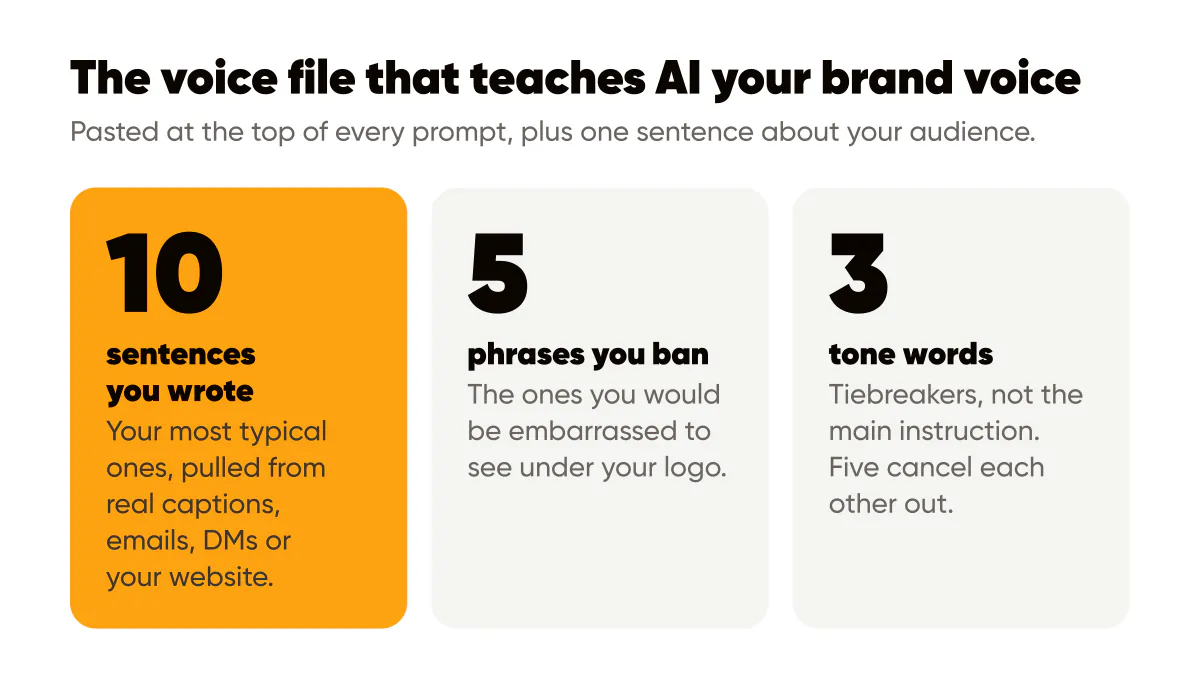
You teach AI your brand voice by giving it evidence, not adjectives. A voice file with 10 sentences you actually wrote, 5 phrases you refuse to use, 3 tone words and 1 sentence about your audience, pasted at the top of every prompt, does more than any "write in a friendly professional tone" instruction ever will.
Why a brand voice prompt fails when it is made of adjectives
The first voice instruction I gave a model for my own captions said "friendly, confident, helpful." Every model reads those words the same way, and the output was the same warm mush you see in half the captions on Instagram. Adjectives describe a voice from the outside. A model needs to see the voice from the inside.
The fix was embarrassingly simple. I pasted eight captions I had written by hand and said "match this." Edits per caption dropped immediately. The model does not need to understand my brand. It needs examples to imitate, and a fence around the things it must not do.
That is the whole idea behind the voice file. It is a small text document, under a page, that you paste into any AI tool before you ask for anything. It travels with you across tools, so it does not matter whether you use a chat assistant, a caption generator or a batch tool like Creobee.
The four parts of a voice file
What goes in the 10 sentences?
Ten sentences you wrote yourself, in your normal posting voice, pulled from real captions, emails, DMs or your website. Not your best sentences. Your most typical ones. If you tend to open with a blunt claim and follow with a specific number, the ten sentences should show that pattern at least three times.
Pick for variety of job, not variety of topic. Include an opening hook, a plain explanation, a sentence with a number in it, one that admits a trade-off, one with a call to action, and one that is just you being a person. If you have never written anything, write ten sentences now about the last customer you helped. Rough is fine. Rough is the point.
Which five phrases should you ban?
The five phrases you would be embarrassed to see under your logo. Mine are "game-changer," "unlock," "elevate," "in today's fast-paced world" and any sentence starting with "Imagine." Yours will differ, but every brand has a list. If you cannot think of five, generate ten captions with a generic prompt, highlight what makes you wince, and you will have your list in two minutes.
Banned phrases work better than tone instructions because they are checkable. "Sound authentic" cannot be verified. "Never use the word unlock" can, by you or by a second pass of the model.
How do three tone words help if adjectives do not?
They help as tiebreakers, not as the main instruction. Once the model has ten real sentences, the tone words tell it which direction to lean when the examples are ambiguous. I use "direct, specific, dry." A wedding photographer might use "warm, unhurried, precise." Three is the limit because five tone words cancel each other out and you are back to mush.
The fourth part is the audience sentence. One sentence: who reads this and what they are trying to do. "Solo business owners who post for their own brand and have about an hour a week for it." That sentence changes vocabulary, reading level and which objections the model anticipates. Skip it and the model writes for a general audience, which is nobody.
How to paste it into any prompt
Put the voice file first, then the task. Order matters more than people expect. Models weight early context heavily, and a voice file buried under the task instructions gets partially ignored.
A working structure looks like this. Start with a line such as "Here is how I write. Match these sentences closely." Then the ten sentences. Then "Never use these phrases:" and the five. Then "Tone: direct, specific, dry." Then the audience sentence. Then a blank line and the actual request: "Write 5 Instagram captions about the topic below, each under 40 words, one call to action each."
Inside Creobee the brand description field does the same job: I paste a compressed version of my voice file there once, and every week of posts the AI content calendar generator plans and writes inherits it. In a chat tool you paste it every time, or save it as a custom instruction if the tool supports one. Either way, the file is the constant and the topic is the variable. That split is the core of the human-plus-AI workflow I run every week: humans own the voice and the angle, machines own the volume.
The five-caption test
Here is how you know whether your voice file works. Generate five captions on one topic. Edit them the way you would before posting. Count the edits.
On my account, a generic prompt produced captions that needed six to ten edits each: hype words out, a specific detail in, the call to action rewritten, the opening line replaced. With the voice file, most captions need one or two, usually adding a receipt the model could not know. That is not a statistic about AI in general. It is what happened in my tests, and the test takes ten minutes, so run your own.
If edits do not drop, the diagnosis is almost always one of three things:
- Your ten sentences are not typical of how you write, so the model is imitating a version of you that does not exist.
- Your banned list is missing the phrase that keeps showing up, so add it and rerun.
- The task instruction contradicts the voice file, for example asking for "exciting, energetic captions" when your tone words say "dry."
Keep the edits you make. They are the raw material for the next version of the file. When I notice I am always adding the same kind of sentence, a concrete number or a trade-off, I add an example of it to the ten and the problem mostly disappears. The AI caption generator guide goes deeper on the edit pass itself.
Two things the voice file cannot do. It cannot supply experience. The model will imitate your sentence rhythm and avoid your banned words, but it does not know that your last client cancelled twice before signing, or that you switched suppliers in March. Those details are yours to add, and they are what makes a caption yours rather than plausible. Google's guidance on AI-generated content is consistent with this: what gets rewarded is helpful, original content, however it was produced, and originality is the part you bring.
It also cannot pass the self-assessment questions in Google's people-first content guidance on your behalf; those ask whether the content shows first-hand experience, and only you can supply that. And it cannot fix a voice you have not settled. If you switch between corporate and casual every week, the file will be inconsistent and so will the output. The voice file is a mirror. Fix the reflection first. A one-page design system with tone words next to your colors and fonts is a good place to keep it, so the visual and verbal sides of the brand stay in one document.
Do this this week
Open a blank note. Paste ten sentences from things you have already published. Write five banned phrases, three tone words and one audience sentence. Paste the whole thing above your next caption request and count the edits on five outputs. If the count drops, save the file where you can find it. If it does not, adjust the ten sentences before touching anything else. Then run every caption through the 12-point quality checklist before it ships, because voice is only one of the things that can go wrong.
Put it into practice
Turn this into posts designed for your feed
Paste your website or say what you do. Creobee plans, writes and designs your posts about it as one feed in your logo and colors, captions included, and on Autopilot it posts them for you.
How the AI social media post generator works