Predis AI Alternatives in 2026, Compared on Cost
Predis AI alternatives compared on one job, posts for 3 accounts: our cost calculation from each vendor's own page, checked November 4, 2026.
People usually leave Predis for one of four reasons: the low price needs a year paid up front, the trial takes a card and payments after it are non-refundable, the credits are shared with a video engine they never use, or they only wanted a scheduler. Which alternative fits depends on which of those it is. I build Creobee, one of the tools below, so it is listed alphabetically with the others and gets the same columns, including the ones where it loses.
Every price and plan fact here was read on the vendor's own pricing or help page and checked November 4, 2026.
What Predis gives you, for reference
Predis's pricing page opens on yearly billing: Core $19 a month ($230 a year), Rise $40 ($474) and Enterprise+ $212 ($2,540), each beside a struck-out $32, $79 and $249. Core is one brand, 10 social accounts and 1,300 credits a month, which its card estimates at "About 325 images or 33 videos". Auto posting, where the AI makes and queues posts for review, starts on Rise. Every plan starts with 3 days free on a card, charged when day 3 ends, and the refund answer says "Payments after that are non-refundable". The full breakdown, with our price-per-credit calculation, is in Predis AI pricing.
Predis is the better tool if you use what it is built around. Its plan comparison lists a video maker, carousel generation, an Instagram story maker, e-commerce product post and video generators, Shopify and WooCommerce integrations, competitor analysis and Google Business posting. None of the alternatives below turns a store's product into a video in the same way.
One job, priced six ways
A price list compares plans; it does not tell you what your job costs. So we fixed one job and found, on each vendor's own page, the cheapest plan that does it: one person, one business, posts scheduled to three accounts (Instagram, Facebook and LinkedIn), with a month queued at once. The calculation is the plan's monthly cost, or the yearly total ÷ 12 where yearly billing is offered.
| Tool (alphabetical) | Cheapest plan for the job | Billed yearly, a month | Billed monthly | Who makes each post |
|---|---|---|---|---|
| Buffer | Essentials, 3 channels at $5 each | $15 | $15 shown | You, with an AI writing helper |
| Canva | Pro | $12 ($144 ÷ 12) | Not read | You, in the editor |
| Creobee | Autopilot | No yearly plan | $39 | Creobee, from your brief |
| Marky | Solo, 3 channels | $19 | $39 | Marky, from your website |
| Ocoya | Starter, 5 channels | $24.17 ($290 ÷ 12), + VAT | $29, + VAT | You, with AI images and captions on credits |
| Predis | Core, 10 accounts | $19.17 ($230 ÷ 12) | $32 struck out | Predis, on credits |
Notes on each row, from the vendors' pages:
- Buffer: the pricing page shows Essentials at "$5 /month" per channel and "$60 billed yearly (save 2 months)", so I could not read a separate monthly-billing price. The Free plan connects 3 channels but holds 10 scheduled posts per channel, which is short of a month for most accounts.
- Canva: the pricing page showed Pro at US$144 a year for one person on its yearly view. Scheduling is on Pro and above, per Canva's Content Planner help, which lists Instagram Business accounts, Facebook Pages and LinkedIn among its platforms and says Instagram scheduling must be done from a desktop browser.
- Creobee: our own pricing. Solo ($19 for 40 posts) makes the posts but does not schedule them, so it does not do this job.
- Marky: pricing page; 14-day trial with a card, "7-day refund on any charge".
- Ocoya: pricing page; 7 days free, card required.
- Predis: the yearly figure is printed; the monthly figure is the struck-out price, which I could not confirm against the page's Monthly switch.
What the calculation shows: on yearly billing, Predis Core is not expensive for this job. It ties Marky Solo at about $19 and undercuts Ocoya. The cheaper options, Canva Pro and Buffer, are cheaper because you make the posts yourself. Creobee is the most expensive way to get three accounts scheduled; what it adds is that the posts are planned, written and designed for you, billed monthly with no year up front. If your reason for leaving Predis is price alone, the table says to stay or to move to a tool where you do the design.
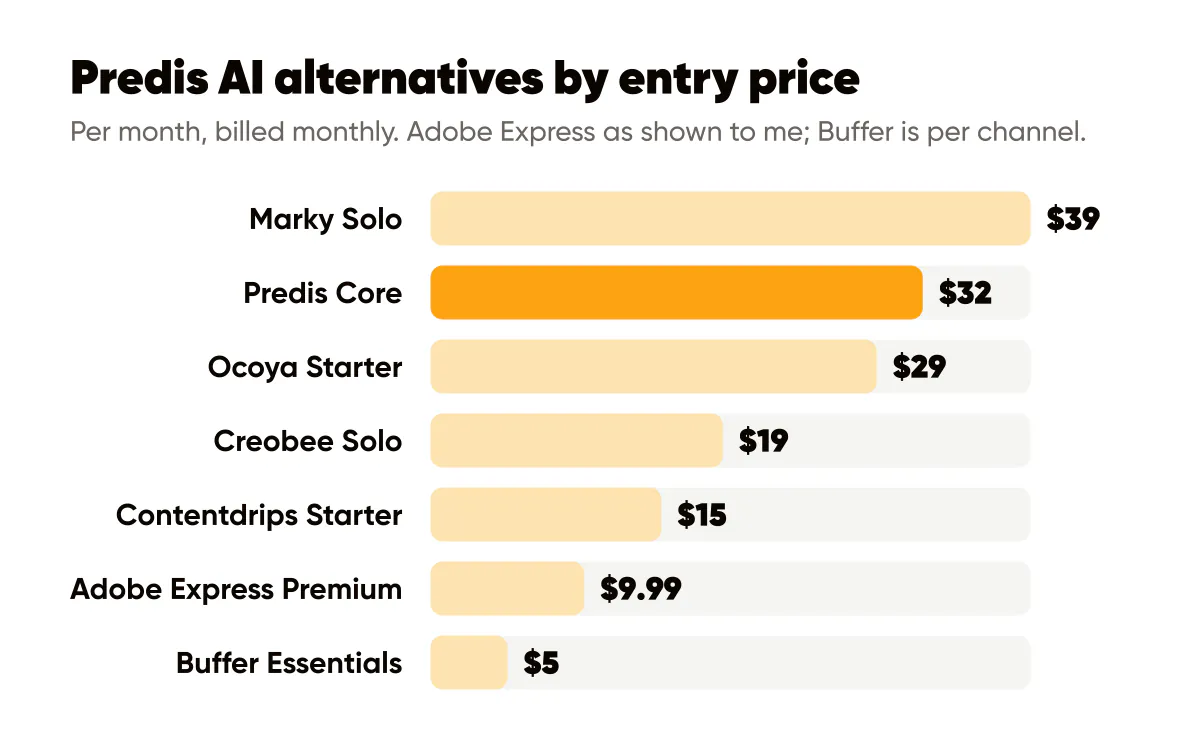
The alternatives, by reason for leaving
You want to design, not generate: Canva. Canva's Free plan includes 1 Brand Kit with 3 colors; Pro has 5 Brand Kits and social content scheduling. On paid plans, Bulk Create fills one design from a spreadsheet of up to 300 rows, on desktop only. The cost is your time: you apply the brand and write the rows. Our step-by-step for that is Canva Bulk Create for Instagram posts.
You already have the images: Buffer. Buffer's AI Assistant helps write and repurpose text, and its pricing page lists no image or video generation: Buffer makes no video and no images. If a designer or photographer already hands you the visuals, it is the cheapest way to get them scheduled.
You want carousels for LinkedIn: Contentdrips. Its FAQ says you can create and schedule carousels, graphics and text posts to LinkedIn company and personal pages and to Instagram. Its pricing page showed two different versions of its plans, with different prices and credit allowances, when I read it on November 4, 2026, so I am not quoting a price; check it on the day you buy.
You want the same kind of tool with a different trial: Marky. It learns your voice from your website, makes posts, carousels and AI images, can animate a designed post, and publishes to Instagram, Facebook, LinkedIn, X, Google Business, TikTok and Pinterest. Its plans are priced by channels and state no post allowance. Details in Marky AI pricing.
You mostly wanted the calendar and an inbox: Ocoya. It publishes to 28 destinations, has a social inbox and visual automations, and generates images, carousels and short video on credits whose per-item cost its pages do not state. Details in Ocoya pricing.
You only want the feed, made for you: Creobee. It plans, writes and designs a feed's posts, carousels and stories in your colors with your logo, with short animated versions of single posts if you want them. It makes no AI-generated images, no filmed or AI video, no ads and no product shots, and it has no inbox or analytics. Solo is $19 for 40 posts, Autopilot $39 for 100 posts posted for you, Pro $79 for 300. The side-by-side is on the Predis alternative page.
Predis or Canva, if those are the two you are weighing
The difference is who does the layout. Predis's FAQ describes a brand as holding "your logo, brand colors, tone of voice, and key messaging", and says everything made under it comes out in that brand: you review rather than design. Canva gives you the editor and a Brand Kit that you apply yourself; post 1 and post 20 match only if you start every one from the same template.
So pick Predis when you want video and product posts made for you and are fine with credits and a card-up-front trial. Pick Canva when you enjoy layout, make more than social posts (flyers, menus, decks), and want a free plan to start; Bulk Create and scheduling need Pro. If you want neither an editor nor a credit system, the calculation above shows what that costs.
Before you switch
Export your logo files, hex colors and font names before your Predis plan ends, and write your brief (who you serve, what you sell, how you sound) in a document you own, so any tool starts from the same page. Then make ten posts in the new tool before Predis renews and count how many you would publish without edits.

Put it into practice
Turn this into posts designed for your feed
Paste your website or say what you do. Creobee plans, writes and designs your posts about it as one feed in your logo and colors, captions included, and on Autopilot it posts them for you.
How the Predis AI alternative works