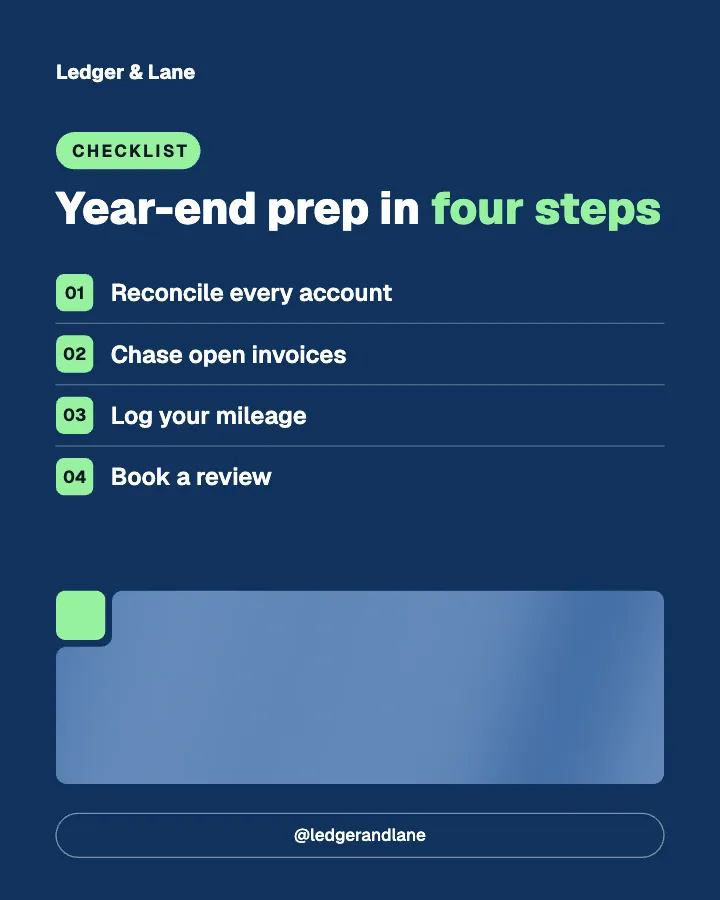
Social media posts for accountants, written and designed for you.
Creobee makes social media posts for accountants, bookkeepers and small CPA firms. Describe your practice once and it plans a month of posts (deadline reminders, tax season checklists, myths about the books and answers to the questions clients ask every week), writes each headline and caption in a clear, professional voice, and designs them as one feed in your logo and colors. You approve every post before it goes anywhere, because AI-written dates and figures must be checked against the current rules.
Example posts for a fictional bookkeeping and accounting, made with Creobee.
How it works
01
Describe your practice
Who you work with (sole traders, small companies, contractors), what you do for them and what sets you apart. Mention your busy season, a fixed-fee package or a free review, and the posts can use it.
02
Keep the professional look
A Professional voice picks the Block style: notched color blocks and a footer bar with your call to action on every post. Your brand color is used exactly and your logo sits on each one. A preview shows your next nine posts.
03
Check it, then post it
Up to 30 posts with captions. Check every date, rate and threshold, leave out anything that is not right for your clients, then download the batch or schedule it on Autopilot.
Six posts from a bookkeeping feed
The posts at the top of this page belong to Ledger & Lane, a fictional bookkeeping firm whose feed was made with Creobee. Here are six more of its headlines, with the kind of caption that goes under each. None of them quotes a tax rate or a filing date, because those depend on where your clients are and change every year. Put yours in your description, and check them in every post.
Educate/Tip
Open a business account today
Mixing personal and business spending in one account is the most common reason books take twice as long to sort out. A separate business account makes every transaction easy to explain and keeps your records clean if anyone ever asks questions. If you change one thing this month, make it this.
Educate/FAQ
Do I need a bookkeeper yet?
If receipts and reconciling eat more than three hours of your month, the answer is usually yes. Until then, good software and a monthly habit can carry you. The day you notice you are putting off the books, or guessing at what you can claim, is the day to get help. We are happy to tell you honestly which side of that line you are on.
Educate/Myth vs fact
Books are a tax-season job
Books kept once a year are books rebuilt once a year, from a shoebox of receipts and a bank statement nobody remembers. Kept monthly, they take an hour or two, show you what is coming before it arrives and turn tax season into a quick check. The work is the same. Doing it little and often is what makes it painless.
Social proof/Objection
My software does it for me
Bookkeeping software is a good start, and we recommend it. It imports your transactions. It does not know that the transfer on the 14th was a loan, that a supplier billed you twice, or which costs your business can actually claim. Someone still has to review the categories every month. That review is the part we do.
Engage/Question
What slows down your month-end?
Missing receipts, a card nobody reconciles, clients who pay late, or a spreadsheet only one person understands? Tell us in the comments. The most common answer becomes next week's how-to, with the fix we use for our own clients.
Inspire/Reminder
Receipts do not file themselves
Photograph each receipt the day you get it and drop it into one folder. Five seconds now saves an hour of searching later, and a receipt you cannot find is a cost you cannot claim. Consider this your Friday reminder.
Each headline is designed into its post; the caption goes underneath when you post or schedule it.
What accountants and bookkeepers should post on social media
Clients choose an accountant they trust, and most of them look you up before they call. A feed that answers their questions, reminds them of what is coming and shows how you work does that job every week, even in the months when you are too busy to think about it. The posts that work for accounting and bookkeeping firms tend to be the same few kinds:
Deadline and tax season reminders, posted early enough to act on.
Checklists: year-end prep, what to send your bookkeeper, what to keep and for how long.
Myth versus fact: the misunderstandings you correct on every first call.
Questions and objections answered: do I need a bookkeeper yet, is my software enough, what does it cost.
How you work: onboarding, the monthly routine, what a review covers.
Offers and availability: a free review, a fixed-fee package, spots before the busy season.
Tax season social media posts, made before the rush
Tax season is when people think about their accountant, and it is also when you have the least time to post. So make the posts before it starts. Pick the "Sell and launch" mix, describe what you offer in the busy months (a filing package, the dates you want clients to remember, extra appointments), and the plan mixes reminders, checklists, answers and one clear offer across the month, with enough useful posts that the feed never reads as an ad.
One batch of up to 30 posts covers a month at one a day, or ten weeks at three a week. On Autopilot you schedule up to 45 days ahead, and up to 90 on Pro, enough for all ten weeks, so the posts keep going out in the weeks when you are buried in returns.
Creobee writes with AI. It is built not to invent numbers, client names or reviews, and dates and prices come from what you put in your description. But tax rules change every year and differ from place to place, and AI writing can still get a date or a threshold wrong. Read every post before it goes out the way you would read a junior's draft: check each deadline, rate and limit against the current rules, and leave out any post you would not sign.
The words on the image cannot be edited, so a post with a wrong date is one you leave out. The caption can be changed when you post it, or on Autopilot while you schedule it, and nothing is published until you schedule it. The posts are general information for your followers, not advice to a particular client; if your firm uses a line saying so, add it to the caption.
Accounting feeds look best when they look calm and orderly. The Block style is made for that: notched color blocks with small accent squares, the supporting line as an accent subtitle, and a footer bar with your call to action and handle on every post. It is picked automatically for a Professional voice. Editorial, with serif headlines and thin rules, suits a firm that wants to feel like a trusted adviser. Your brand color is used exactly, every word meets the WCAG AA contrast standard, and your logo is on every post.
The layout follows the post: a checklist becomes numbered rows, a myth sits beside the fact with the myth struck through, a count of deadlines becomes a big number, an offer gets a button. With "Add people" switched on, some posts show real people from a curated library of 30, tinted in your colors. They never appear on client stories or quotes, so nobody reads as your client. No picture is AI-generated.
Every post is a 1080 by 1350 image with a caption. Instagram, Facebook and LinkedIn all show that 4:5 shape uncropped in the feed, so the same batch works on your Instagram, your Facebook Page and your LinkedIn. On Autopilot, Creobee publishes to Instagram, Facebook Page, LinkedIn, Threads, Pinterest, Bluesky and TikTok. Each post has one caption, used on every network you send it to. It writes posts in English, Spanish, Portuguese, French, German and Turkish, and no other languages.
What it costs next to a template pack or a freelancer
Template packs for accountants give you layouts to fill in yourself. A freelancer plans and writes for you on a monthly retainer. Creobee sits in between: Solo is $19 a month for 30 finished posts, about $0.63 a post, and Autopilot is $39 for 90 posts plus publishing to 7 networks. Creobee makes still 4:5 posts: no video or Reels, no carousels yet, no replies to comments or DMs and no analytics.
A template pack for accountants vs Creobee
Template packs are a fair choice if you like to design. This is what each one leaves you to do every month.
Creobee
What you get
Finished posts with captions
Who writes the posts
AI, from your description; you check and approve
Tax season
Reminders, checklists and answers planned into the month
Your brand
Your exact brand color and logo on every post
Checking the facts
You check every date and figure before posting
Posting
On Autopilot, to 7 networks
Price
First 3 posts free, no card needed, then from $19 a month
Accounting template pack
What you get
Editable layouts, often for Canva
Who writes the posts
You, every month
Tax season
Find the reminder templates and fill them in
Your brand
You recolor each layout
Checking the facts
You wrote them
Posting
A separate scheduler
Price
A one-off purchase
Feature
Accounting template pack
Creobee
What you get
Editable layouts, often for Canva
Finished posts with captions
Who writes the posts
You, every month
AI, from your description; you check and approve
Tax season
Find the reminder templates and fill them in
Reminders, checklists and answers planned into the month
Your brand
You recolor each layout
Your exact brand color and logo on every post
Checking the facts
You wrote them
You check every date and figure before posting
Posting
A separate scheduler
On Autopilot, to 7 networks
Price
A one-off purchase
First 3 posts free, no card needed, then from $19 a month
Pricing
Pick how much gets done for you
Every plan designs your feed. Pick how many posts, and whether we post them too.
Your logo and brand color, and real people if you want them
Download everything, keep it in your gallery
Recommended
Autopilot
For handing the whole job over
$39/month
90 designed posts a month, captions included
Posted for you on Instagram, Facebook, LinkedIn, Threads, Pinterest, Bluesky and TikTok
Schedule every post you make, in grid order, across 10 accounts
Publishing never uses your posts
Everything in Solo
Pro
For posting every day across several accounts
$79/month
300 designed posts a month, captions included
500 scheduled posts a month on up to 15 accounts
Schedule your own photos too, uploaded from your device
Schedule up to 90 days ahead
Everything in Autopilot
For comparison: freelancers usually charge $300 to $1,500 a month for 8 to 16 posts.
7-day money-back guarantee
Cancel anytime from your dashboard
Your plan starts right after checkout
Questions from accountants and bookkeepers
Straight answers on pricing, posts, and what Creobee does and does not do.
A steady mix of useful and personal: deadline reminders, checklists, myths corrected, client questions answered, how you work, and the occasional offer. The useful posts earn the follow, and the offers turn some followers into clients. Keep figures general unless you are sure they apply to everyone who will read them.
Yes. Mention your busy season, your filing package and the dates that matter in your description, pick the "Sell and launch" mix, and the month mixes reminders, checklists and an offer. Every date comes from what you tell it and still needs checking by you, because the rules change and AI writing can get a detail wrong.
No. Creobee is not a tax tool and does not look anything up. It writes from your description and is built not to invent figures, but it can still get a detail wrong, so you approve every post. Nothing is published until you download it or schedule it on Autopilot.
Yes. The same posts suit bookkeepers, small accounting practices and CPA firms that want a steady feed. One account holds one business, so a firm with several brands needs an account for each; Pro adds posts and connected accounts, not brands.
Block, the professional one, with a footer bar carrying your call to action on every post; it is picked for a Professional voice. Editorial suits a firm that wants a calmer, adviser-like feed. You can switch and preview your next nine posts before anything is made.
Solo is $19 a month for 30 designed posts, Autopilot is $39 for 90 posts and posts them for you on Instagram, Facebook Page, LinkedIn, Threads, Pinterest, Bluesky and TikTok, and Pro is $79 for 300 posts and up to 15 connected accounts. Billing is monthly, with a 7-day money-back guarantee.
Partly. Every new account gets 3 finished posts free, with no card and no watermark, so you can see your own brand on real posts before paying anything. After that, plans start at $19 a month for 30 posts, with a 7-day money-back guarantee. They are made from your own description, so you judge real posts for your practice, not a demo.