Instagram Carousel Tips: What to Put on Each Slide
Instagram carousel tips, slide by slide: the hook, the teaching slides, the proof and the CTA, so your carousels earn saves, shares and sales.
Slide 1: Hook and promise
Pair a sharp headline with a visual that foreshadows the payoff. Avoid logos here. Keep it about them. The first slide determines whether people swipe or scroll away, so make it count. Your headline should promise a specific outcome, and your visual should reinforce that promise.
The hook should create curiosity or promise value, following the same patterns in our viral hook formulas guide. "I doubled my email list in 30 days" works because it's specific and desirable. "Here's how to grow faster" is vague. Specificity builds trust and creates intrigue. Make people think "I need to know how they did that."
Your visual should reinforce the headline without duplicating it. If your headline promises "30 days to 10K followers," show growth or success visually. Use colors, imagery, or graphics that evoke the outcome. Avoid generic stock photos. Use visuals that feel relevant and authentic.
Keep logos off the first slide. The opener should be about the viewer's outcome, not your brand. Once you've hooked them, you can introduce branding. But start with value, not promotion.
Slides 2-4: Teach the shortcut
Share a concise, step-by-step fix. Each slide should deliver one actionable point, not a paragraph. Carousels work best when each slide is digestible. One idea per slide, clearly communicated, with visuals that support the message.
Structure your teaching slides as a progression. Slide 2 might introduce the framework. Slide 3 shows the first step. Slide 4 shows the second step. Each builds on the last, creating a logical flow that keeps people swiping.
Use visuals to reinforce your points. If you're teaching a process, show it visually. If you're sharing a template, display it. If you're explaining a concept, illustrate it. Visuals make information more memorable and easier to understand.
Keep text minimal. Carousels are scanned, not read deeply. Use bullet points, short sentences, and plenty of white space. If you need more detail, save it for the caption or a follow-up post. The carousel should give the gist, not the full explanation.
Make each slide actionable. "Step 1: Define your audience" is better than "Understanding your audience is important." People should be able to take action from each slide, even if they don't swipe all the way through.
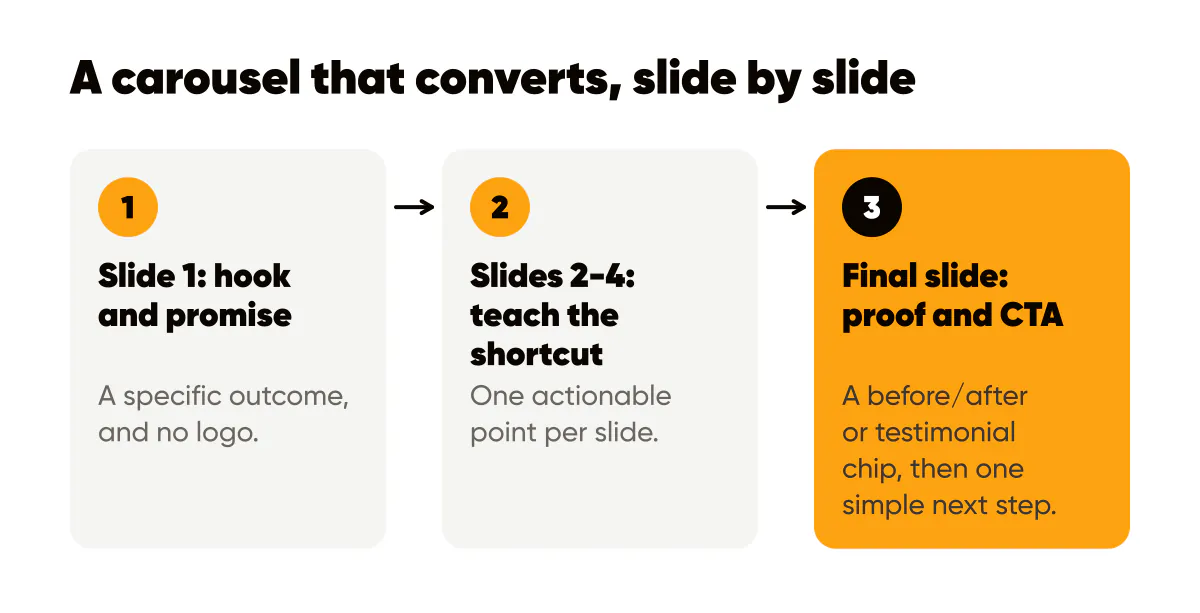
Final slide: Proof + CTA
Show a before/after or testimonial chip, then invite a simple next step like "Comment for the template." The final slide should reinforce the value and make it easy to take action.
Proof makes your promise credible, the same principles behind our social proof posts guide. Before/after comparisons show transformation. Testimonials show social validation. Usage stats show popularity. Choose the proof that best addresses your audience's likely objections or concerns.
Your CTA should be specific and low-friction. "Comment 'TEMPLATE' for the guide" is better than "Let me know if you want this" because it's clear and easy to automate. Make it obvious what action to take and what they'll get in return.
Give the final slide the strongest design of the set. The CTA should stand out: bold colors, clear typography, obvious action button. Don't make people search for how to engage. Make it impossible to miss.
Optimize for the carousel format
Carousels perform best when each slide can stand alone. Some people will only see slide 1. Others will swipe through a few. Few will see them all. Design so slides 1, 2, and the final slide work independently. If you design the set as one wide image so elements flow across slides, the Instagram carousel splitter cuts it into evenly sized 4:5 slides.
Track which slides get the most engagement, the metrics our saves and shares guide says matter most. Use Instagram's insights to see where people drop off. If slide 3 loses people, maybe it's too dense or not compelling enough. Optimize based on data, not assumptions.

Put it into practice
Turn this into posts designed for your feed
Paste your website. Creobee reads what you sell, then plans, writes and designs your posts about it as one feed in your logo and colors, captions included, and on Autopilot it posts them for you.
How the AI Instagram post generator works