Instagram Link in Bio Tips: Turn Visits Into Sales
Instagram link in bio tips: one link or a link page, links ordered by business goal, a link that matches this month's posts, and UTM tags that show what sells.
A link in bio strategy means deciding one primary destination for your profile, ordering any extra links by business goal rather than habit, and changing the link to match whatever you are posting about this month. Then you tag every link with UTM parameters so Google Analytics can tell you which posts actually sent people, not just how many arrived.
Why the link in bio deserves a strategy at all
Instagram gives you one small, precious piece of real estate that leaves the app. Every caption that says "link in bio" points at it. Most solopreneurs set it once, forget it, and then wonder why a launch post produced twelve profile visits and zero sales. The link was still pointing at their homepage from eight months ago.
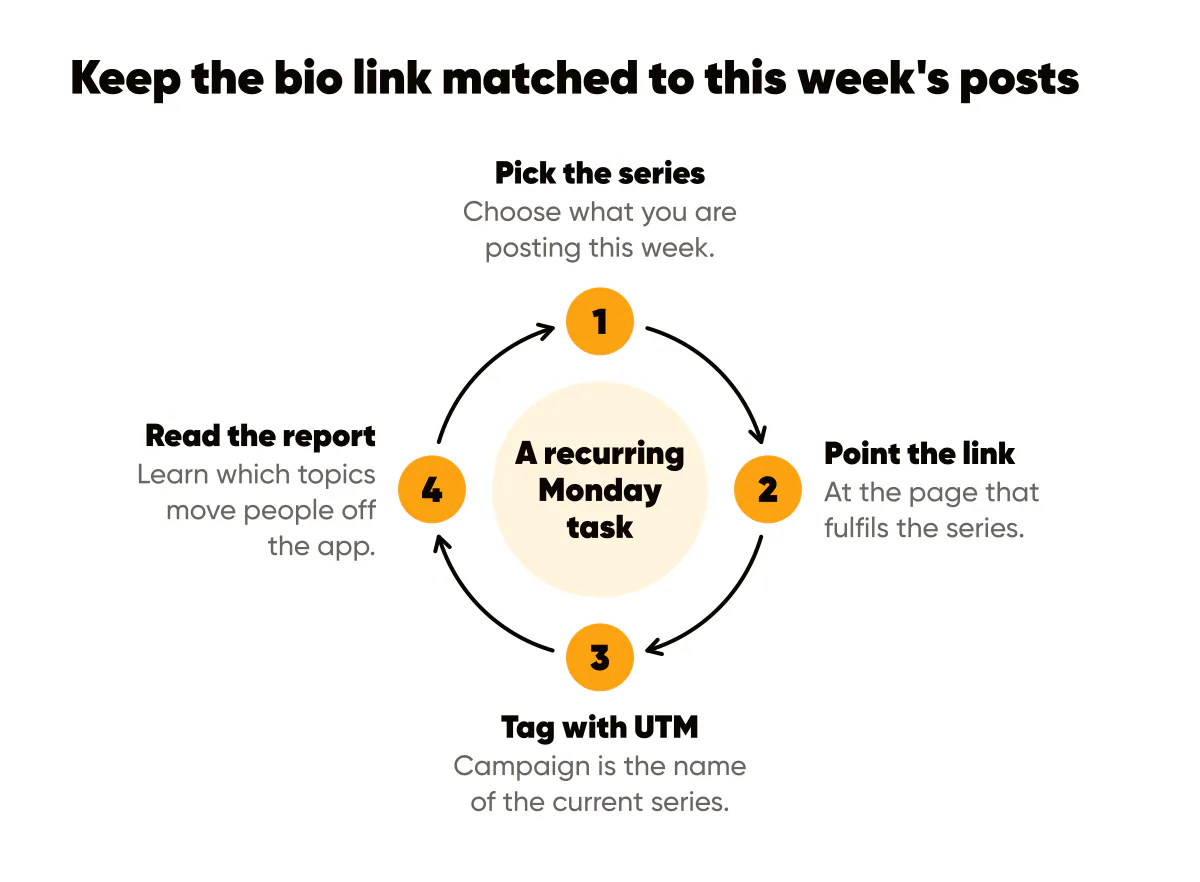
I check Creobee's bio link every Monday as part of the planning routine, and I change it more months than not. The profile is the landing page for your feed; the link is its only button. Treat it like a button on a website: it should say what happens when you press it, and it should be the thing you most want pressed this month.
One primary link or a link page?
One primary link if you have one goal this month. A link page if you genuinely have three or more things people ask for and you can order them ruthlessly. Both are legitimate; the failure mode is a link page with eleven items in the order you added them.
Hick's Law is the reason to keep it short: every extra option slows the decision, and a profile visitor is giving you seconds, not minutes. My rule is three links maximum on a link page, with the first one carrying the current campaign. If a fourth thing matters, it replaces the third, it does not join it.
Instagram now lets you add more than one link directly in the profile, which the Instagram Help Center documents, so for many accounts a separate link page is no longer required. Fewer hops means fewer people lost between the tap and the destination.
Ordering links by business goal
Write your business goals for this quarter in order. For most solopreneurs that list looks like: get paying customers, grow the email list, book calls, everything else. Your link order should mirror that list, not your content calendar and not your ego.
- First position goes to the action that produces revenue or the most direct path to it, such as the offer page or the booking page.
- Second position goes to the asset that captures an email address, because a subscriber is worth more than a follower over time, which is the case made in converting social followers to email.
- Third position, if you use one, goes to the thing people ask about most in DMs, so you can answer with "second link in my profile" and stop typing it out.
Everything else lives in your website navigation, not your bio. A profile visitor who wants your podcast can find it from your homepage; do not spend a bio slot on it.
Matching the link to your current post series
This is the piece most people miss. If this week's carousels are about pricing mistakes, the bio link should go to your pricing guide or the pricing-related offer, not to a generic homepage. The caption says "the full breakdown is at the link in my bio" and the link delivers exactly that. Anything else is a broken promise, and people remember broken promises.
During a launch this becomes essential. The 14-day launch content sequence only works if the link changes on day one to the launch page and changes back after the close. During a content push built from one long article, as described in turning one blog post into a week of Instagram content, the link points to that article for the whole week.
Write the link change into your content calendar as a task with a date, the same way you schedule the posts. It takes one minute and it is the minute that makes the rest of the week's captions honest. Even when the posts go out on social media autopilot, this one stays manual: the link does not change itself.
How do you track which posts drive link clicks?
UTM parameters. Append a query string to the link so analytics can separate this month's Instagram traffic from everything else. The pattern I use: source is instagram, medium is bio, and campaign is the name of the current series, such as pricing-week or september-launch. When the series changes, the campaign value changes, and the report splits cleanly.
Set up Google Analytics on the destination site if you have not already, then look at the campaign report after each series ends. You will learn which topics move people off the app, which is different from which topics get likes. On my account those two lists overlap far less than I expected.
If your link page tool has its own click counts, use them as a second opinion, not the source of truth. The analytics on your own site sees what happened after the click, which is the part that turns a visit into a customer.
A hypothetical month for a wedding photographer
Say it is September and you shoot weddings. Goal one is booking next spring, goal two is the email list. Week one, you post a five-part series on how to choose a photographer, and the bio link goes to a guide page with an inquiry form at the bottom, tagged with campaign choose-guide. Week three, you post three real-wedding features, and the link moves to your availability page, campaign spring-dates.
At the end of the month the analytics show which week's posts produced inquiries, not just clicks. Next September you know which series to lead with. The bio and the rest of your profile copy were built to send people to that link, so the two pieces need to agree: the bio line above the link should name the destination.
Do this this week
Write your top three business goals in order and rewrite your bio links to match that order, cutting anything below three. Pick the series you are posting this week and point the first link at the page that fulfils it. Add UTM parameters with a campaign name you will recognise next month, then confirm the destination is set up in Google Analytics before you post a single "link in bio" caption. Add a recurring Monday task to review the link. One button, pointed at the right place, changed weekly, is a strategy most accounts never get around to having.
Put it into practice
Turn this into posts designed for your feed
Paste your website or say what you do. Creobee plans, writes and designs your posts about it as one feed in your logo and colors, captions included, and on Autopilot it posts them for you.
How the AI Instagram post generator works