Social Media CTA Examples That Do Not Sound Desperate
Social media CTA examples sorted by how warm the reader is, the stock buttons our post designer refuses, and lead magnet, DM and price posts.
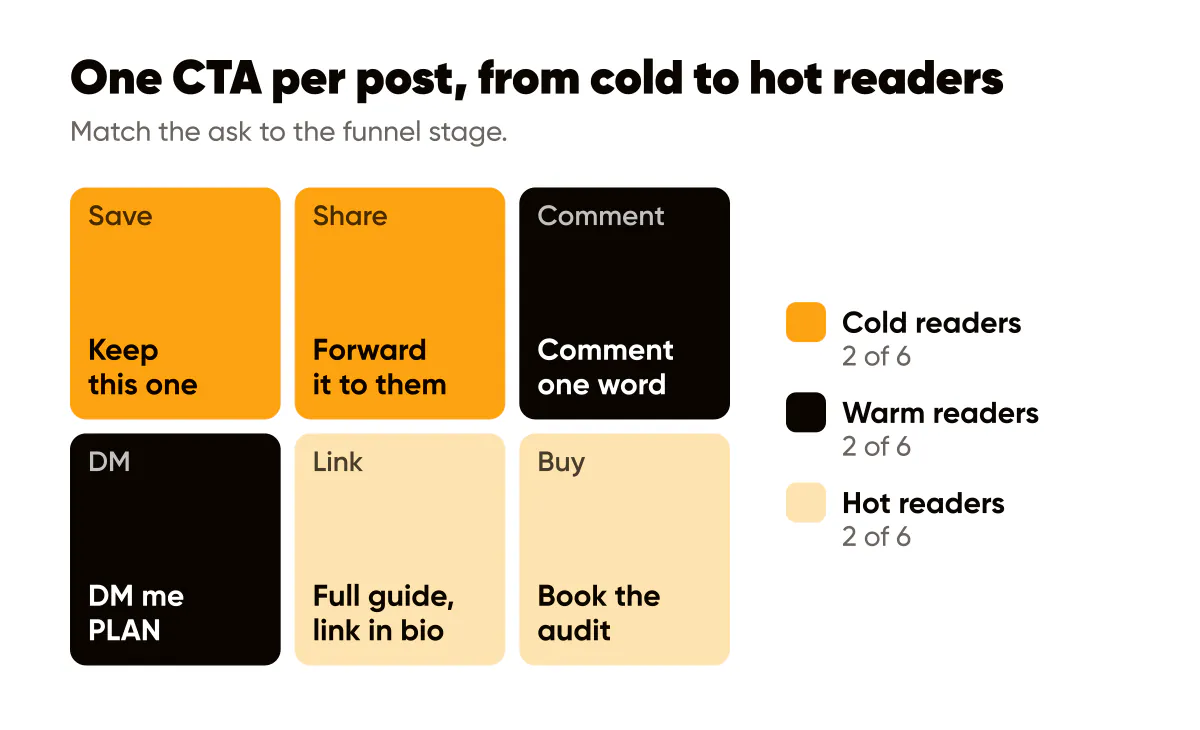
A call to action works when it asks for one thing the reader is ready to do. Someone who has never heard of you might save a useful post; they will not book a call. Someone who has followed you for months might. So the forty lines below are sorted by how warm the reader is, from save and share at the cold end to link and buy at the hot end.
Three rules sit behind all of them:
- One ask per post. A caption that asks people to like, save, share, comment and click gets none of it.
- Match the ask to the reader. A stranger saves; a regular messages you; a customer who is nearly ready clicks.
- Make it concrete. "Comment below" is a shrug. "Comment the one word you would put on your homepage" has a clear finish line.
Not every post needs one. I leave about a third of Creobee's posts to end on the idea, because a feed where every caption ends in an ask teaches people to skip the last line.
The buttons our post designer refuses
Creobee, the tool I build, writes a short call to action onto some posts as a button: a question post's reply prompt, an offer post's next step, a carousel's closing slide. Writing those rules forced us to decide what a usable button is, so here they are as the code has them on November 4, 2026:
- Two to four words, at most 26 characters. A button longer than that is blanked rather than squeezed in, and the post goes out without one.
- No stock buttons. A button that could sit on any business's post is blanked: "Learn more", "Find out more", "Read more", "Get started", "Click here", "Check it out", "Contact us", "Get in touch", "Try it now". The same check runs in every language the posts are written in, so German "Mehr erfahren" goes too.
- About this business's customer. The model is asked for "the next step this business's customer takes", so a button names something that customer would actually do.
None of that is a measured result about clicks; it is a writing rule we hold the generator to. It is also a fair test for a caption you write by hand: if the ask would fit any business, rewrite it until it only fits yours.
Save and share, for people who just found you
Saves fit checklists, frameworks and anything someone will want later. Instagram's own ranking explainer (May 31, 2023, checked November 4, 2026) names posts you have liked, shared, saved or commented on among the things it uses to learn what you are interested in.
- Save this for the next time you sit down to plan a week of posts.
- Bookmark this before quarter end, you will need it then.
- Save this and tick off one item a day this week.
- Keep this one, it is the checklist I use before every launch.
- Save this so you have it when a client asks.
- This is a reference post, not a read-once post. Save it.
- Save now, use it on Monday.
Shares work when the post says something the reader wants to say to someone else. Make the recipient obvious.
- Send this to the friend who still designs every post from scratch.
- Share this with someone who started their business this month.
- If a colleague needs to hear this, send it to them.
- Share this to your story so you can find it again.
- Know a cafe owner with no time for social media? This is for them.
- Share this if you have ever posted at midnight because you forgot.
- Tag the person who taught you this the hard way.
Comment and DM, for people who know you
For comments, ask a question with a short, concrete answer. Long open questions get silence.
- Comment one word that describes your brand right now.
- Which of these three would you try first? Reply with the number.
- Tell me your niche and I will suggest a hook in the replies.
- Yes or no: do you batch your posts?
- Drop your biggest content bottleneck in one sentence.
- If you could keep one tool, which would it be?
- Finish this sentence: my customers come back because...
- Disagree? Tell me why, I read every reply.
DM asks open a private conversation. A keyword makes the ask feel like a system rather than a favour, and makes the messages easy to find later.
- DM me the word TEMPLATE and I will send you the one I use.
- Message me if you want the full checklist as a file.
- Send me your handle and I will tell you what I would fix first.
- Want the longer version? DM me and I will send the doc.
- If this is your exact situation, message me. I have a shortcut for it.
- DM me PLAN and I will send you the planning sheet.
Link and buy, for people who are nearly ready
A link ask only works when the link is where you say it is, so name the destination and what is there. The Instagram bio guide covers setting the link up.
- The full guide is at the link in my bio. It is about an eight minute read.
- Grab the planning sheet, first link in my profile.
- Join the newsletter for the version of this I do not post publicly.
- The whole breakdown is on the blog, link in bio.
- Want this every week in your inbox? Link in bio.
- The examples I could not fit here are in the article, link in profile.
A buy ask belongs on a post about the offer, not on a lesson. Say who it is for, what happens next, and any deadline that is real. Invented urgency is exactly what makes a CTA sound desperate.
- If you post every week and design every post yourself, the link in bio shows another way.
- Book the audit if you want a second pair of eyes on your feed this month.
- Enrolment closes Friday at midnight. That is a real date.
- Three spots this month. When they are gone, the next opening is in January.
- Ready to hand off the design work? The link in bio walks you through it.
- Try it on your next batch of posts and tell me what broke.
Line 38 is only fine if the number and the month are true. The FTC's advertising and marketing basics (checked November 4, 2026) say ad claims "must be truthful, cannot be deceptive or unfair, and must be evidence-based", and a spot count or a deadline in a caption is a claim.
Lead magnet posts
A lead magnet is a small free thing, a checklist, a template, a two-page guide, offered for an email address. It works when it solves one named problem in one sitting and sits one step before what you sell: a bookkeeper's year-end checklist, a web designer's homepage copy template. "A guide to social media" is worth nothing; "the checklist I run before every post goes live" is worth an address.
The post has three parts in this order: the promise as the headline, a preview of what is inside (three of the checklist's items in the caption, or on a second carousel slide), and one ask, usually line 23 or line 30 above. Say what happens after signing up ("the checklist now, one short email a week after that"), and make the first email deliver the file in its first line. The magnet should be useful to someone who never buys from you; if it is a sales letter in disguise, people notice.
From a comment to a conversation
Most sales that start on social media finish in a DM thread that began as a comment. Four moves cover it:
- Reply to the comment with a question, not a pitch: "Stuck on the pricing or on saying it out loud? The fix is different."
- Offer the DM as an option they can decline: "Happy to go into detail here or in DMs, whichever you prefer."
- In the DM, ask two questions: one about their situation, one about their timing.
- Offer one next step, not a menu: a call, a quote, a photo, a hold at the counter until Saturday.
Never send a cold DM to someone who only liked a post, and never open a DM with a link. A keyword tool that sends what someone explicitly asked for is fine; everything after that first message should come from you, and should mention something they actually said.
Posting your prices
If your offers are packaged and repeatable, posting the price usually helps: it qualifies people before they message and cuts the "how much?" threads that end the moment you answer. If every job is scoped by hand, post a range ("most projects land between X and Y, depending on scope") or the three things that move the price. Package tiers work best as two or three, one carousel slide each in the same layout.
Two rules keep it honest. A "from" price must be one you actually sell at, and a price rise gets a post with its date and reason before it takes effect, ideally with existing clients told what happens to their rate.
Rewriting a line in your own voice
Take any line above and swap the noun for your thing. "Save this for the next time you plan a week of posts" becomes "Save this for the next time you plan a week of menus" for a chef. Then read it out loud. If you would not say it to a customer standing in front of you, do not post it.
A quick exercise for this week: count the asks in your last ten captions and cut any caption with two or more down to one. If you are unsure whether a post deserves a save ask or a share ask, the saves and shares guide shows which kinds of post earn each.

Put it into practice
Turn this into posts designed for your feed
Paste your website or say what you do. Creobee plans, writes and designs your posts about it as one feed in your logo and colors, captions included, and on Autopilot it posts them for you.
How the AI Instagram post generator works