Best AI Instagram Post Generators (2026): 9 Tools
The best AI Instagram post generators for small business, compared: what each makes, which have a free plan, prices as of September 2026 and where each wins.
The best AI Instagram post generator for a small business depends on one question: do you want a tool that writes text for you to design around, or one that hands you finished, branded images? Canva Magic Studio and Adobe Express lead if you like to design. Predis.ai, Ocoya and Contentdrips generate visuals plus copy and schedule them. Buffer, Later and Hootsuite add AI writing to a scheduler. Creobee, my own AI Instagram post generator, turns one brief into a batch of finished, branded 4:5 posts, captions included, with no AI-generated images. Below is the comparison I wish existed when I started, with every price checked on the vendor's own site on September 30, 2026.
How I compared these tools
I build Creobee, so read the Creobee section with that in mind. To keep the rest fair, every claim about a competitor comes from that vendor's own website as read in September 2026, not from review roundups. Where a page would not load or did not state something plainly, I say so rather than guess. Prices differ by region and billing period and change often, so treat every number as a snapshot.
"AI Instagram post generator" here means a tool that uses a language or image model to produce all or part of a feed post. Pure schedulers and pure image models are out; AI image generators vs branded post composers covers that second distinction.
Is there an AI that makes Instagram posts?
Yes. Three kinds of tool do it, and they mean different things by "makes".
- Editors with AI inside. Canva and Adobe Express write copy and generate images inside a template editor. You still assemble each post.
- Generators that design posts for you. Predis.ai, Ocoya, Contentdrips and Creobee take a brief and hand back posts with text and visuals already laid out. Predis and Ocoya also make carousels and short video; Contentdrips leads on carousels; Creobee makes single designed image posts only.
- Schedulers with an AI writer. Buffer, Later and Hootsuite write or rewrite captions in the composer. The picture is still yours to bring.
Most of these also generate pictures with an image model. Creobee does not: it writes the words with AI and designs every post from your brand, a background library or your own photo, so the headline on the image is always spelled the way it was written.
What is the best AI to make Instagram posts?
It depends on the bottleneck, so here is the short answer by situation.
- You enjoy design and make many formats: Canva Magic Studio, or Adobe Express if you want a free plan with generative images built in.
- You want posts, carousels and video from one brief: Predis.ai.
- You publish to many networks, in several languages: Ocoya.
- You lead on LinkedIn and repost carousels: Contentdrips.
- You have your visuals and only need captions: Buffer (free), Later or Hootsuite.
- You want a month of static, on-brand feed posts without opening an editor: Creobee.
Comparison table
| Tool | What it generates | Branded images | Schedules posts | Entry price, September 2026 | Where it wins |
|---|---|---|---|---|---|
| Canva Magic Studio | Layouts, copy and images inside a template editor | Yes, via Brand Kit, applied by you | Yes, Content Planner on paid plans | Free plan; paid price not quoted here | Range of formats and design control |
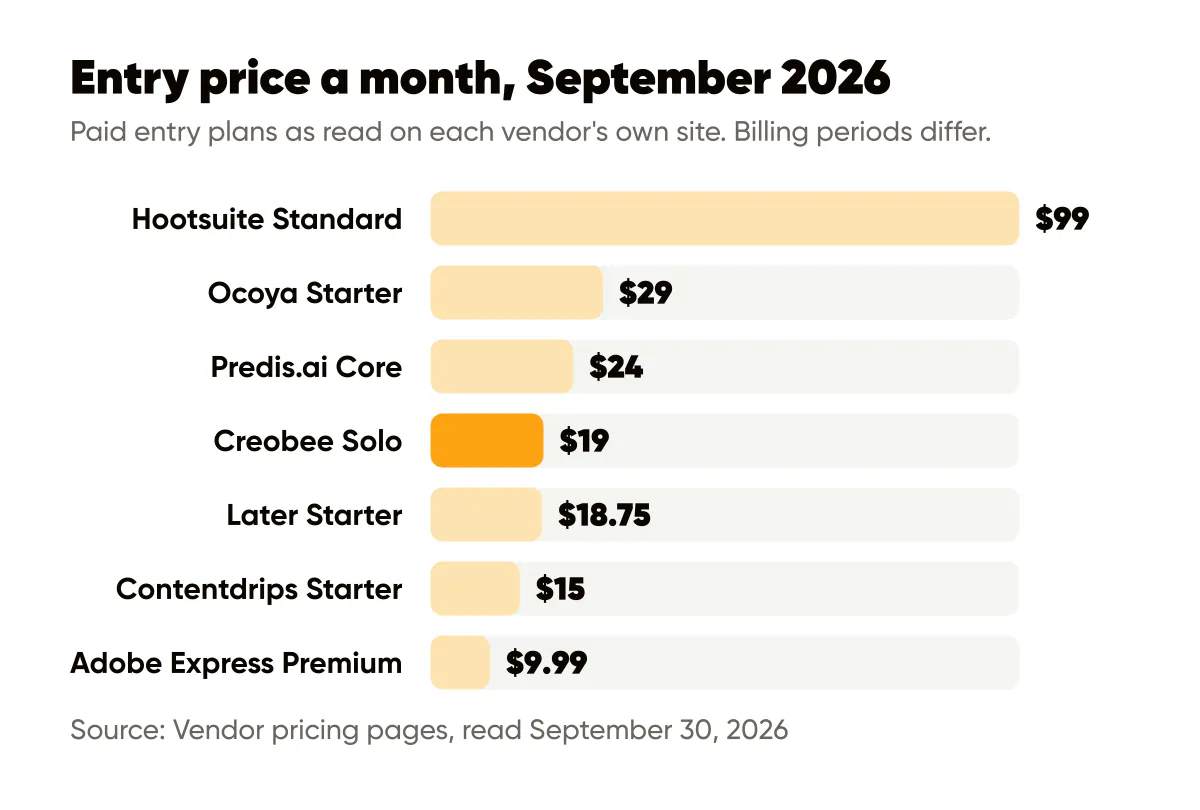
| Adobe Express | Templates from a prompt, images, text effects | Yes, brand kits on Premium, applied by you | Yes, Content Scheduler, free plan included | Free plan; Premium US$9.99 a month as shown to me | Free plan with a scheduler and generative images |
| Predis.ai | Images, carousels, videos, captions | Yes, automatic from brand settings | Yes, on every plan; AI Auto Posting from Rise | Core $24 a month billed yearly, $32 monthly | Video, product ads and carousels from one brief |
| Ocoya | Copy, images, carousels, short video | Yes, automatic | Yes, to 20+ networks | Starter $29 a month | Network breadth and 37 languages |
| Contentdrips | Carousels, text posts, quote cards, infographics | Yes, brand kit | Yes, LinkedIn on paid plans | Free plan with 50 credits; Starter $15 a month | Carousels, with a free plan |
| Buffer AI Assistant | Caption text, ideas, rewrites | No images | Yes, Buffer is a scheduler | Free plan, 3 channels; Essentials $5 a month per channel | Free AI writing in a simple scheduler |
| Later Caption Writer | Instagram captions only | No images | Yes, Later is a scheduler | Starter $18.75 a month, billed yearly | Instagram-first scheduling and visual planner |
| Hootsuite | Posts, captions and images with AI, plus its Wisdom assistant | Not automatically | Yes, Hootsuite is a scheduler | Standard $99 per user a month, billed yearly | Inbox, monitoring and reports for a team |
| Creobee | Captions plus finished 1080 by 1350 designed posts, up to 30 per batch, no AI-generated images | Yes, automatic, each batch designed as one feed in your logo and brand color | Yes, on the Autopilot and Pro plans | Solo $19 a month for 30 posts | A planned, patterned month of feed posts from one brief |
Sources: Adobe Express pricing, Predis.ai pricing, Ocoya pricing, Contentdrips pricing, Buffer pricing, Later pricing, Hootsuite plans and Creobee's own pricing, all read on September 30, 2026. Canva's pricing page refused to load for me, so I do not quote its price; check Canva's pricing for your region.
Is there a free AI Instagram post generator?
Yes, with limits. As of September 2026 these have a permanent free plan:
- Canva has a free plan with templates and some AI features. Bulk Create and the Content Planner need a paid plan.
- Adobe Express has a free plan with free daily generations and a Content Scheduler for one account per social network.
- Contentdrips has a free plan with 50 AI credits and basic templates.
- Buffer has a free plan for three channels, and its AI Assistant is included.
The generators that design the whole post for you have trials instead. Predis.ai gives three days and takes a card to start. Ocoya gives seven days, Later and Hootsuite fourteen (Hootsuite says no card is needed). Creobee has no free plan either, but every new account gets its first 3 posts free with no card, so you can judge the output on your own business before paying. Outside this list, Marky starts you with 30 free posts; the details are in Marky AI pricing.
A free plan is the right start if you post once or twice a week and enjoy assembling posts. If you need twenty or more a month, the free tiers run out of credits or time long before they run out of templates.
The nine tools, one by one
Canva Magic Studio
Canva is the tool most small businesses already have open, and Magic Studio is the AI layer on top: Magic Write drafts copy, Magic Design proposes layouts, and Brand Kit holds your logo, colors and fonts so you can apply them to any design. Canva titles its landing page for this a free AI social media post generator, and the paid plans add the Content Planner for scheduling and Bulk Create for filling one template from a spreadsheet. Canva's pricing page would not load for me, so I am not quoting the Pro price.
The strength is range: one subscription covers feed posts, Stories, Reels covers, pins, presentations and print. The weakness for a weekly poster is that each post is still an open canvas, and open canvases drift. I go deeper on that trade-off in Canva vs AI generators for social posts.
Where it wins: design control, formats well beyond feed posts, and a free plan most owners already use.
Best for: owners who enjoy design, need many formats, and post a few times a week rather than daily.
Adobe Express
Adobe Express covers similar ground with Adobe's generative image engine behind it: thousands of templates, text to image, template generation from a prompt, text effects, and a Content Scheduler. The free plan is real and usable, with free daily generations and scheduling to one account per social network. Adobe's pricing page showed me Premium at US$9.99 a month with 250 generative credits a month, brand kits and a 30-day free trial. The page localizes, so your figure may differ.
Where it wins: the most complete free plan here, scheduler included.
Best for: businesses that want a free editor with generative images built in, and are happy to assemble each post themselves.
Predis.ai
Predis.ai is the closest thing here to a one-click post. You set brand colors, tone and logo once, then give it a prompt, a product URL or an image, and it produces the visual, headline, copy and call to action together, as a single post, a carousel or a video. Every plan can schedule and publish (Core to up to 10 channels). Rise adds Auto Posting, where the AI makes up to two posts a day for you to review before they go out.
Core is 24 dollars a month billed yearly (288 dollars a year) or 32 dollars billed monthly, for one brand and 1,300 credits. The plan card says that is about 325 images or 33 videos, while the credit table on the same page lists a social post at 15 credits, which would be about 86; Predis says credits depend on the model you pick. Every plan starts with three days free, Predis takes a card to start the trial and charges it when day three ends, payments after that are non-refundable, and there is no free plan.
Where it wins: video, UGC-style ads and product posts from a URL, plus carousels, all from one tool. Nothing else here matches that range.
Best for: product sellers who want images, carousels and short video from the same brief.
Ocoya
Ocoya pairs a scheduler that publishes to more than 20 places, Instagram, TikTok, LinkedIn, X, Facebook, YouTube Shorts, Pinterest, Threads and Bluesky among them, with AI that writes on-brand copy from a one-line idea, translates it into any of 37 languages, and generates images, carousels and short video. Starter is 29 dollars a month for one user, five social profiles and 300 AI credits, with a seven-day trial and no free plan.
Where it wins: distribution breadth and languages. It is a team tool priced like one, so a solopreneur with two accounts pays for reach they may never use.
Best for: small teams publishing to several networks in more than one language.
Contentdrips
Contentdrips is built around carousels and text-led graphics, LinkedIn first and Instagram second. It generates carousels, text posts, quote cards and infographics with your brand kit of fonts, colors and styles. Its paid plan cards list publishing to LinkedIn, and its FAQ says you can schedule to LinkedIn and Instagram from one dashboard. It has a free plan with 50 credits, Starter at 15 dollars a month and Pro at 26 dollars, both billed monthly.
Where it wins: carousels, on a free plan, for less than any generator here.
Best for: consultants and founders who lead on LinkedIn and repost carousels to Instagram.
Buffer AI Assistant
Buffer's AI Assistant is a writing helper inside a scheduler: it generates ideas, repurposes existing posts, and adjusts tone or length. It does not make images or designs. It is included on every plan, including the free plan with three channels. Paid Essentials is 5 dollars a month per channel.
Where it wins: the cheapest way to get AI captions and scheduling in one place.
Best for: owners who have their visuals sorted and want free caption help attached to a simple scheduler.
Later Caption Writer
Later's Caption Writer generates on-brand Instagram captions, and each generation uses one AI credit. Starter comes with five AI credits a month and one social set of eight profiles, and costs 18.75 dollars a month billed yearly, with a 14-day trial and no free plan. Later does not generate images.
Five credits a month is a very small allowance, so treat the Caption Writer as a bonus on a scheduler rather than the reason to buy Later.
Where it wins: Instagram-first scheduling with a visual planner.
Best for: Instagram-first accounts that want Later's scheduling and will use AI captions occasionally.
Hootsuite
Hootsuite's plans page says every paid plan can "generate posts and images with AI" and includes Wisdom, its AI assistant. I did not test the image side. Standard manages up to ten social accounts, has a free 14-day trial with no card, and costs 99 dollars per user a month, billed annually.
Hootsuite is a team platform with an inbox, monitoring and reports; AI writing is a feature inside it, not the product.
Where it wins: the inbox, brand monitoring and reporting that none of the generators here offer.
Best for: businesses with a marketing hire who already need Hootsuite's reporting.
Creobee
Creobee works differently from everything above, and here I stop being neutral. You describe your business, audience and tone once, and each batch is spread across your content pillars and post formats, so it is not thirty versions of one tip. Every post comes back finished: a headline, a caption and a 1080 by 1350 image with your logo, in a layout for its kind of post, so a checklist becomes a numbered list and an offer gets a button. The batch is designed as one feed in one of five styles and your brand color, with posts taking turns between looks in a grid pattern, on a background from a library of more than 90 or a photo you upload. There are no AI-generated images; the words are AI-written, the design is typeset. A batch is up to 30 posts. The AI social media post generator page walks through the flow, and the Facebook post generator page covers the same posts for page owners.
Solo is 19 dollars a month for 30 posts. Autopilot is 39 for 90 posts plus scheduling and posting to Instagram, Facebook Pages, LinkedIn, Threads, Pinterest, Bluesky and TikTok across up to ten accounts, and Pro is 79 for 300 posts and up to 15 accounts. A one-time top-up of 30 posts is 15 dollars for plan holders. There is no free plan, but every new account gets its first 3 posts free, no card needed.
The weaknesses are plain. Creobee makes no video, Stories, Reels or carousels. Every image is 4:5 portrait, the right feed format but the only one. There is no template library and no canvas; you choose a style and a grid pattern, not the layout of each post. Publishing starts on Autopilot, the middle plan, and it publishes what you made and scheduled; it does not make new posts on its own. And the output is deliberately consistent, designed text-led posts that look like one brand made them, which is a feature for a weekly poster and a limitation for a brand built on visual variety. If you want a canvas, Canva is better, and I say so on the Canva alternative page.
Best for: solopreneurs who post three or more times a week, care more about consistency than novelty, and would rather review 30 finished posts than design one.
How to choose
Ignore the feature grids and ask four questions about your own week.
Does it plan a month or one post at a time? Buffer, Later and Hootsuite help you write the post in front of you. Predis, Ocoya and Creobee produce a batch from one brief. If your problem is "what do I post today", a batching tool solves it; if your problem is "this caption is flat", a writing assistant is enough.
Does it keep the brand consistent without you policing it? A brand kit you apply is not the same as a rule the tool enforces. Canva and Adobe Express give you the kit; Predis and Ocoya apply it for you, and Creobee designs each batch as one feed in your logo and brand color. Consistency is what quietly dies around post 14, as I argue in the brand consistency guide.
Does it post for you, and do you need that? Scheduling is included in most of these tools and starts on the Autopilot plan in Creobee. If you already schedule through Meta's own tools, paying twice is waste. If publishing is the step you always skip, pay for it. If you want one tool to run the whole account, not only make the posts, the best AI social media managers for small business compares the tools built for that.
What is the price per finished post? Divide the monthly price by the posts you will realistically publish, not by the credits in the plan. A 99 dollar plan producing 12 posts costs more than 8 dollars a post before your time. Creobee works out at about 63 cents a post on Solo and about 26 cents on Pro at full use. Predis Core on annual billing is somewhere between about 7 and 28 cents an image at full use, depending on which of its two counts applies to the model you pick, so on images alone Predis can be the cheaper tool. Cheap credits you never spend are not cheap. AI tools vs hiring a designer runs this math with your time included.
What an AI post generator cannot do
None of these tools knows your customers. They write plausible text about your niche, and plausible is the enemy of memorable. The receipt that makes a post land, a number from last Tuesday or a question a client actually asked, has to come from you in the brief. The one-hour batching method spends most of the hour on that input, not on generation.
They also cannot judge. Every tool here will produce a beautiful post about nothing; a batch tool will produce thirty. I reject about a third of what my own product generates for my own account. Budget review time into whatever you pick.
And they cannot fix a grid after the fact. Before you commit a batch, drop the images into the free Instagram grid planner and look at them as a profile. If the logo drifts or the colors fight, the generator is not the problem; the brand settings are.
Frequently asked questions
Do AI Instagram post generators make AI images?
Most do. Canva, Adobe Express, Predis, Ocoya and Hootsuite all offer image generation. Creobee does not: it writes the words with AI and designs the post around them, on a preset background or your own photo, so the text on the image is exact and no picture is AI-generated.
Can an AI generator make posts that match my brand?
Yes, if it applies a brand kit automatically rather than leaving it to you. Predis and Ocoya apply your brand settings to every post, and Creobee designs every batch in your logo and brand color. Canva and Adobe Express can match your brand perfectly, but each post depends on you applying the kit again.
Do these tools also work as a Facebook post generator?
Most do. Predis, Ocoya, Buffer, Later and Hootsuite schedule to Facebook Pages, and images and captions transfer with little change. Creobee's 4:5 posts work on Facebook as they are, and the Autopilot and Pro plans publish to Pages.
Is Canva's AI post generator better than a dedicated tool?
Canva is better when you need many formats and want to design. A dedicated batch generator is better when you need twenty or thirty on-brand posts a month and would rather not open a canvas.
Pick one and run a single batch
Choose the tool that matches your bottleneck. If you cannot write, take a caption assistant. If you cannot design, take a generator that locks the brand for you. If you cannot stay consistent, take a batch tool and produce a month in one sitting. Then measure the only number that matters: how many generated posts you kept without edits. Above two thirds, the tool fits. Below half, change tools or fix the brief before blaming the model.

Put it into practice
Turn this into posts designed for your feed
Paste your website. Creobee reads what you sell, then plans, writes and designs your posts about it as one feed in your logo and colors, captions included, and on Autopilot it posts them for you.
How the AI Instagram post generator works