Social Media Posts for Insurance Agents: 62 Ideas
Social media posts for insurance agents: 62 ideas by pillar, for life, home, auto and health, and for open enrollment, plus six examples and a compliance check.
Good social media posts for insurance agents teach, remind and reassure: plain explanations of coverage terms, seasonal risk reminders, life-event checklists, what happens after a claim, and a real face people can call. Below are 62 ideas: 36 by content pillar, 20 for the four lines most agents sell (life, home, auto and health) and 6 for fall open enrollment. Then six written examples, a four-week plan for the fall, and the compliance habits to build before you post anything.
What insurance posts are actually for
Nobody buys a policy because of a Facebook post. They buy when something changes: a new house, a teenager with a license, a renewal that went up, a storm that made them read their policy for the first time. Your posts have one job before that moment: make your name the one they remember and trust.
That is why Facebook matters more than Instagram for most agents. Your clients are homeowners, parents and small business owners in your town, and many of them spend time in local Facebook groups. Instagram is worth keeping for younger renters, but if you only run one, run the Facebook Page. Are Facebook Page posts still worth it covers what reach to expect.
36 post ideas for insurance agents by pillar
They are grouped into seven content pillars. Each is an angle: add your town, your lines of business and your voice.
Educate
- Deductible vs premium, one sentence each.
- Replacement cost vs actual cash value on a home policy.
- What the three numbers on your auto liability coverage mean.
- Is flood covered by your home policy? Often not; how to check yours.
- Renters insurance: what it covers that your landlord's policy does not.
- What an umbrella policy is and who usually asks about one.
- How to film a home inventory in ten minutes, before you need it.
Engage
- "What's one insurance word you have never understood?"
- This or that: higher deductible and lower premium, or the reverse?
- "When did you last read your policy?" as a simple poll.
- "Which road in town do you avoid in snow?"
- Myth or fact: does a red car cost more to insure? Answer in tomorrow's post.
Inspire
- A local client's business, spotlighted with their permission.
- The team at the charity run or the youth league you sponsor.
- The five-minute habit that protects a lot: smoke alarm test day.
Behind the scenes
- Meet the agent: years licensed, towns served, how to reach you.
- Meet the person who actually answers the phone.
- What a policy review appointment looks like, and what to bring.
- Why we ask so many questions when we quote.
- A day in the office after a big storm.
Social proof
- A client review on a branded card, quoted with permission.
- A claims story told with consent: what the process looked like, not the payout.
- A thank-you to clients who refer friends (check your state's rules before offering any reward).
- The year you opened and the neighborhood you have served since.
Promote
- Book a policy review before your renewal.
- Who we help: families, first-time buyers, contractors, landlords.
- "Ask whether bundling changes your price," without promising a number.
- Text us: a post that is just your number and hours.
- Small business coverage questions a contractor should ask.
Timely
- Storm season: where your policy documents and photos should live.
- Winter driving: the car kit, and what roadside coverage is.
- Holiday travel: does your auto policy cover a rental car? Ask us.
- Space heaters and holiday decorations: fire safety at home.
- New driver in the house: what to tell your agent.
- Life events that should trigger a review: new home, new baby, marriage, a new business.
- Open enrollment reminders, only for the lines you are appointed to sell (see compliance below).
More angles for industries people call dull are in content ideas for boring industries. The fastest source is your inbox: every question a client asked this month is a post, the method in turn customer questions into posts. If you would rather have the month drafted for you, Creobee (which I build) has a Facebook post generator for local businesses that drafts a month of posts like these in one batch, each one a finished branded image with its caption.
20 post ideas by line of insurance: life, home, auto and health
The pillars above work for any agency. These are sorted by the line of business instead, so a life-first agent and a P&C shop can each pick their own. Post only about the lines you are licensed and appointed to sell.
Life insurance social media posts
- Term vs permanent life insurance, one sentence each.
- How much cover is enough: the questions to ask (income, debts, childcare, the mortgage), never a number for everyone.
- Life insurance through work: what can happen to it when you change jobs.
- Who is your beneficiary? Why to check it after a marriage, a divorce or a new baby.
- "I'm young and healthy, why now?" How age and health at application can affect the price.
Home insurance social media posts
- What dwelling coverage pays for, and why it is not the market price of your house.
- Water backup vs flood: two different problems, often two different coverages.
- Renovating? Why to call your agent before the work starts, not after.
- Working from home: what a standard home policy may not cover, like business equipment or clients visiting.
- An older roof: the question to ask about how your policy treats it at renewal.
Auto insurance social media posts
- Comprehensive vs collision, in plain words.
- Uninsured motorist coverage: what it is and why it is worth asking about.
- Lending your car to a friend: the question to ask your agent first.
- Gap coverage on a new car loan or lease, explained on one card.
- Driving for a delivery or rideshare app: why your personal policy may not cover those hours.
Health insurance social media posts
- Deductible, copay and out-of-pocket maximum, one line each.
- HMO vs PPO: what changes when you see a doctor outside the network.
- Life events that can let you enroll outside open enrollment: a new baby, marriage, a move, losing job-based coverage. HealthCare.gov lists them and the time limits.
- Turning 65: Medicare's Initial Enrollment Period lasts seven months, starting three months before you turn 65 and ending three months after the month you turn 65.
- What to have ready before a coverage review: current plan, doctors you want to keep, prescriptions.
6 open enrollment post ideas for Q4
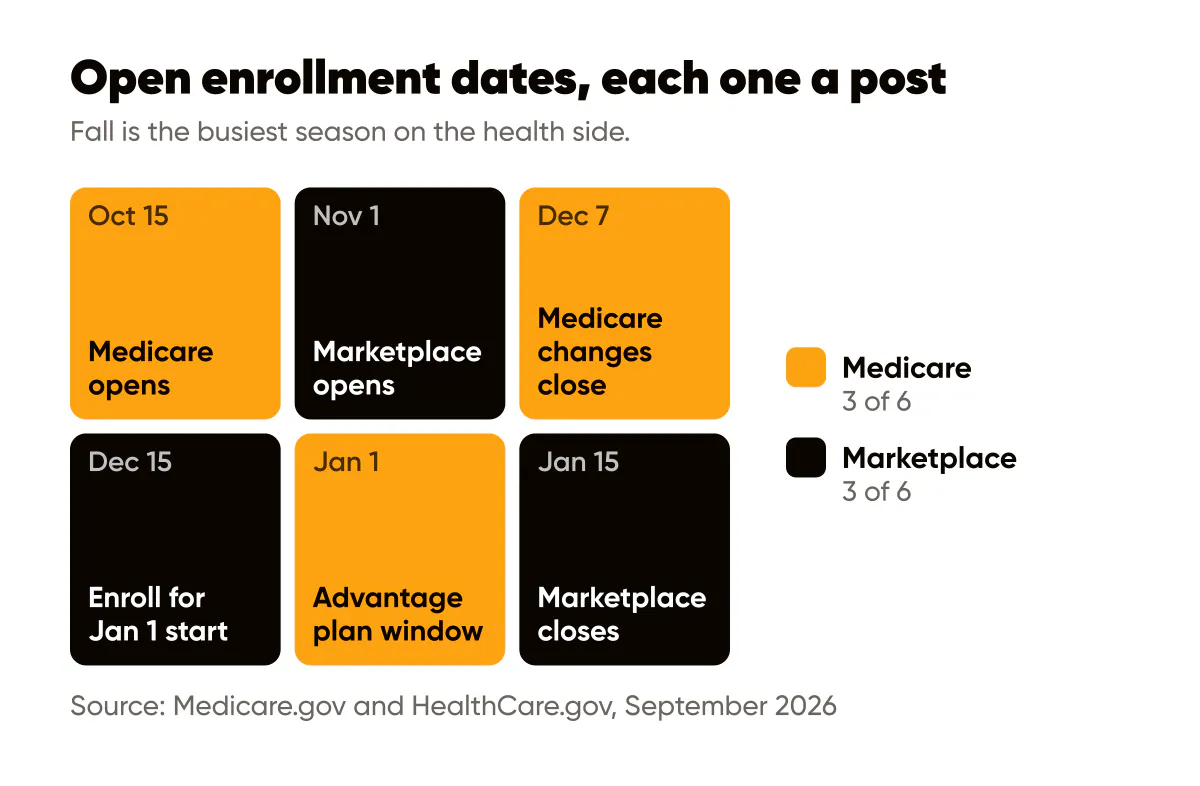
Fall is the busiest season on the health side, and each date below is a post. Dates are as published on Medicare.gov and HealthCare.gov in September 2026; state-run marketplaces can set their own.
- October 15: Medicare Open Enrollment starts. What you can change, from switching Medicare Advantage plans to joining or dropping a drug plan.
- "Has your plan changed for next year?" A reminder to compare before the window closes, with your number.
- November 1: Marketplace Open Enrollment opens for 2027 coverage. Who should look again, even if they are happy with this year's plan.
- December 7: the last day for Medicare Open Enrollment changes, which start January 1.
- December 15: the last day to pick a Marketplace plan for coverage that starts January 1.
- January 15: the last day of Marketplace Open Enrollment, with coverage from February 1. For people already in a Medicare Advantage plan, a second window runs January 1 to March 31.
Health and Medicare posts carry the strictest rules of any line, so read the compliance section before you schedule a single one of these.
Six written examples for an imaginary agency
These are for Birch Lane Insurance, an imaginary two-person independent agency in an imaginary town called Millbrook. Every detail is invented. Run real versions past your carrier's compliance team before posting.
1. Educate: deductible vs premium
Headline: Deductible vs premium, in plain words
Caption: Your premium is what you pay to keep the policy. Your deductible is what you pay toward a claim before coverage kicks in. A higher deductible can lower the premium, but only pick one you could actually pay tomorrow. Questions about yours? Send us a message.
2. Myth vs fact: flood
Headline: Is flood covered by your home policy?
Caption: Often it is not: many standard home policies exclude flood, and flood coverage is bought separately. The only way to know is to read your own policy or ask us to walk through it with you. Better to learn now than after a storm.
3. Behind the scenes: after a crash
Headline: You call us after a crash. Then what?
Caption: First, we check everyone is safe. Then we help you report the claim, tell you what the adjuster will ask for, and stay your point of contact while the carrier handles it. Save our number in your phone today.
4. Timely: winter driving
Headline: Snow tires on? Check your car kit too.
Caption: Blanket, charger, scraper, water, a flashlight. And while you are at it, check whether your auto policy includes roadside assistance, because a lot of people assume it does. Message us and we will look it up for you.
5. Engage: local roads
Headline: Which Millbrook road do you avoid in snow?
Caption: Ours is the hill on Cedar Street, every January. Tell us yours in the comments, and next week we will post the winter driving tips we give our own kids.
6. Promote: policy review
Headline: Book a 20-minute policy review
Caption: Bring your declarations pages, or just your questions. We will tell you what you have, what you do not, and what to ask your other providers. No pressure and no promises about price, just a clear picture before renewal.
A four-week plan for October
Three posts a week (Creobee's pace for the "Be seen as the expert" goal), Facebook first, with the same images on Instagram if you run it.
| Week | Focus | Posts | Call to action |
|---|---|---|---|
| 1 | Policy review season | Deductible vs premium, meet the agent, policy review invite | Book a review before renewal |
| 2 | Winter prep | Car kit and roadside coverage, space heater safety, local roads question | Message us to check your roadside coverage |
| 3 | Medicare Open Enrollment starts (Oct 15) | Carrier-approved Medicare post if you sell it, otherwise life-event checklist; claims process explainer; client review | Call to book an appointment |
| 4 | Holiday travel and Marketplace prep | Rental car question, holiday decoration safety, Marketplace dates reminder if you sell health plans | Text us before you travel |
Dates, as published on the official sites in September 2026: Medicare's Open Enrollment runs October 15 to December 7 (Medicare.gov), and HealthCare.gov says Open Enrollment for 2027 Marketplace coverage starts November 1 and runs to January 15, with December 15 the last day to enroll for coverage that starts January 1 (HealthCare.gov). States that run their own marketplace can set different dates, so check yours.
Compliance habits before you post
I am not a lawyer or a compliance officer, and rules differ by state, carrier and line of business. Treat this as questions to take to your carrier's compliance team and your state insurance department, not as advice.
- Social media is advertising. Assume your posts count as insurance advertising, because in many states they do, and your carriers have their own social media policies on top.
- Many carriers require pre-approval. Especially for anything that names the carrier, uses its logo or describes a product.
- No promised savings or outcomes. "Save 30 percent" or "you're covered for that" can be a problem. Say "ask us" and explain terms in general.
- Never guarantee a claim. Explain the process; the decision is the carrier's.
- License details where required. Some states and carriers require your name, agency and license number on ads. Put them in the caption or profile as your rules say.
- Medicare has its own federal rules. Medicare Advantage and Part D marketing is governed by CMS rules, and carriers add their own requirements. Check before posting anything that mentions Medicare plans.
- Referral rewards and giveaways. Anti-rebating rules vary by state, so check before offering anything of value.
- Keep records. If your state or carrier requires archiving posts, keep a dated copy of everything you publish.
- Keep policy talk out of the comments. Move any question about a client's own policy or claim to a call or private message.
If you are also a registered representative, your broker-dealer's social media rules apply as well.
A batch workflow helps here. Write the month at once, review every caption, download the set, and submit it in one go instead of a post every few days. Approved files double as your record.
What not to post
- "Cheapest" or "best coverage" claims, or carrier comparisons without approval.
- A sales pitch the day after a local disaster. Post carrier claim lines and practical steps instead, and leave selling for later.
- Quoted prices. Every quote depends on the person, and a public number sets the wrong expectation.
- Generic stock slogans with no local detail. If any agent in the country could post it, it does nothing for you.
The honest limits of branded text posts
Creobee makes single 4:5 images with a headline and your logo, each with a written caption. It does not make video, Reels, carousels or Stories. A short phone video introducing yourself builds trust faster than any graphic, so film that yourself. A claims explainer would suit a carousel; in Creobee it is one image with the steps as a short numbered list and the detail in the caption.
Creobee also does not know your carrier's rules or your state's requirements. Plausible AI copy can still be non-compliant, so every caption gets your review. Scheduling to Facebook Pages and Instagram is on the Autopilot and Pro plans; on Solo you download the images and post with Meta Business Suite or any scheduler.
What it does well is the steady, explanatory posts agents know they should publish and rarely find time for. The AI social media post generator page shows what a batch looks like; for insurance I would pick the "Professional" or "Calm" tone. If you want the month off your desk entirely, that is what done-for-you social media posts means here: software plans, writes and designs it, and you and your compliance team approve every post. Solo is 19 dollars a month for 30 posts, and your first 3 posts are free, no card needed. If a quiet Facebook Page is what you keep meaning to fix, make a month of Facebook posts and send it to compliance this week.
Try it on your own agency first. Type one line about what you sell, and your first 3 posts start from it.
Frequently asked questions
Do insurance agents need approval before posting on social media?
Often, yes. Many carriers require pre-approval for posts that mention them or their products, and state advertising rules can apply too. Ask each carrier you are appointed with for its social media policy.
Should an insurance agent post on Facebook or Instagram?
Facebook first for most local agents, because your homeowners, parents and business owners are there. Add Instagram with the same images to reach younger renters.
How often should an insurance agent post?
Three times a week keeps you familiar without outrunning your approved content. Never going quiet during renewal or storm season matters more than frequency.
Can I post about Medicare plans on social media?
Carefully. If you sell Medicare plans, CMS rules and your carriers' requirements apply, which often means approved materials and disclaimers. Ask your carriers' compliance team before posting anything that mentions Medicare plans.
Put it into practice
Turn this into posts designed for your feed
Paste your website. Creobee reads what you sell, then plans, writes and designs your posts about it as one feed in your logo and colors, captions included, and on Autopilot it posts them for you.
How the AI Facebook post generator works