How to Mix Posts, Carousels and Stories in a Week
An Instagram content mix for small business: topics, then formats. What feed posts, carousels, animated posts and stories each do, with three weekly paces.
An Instagram content mix has two layers. The first is what you talk about, your content pillars. The second is the shape each post takes: a still post, a carousel, an animated post or a story. Most advice stops at the first layer, and that is how a feed ends up as one format repeated. This post covers both, then lays out three weekly paces with exact counts.
I build Creobee, whose weekly planner uses the paces below, so read the numbers as our planning rules, not as a promise of results.
Layer one: three to five pillars
A pillar is a recurring theme every post belongs to. Pick three to five, with at least one from each of these sources:
- Your customers' problems. The questions they ask before they buy and the mistakes they make before they find you. These posts teach.
- Your offer. What you sell and how it works, so the sale is never a surprise.
- Your proof. The work itself, the process, results you can show with permission.
Five is a ceiling. Past it, a pillar comes up so rarely that followers never learn it exists. If you have eight candidate themes, group them: "pricing tips", "contract tips" and "client red flags" are one pillar called running your business.
Then cross the pillars with the formats below. Pillars down the side, formats across the top, and every cell is a post idea: "proof, as a carousel: the five stages of a kitchen refit". A grid of four pillars and four formats is sixteen ideas before you have thought hard about anything. Content ideas for service businesses has examples grouped this way.
Layer two: what each format does
Instagram says in Instagram Ranking Explained that it "doesn't have a singular algorithm": Feed, Stories, Explore and Reels rank with their own signals. Its creators page on reach (both checked November 4, 2026) spells out who sees what: stories come from accounts people chose to follow, the feed mixes followed accounts with recommendations, and Explore and Reels show mostly accounts people don't follow yet. So each format reaches a different group.
Carousels: the post people keep. Several images in one post, up to 20 according to Instagram's carousel help page. They suit anything with steps or parts: a how to, a checklist, a myth and its fact. In Socialinsider's Instagram benchmarks (checked November 4, 2026) carousels averaged a 0.55% engagement rate in 2025, Reels 0.52% and single images 0.37%. That describes brand pages on average, not your account, but it supports putting your most useful material in carousels.
Animated posts: the post you want noticed. A designed post whose words move for a few seconds and land on the finished design, published as a Reel shared to your grid. Since Reels are where Instagram shows accounts to non-followers, use motion on the week's main message: an offer, an announcement, a number. How to make animated Instagram posts covers the method.
Still posts: quick and clear. The fastest to make and to read. Opening hours, a quote, small news. Fewer of them, not none.
Stories: the followers you already have. Full screen 9:16, gone after 24 hours, shown only to people who follow you. That makes them the place for daily contact: what's fresh, a question, a reminder of the offer. A designed still works; you don't need to film. How often? In Socialinsider's stories benchmarks (June 26, 2025, checked November 4, 2026) brands with 1,000 to 5,000 followers posted about 12 stories a month and brands with 10,000 to 50,000 about 35. The same study found 23.8% of viewers left on the first story and 20.5% on the second, so one or two good frames a day beat ten in a row.
A cheap story on a busy day is your own feed post reshared with one line on top saying why to look ("the full list is in the post"). Keep that line away from the very top and bottom of the frame, where Instagram's name bar and reply bar sit.
Three paces, in exact counts
These are the three paces Creobee's planner uses, read from our code on November 4, 2026. Each week holds at most two feed posts and one story a day, and two carousels are never neighbours in the feed. The monthly figure is the weekly total times 52 weeks, divided by 12 months, rounded up.
| Pace | Feed posts | Animated | Carousels | Still | Stories | Week | Month |
|---|---|---|---|---|---|---|---|
| Light | 5 | 2 | 2 | 1 | 4 | 9 | 39 |
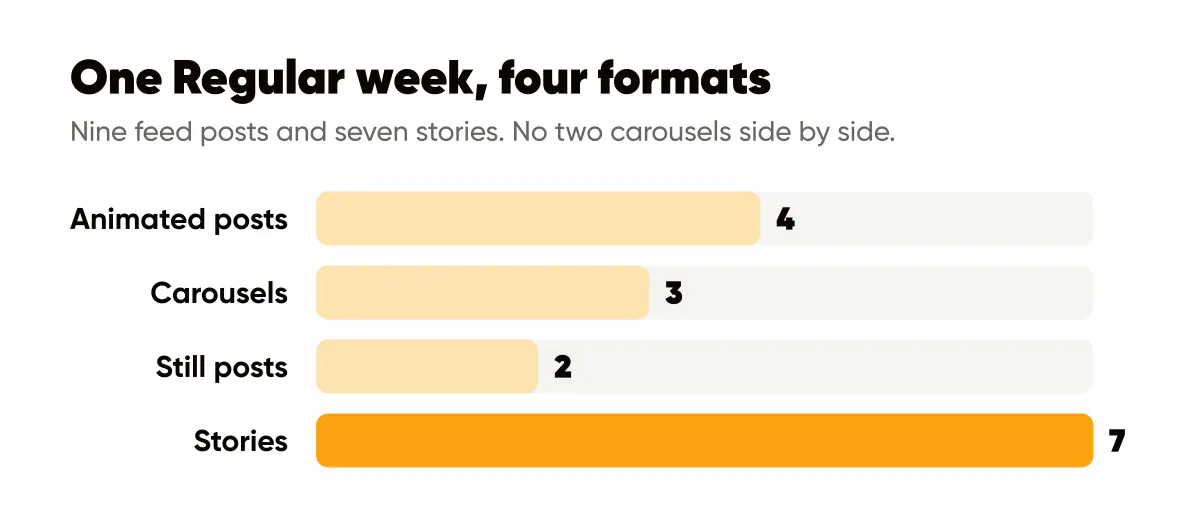
| Regular | 9 | 4 | 3 | 2 | 7 | 16 | 70 |
| Full | 14 | 7 | 4 | 3 | 7 | 21 | 91 |
In a Regular week that comes out like this:
Light posts to the feed on five days and adds a story on four. Two of those story days have no feed post at all, so no day of the week is empty for long. It is the place to start if you have never posted every week.
Regular is one feed post every day, a second one on two days, and a story every day. It is the pace I'd pick for most small businesses once the making is batched.
Full is two feed posts and a story every day, for a business with a lot going on: daily specials, new stock, frequent events.
Whatever the pace, place formats by job: open the week with an animated post, put carousels mid week, keep a still for the day you have quick news. Our default times are a feed post at 10:00, the story at 12:30 and, on two-post days, a second feed post at 17:00. They are defaults, not a claim about the best time to post.
Keep the grid steady
More formats means more ways for the profile grid to fall apart. Only a carousel's first slide shows on your profile, so design it as a finished post in its own right. A Reel's grid tile is its cover, so make the animated post start and end on the still design and use that as the cover. Stories never reach the grid, but the same people see both, so keep the same fonts and colours. The wider rules are on the Instagram feed design page.
When to drop a format
After four weeks, look at each format on its own. Carousels should be saved and shared; if they aren't, cut them to five slides with one point each before dropping them. Animated posts should be the ones people stop on; if they do no better than your stills, keep motion for offers and announcements. Stories should bring replies or taps; if nobody answers, change the time before you stop. Change one format at a time and give it two or three weeks. And if video doesn't suit your business, a week of carousels and stills is fine.
If laying out the week is the part you keep skipping, Creobee's social media posting schedule does it: you pick a pace, say once whether you want animated posts, and it writes and designs the week in your style, 4:5 feed posts, carousels and 9:16 stories, each with a day and a time. On the Autopilot and Pro plans you schedule it in one confirm, with stories going to Instagram; on Solo you download it. A story counts as one post. The posting schedule template has a week you can copy by hand.
Put it into practice
Turn this into posts designed for your feed
Paste your website or say what you do. Creobee plans, writes and designs your posts about it as one feed in your logo and colors, captions included, and on Autopilot it posts them for you.
How the Social media posting schedule works