Social Media Posting Schedule Template for Small Business
A social media posting schedule template for small business: three weekly paces, times that fit a working day, and where carousels and stories go.
A social media posting schedule is a short list of decisions you make once: which days you post, at what time, in which format, and on which network. Make them once and the week stops being a daily question. For most small businesses a good start is five feed posts and four stories a week, at fixed times that fit around opening hours, with no two carousels in a row and never more than one story a day. Below is the template I use, three paces to pick from, and what the published data says about timing.
A note before the details. I build Creobee, which makes and schedules a week of posts at one of these paces, so I have an interest in this topic. The section about it is short and comes near the end. The timing and frequency numbers come from Buffer and Hootsuite, linked where I quote them and read on October 9, 2026.
What a posting schedule decides
A schedule answers four questions, and most people only answer the first.
- Day. Which days of the week get a post. Fixed days turn posting into a habit and let followers learn when to expect you.
- Time. One or two fixed slots a day. The slot matters less than keeping it, because a time you hold for a month is a time you can actually test.
- Format. A still post, a carousel, an animated post or a story. Each does a different job, so the week needs a spread, and the order matters for how the grid looks.
- Network. Instagram, Facebook, LinkedIn and the rest do not all take the same things. A story has nowhere to go on LinkedIn, and a carousel lands differently on each network.
Leave any of the four open and you decide it again every morning, which is the part that wears people out.
Three paces you can keep
Pick the pace you could hold for three months in a busy season, not the one you could hold in a quiet week. These are the three I recommend, from lightest to busiest:
| Pace | Feed posts a week | Stories a week | Posts a week | Posts a month |
|---|---|---|---|---|
| Light | 5 | 4 | 9 | 39 |
| Regular | 9 | 7 | 16 | 70 |
| Full | 14 | 7 | 21 | 91 |
A month here is a week times 52, divided by 12, rounded up, so the monthly column is honest about the extra days.
The published advice sits around the same range. Buffer's frequency study (August 13, 2025; 2.1 million posts from over 102,000 accounts) recommends 3 to 5 Instagram feed posts a week, and it left stories out of the count. Hootsuite's posting frequency guide (April 18, 2025) also suggests 3 to 5 feed posts a week on Instagram, about 2 stories a day, and 1 to 2 posts a day on Facebook. Treat both as a range to test against your own account, not as a promise of results. The guide to how often to post on Instagram covers when to climb from one pace to the next.
Light is where most one person businesses should start. It fills every day with a post or a story from just five finished feed posts. Move to Regular when Light feels easy for a month and you have more good ideas than slots.
Times that fit a small business day
Here is what the largest timing dataset I know of says. Buffer's best time to post on Instagram (published September 23, 2026) analyzed 9.6 million posts sent through Buffer between January 2024 and December 2025. Its top three slots were Thursday at 9 a.m., Wednesday at 12 p.m. and Wednesday at 6 p.m., in each account's own time zone. Wednesday was its best day, followed by Thursday and Tuesday, and it ranked Friday and Saturday lowest.
That is an average over millions of accounts, and your followers may not be average. A bakery's customers can be most active on Saturday morning, which is exactly the day the chart calls weak. So I use the chart for the shape of the day and my own Insights for the details.
The shape of the day that works for a small business is three slots:
- 10:00 for the main feed post. Late enough that you are open and can answer the first comments, early enough to catch the morning.
- 12:30 for the story. Lunch is when people tap through stories, and a story at midday can point to something happening that afternoon.
- 17:00 for a second feed post on the busiest pace only. The end of the working day, close to Buffer's evening slot.
Keep those for four weeks before you move anything. Then open Insights, look at when your followers are most active, and shift a slot by an hour if the numbers point that way. One change at a time, a month each, or you will not know which change did what.
Where each format sits in the week
The order of formats matters as much as the count, for two reasons: variety for the person following you, and the grid for the person visiting your profile.
- One feed post a day is the base. The busiest pace adds a second one in the evening. More than two a day on a small account crowds your own posts out of your followers' feeds.
- No two carousels in a row. A carousel asks for more attention than a single image. Two back to back feel like homework, and on the grid two carousel covers next to each other look like a repeat. Put a single post or an animated post between them.
- One story a day at most. A small business does not need to run a story channel. One story on the days it has something to say is easier to keep up than several on a good day and none for a week. The story ideas for small business give you one for each day.
- Mix the formats across the week. On the Light pace that is two animated posts, two carousels and one still post. Animated posts start and end on the post's own design, so the grid stays put while the feed gets movement. The guide to mixing formats in one week goes deeper.
Here is the Light pace laid out as a week starting on Monday:
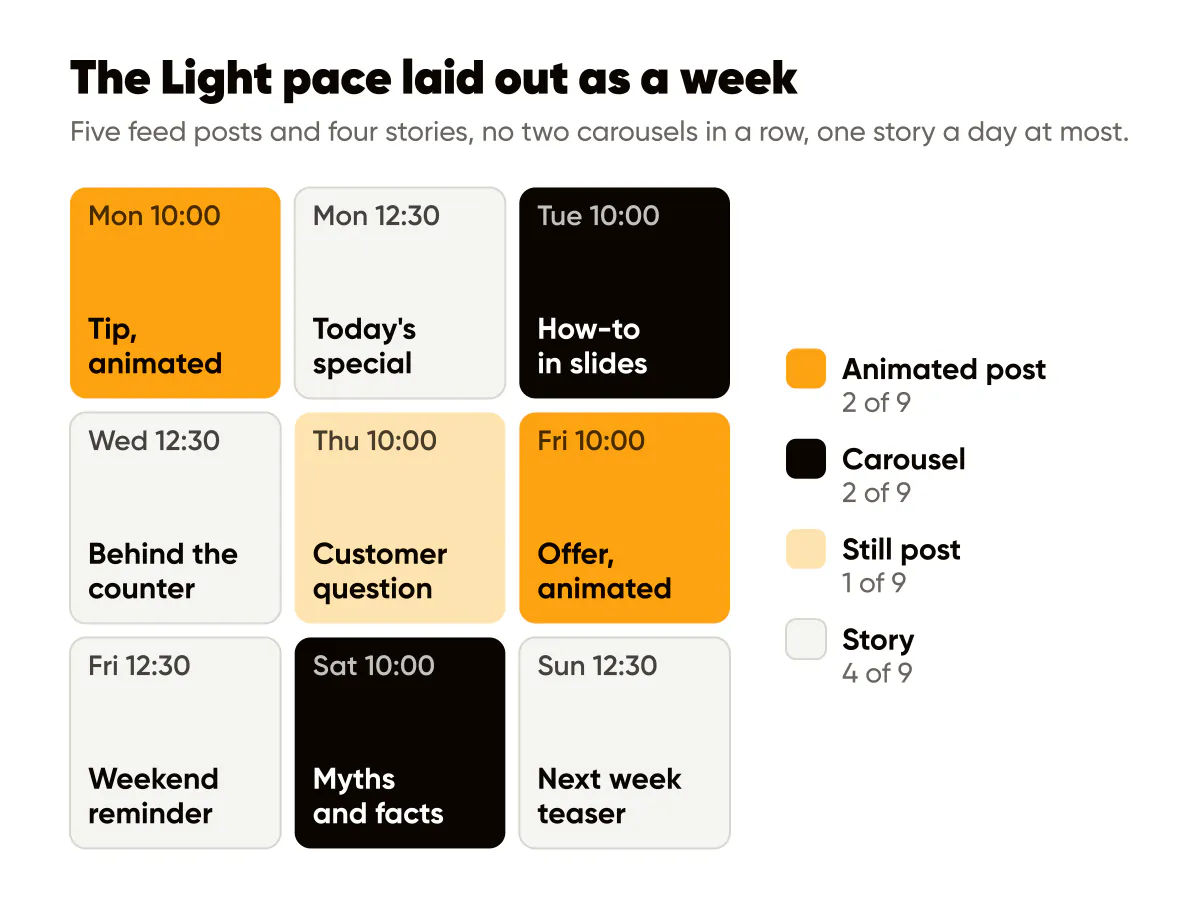
Days with no feed post still get a story, so the account is never quiet for a whole day, and nothing on this list asks you to film yourself.
Which network gets what
Not every network takes every format, so a schedule should say where each one goes:
- Instagram takes all of it: feed posts, carousels, animated posts as Reels that stay in the grid, and stories.
- Facebook takes feed posts and stories. A Page that only reposts Instagram still benefits from fixed times; the Facebook Page posts guide covers what to change.
- LinkedIn, Threads and the rest take the feed posts. Stories have no place there, so skip them, and send a carousel as a single image that makes sense on its own.
The simple rule: write each post once, and decide per network whether it goes out as it is, as a single image, or not at all.
Copy the template
Copy this into a sheet or a notes app and fill in the topic column each week. It is the Light pace from the diagram:
| Day | Time | Format | Topic |
|---|---|---|---|
| Mon | 10:00 | Animated post | Tip, animated |
| Mon | 12:30 | Story | Today's special |
| Tue | 10:00 | Carousel | How-to in slides |
| Wed | 12:30 | Story | Behind the counter |
| Thu | 10:00 | Still post | Customer question |
| Fri | 10:00 | Animated post | Offer, animated |
| Fri | 12:30 | Story | Weekend reminder |
| Sat | 10:00 | Carousel | Myths and facts |
| Sun | 12:30 | Story | Next week teaser |
For Regular, give every day a story at 12:30 and a feed post at 10:00, and add a second post at 17:00 on two days of the week, keeping carousels apart. For Full, every day gets a post at 10:00, a story at 12:30 and a post at 17:00.
The topic column is where the real work is. Rotate your content pillars through it so the week is not five offers in a row; the content pillars guide shows how to pick them, and the weekly content planning routine is a 90 minute session that fills the column every Monday.
Where Creobee fits
Filling the template is the part that takes time. Creobee's social media posting schedule does it for you: you pick Light, Regular or Full, answer once whether you want animated posts, and it writes and designs the whole week in your brand. Every slot has its day and time (10:00, 12:30 and 17:00 by default), with feed posts as 4:5 designs and stories written for the day as 9:16 still images. If you say no to animated posts, those days are made as still posts instead.
On the Autopilot and Pro plans the week is scheduled in one confirm, and you can change the times as you schedule. Stories go to Instagram and the other networks skip them; carousels go to Instagram, with a single image version of the same post on the other networks. A scheduled story is the image alone, so add a poll or a link sticker in the app if you want one. On Solo you download the week and post it yourself.
A story counts as one post, like a feed post. The Light pace is 39 posts a month, which fits Solo's 40; Regular and Full need Autopilot or Pro. The social media autopilot page explains the publishing side, and every new account gets its first 3 posts free to try it.
Frequently asked questions
What is the best posting schedule for a small business?
The one you can keep for three months. For most small businesses that is five feed posts and four stories a week, at the same times each day. Start there and add posts only when it feels easy.
Should I post at the same time every day?
Yes, at least for the first month. A fixed time is easier to keep, and it gives you a clean comparison when you later test a different slot.
How many stories a week should a small business post?
Between four and seven is plenty for a small account: one on the days you have something to say, never several in a burst. Hootsuite suggests more, about two a day, which suits accounts with a team behind them.
Do I need a different schedule for each network?
Use one schedule and let each network take what fits it. Feed posts can go everywhere, stories only to Instagram and Facebook, and a carousel works best on Instagram, with a single image elsewhere.
Do this this week
Pick one pace from the table, copy the template, and fill in only the topic column for next week. Set the times in your calendar as reminders, or schedule the whole week in one sitting. At the end of the week, count how many slots you kept. If you kept all of them, hold the pace for a month before you change anything. If you missed more than two, drop to a lighter pace; a schedule you keep beats a fuller one you abandon.
Put it into practice
Turn this into posts designed for your feed
Paste your website or say what you do. Creobee plans, writes and designs your posts about it as one feed in your logo and colors, captions included, and on Autopilot it posts them for you.
How the Social media posting schedule works