Instagram Hashtag Strategy 2026: How Many, Which, and Where
Instagram hashtag strategy for 2026: 3 to 5 specific tags per post, chosen by topic rather than volume, with the real keywords in captions and alt text.
Hashtags still matter on Instagram in 2026, but only as categorization. They help Instagram understand what a post is about; they do not push it to strangers on their own. Use three to five specific tags per post, put the real keywords in your caption and alt text, and stop treating banned-tag lists as a reach strategy.
What hashtags do on Instagram now
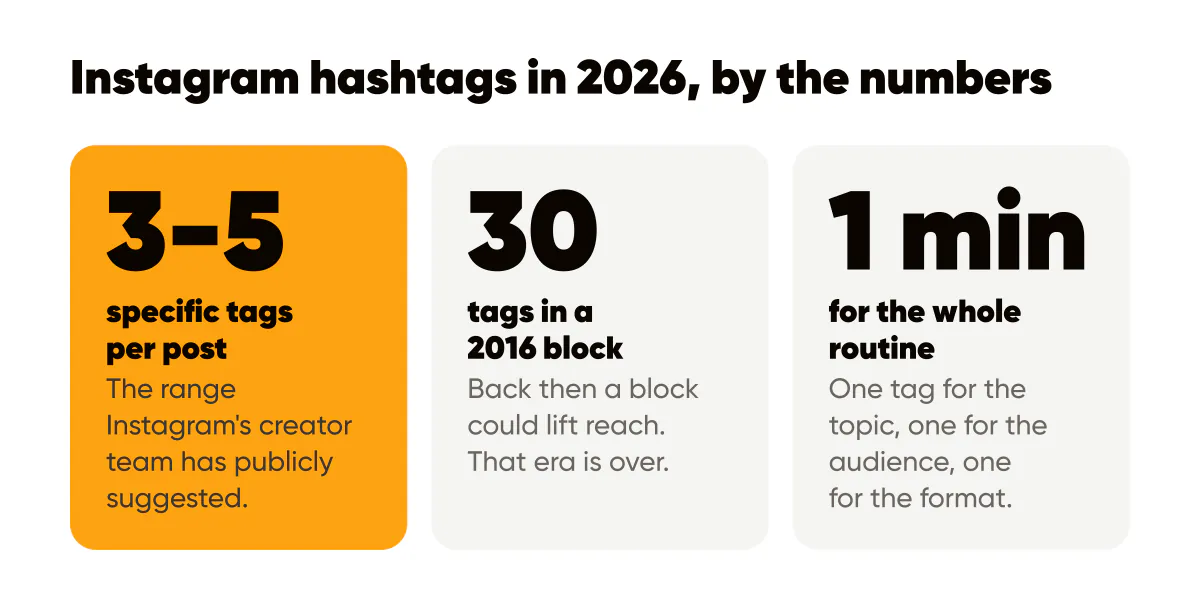
In 2016 a block of thirty hashtags could noticeably lift a small account's reach, because hashtag pages were a discovery surface people actually browsed. I used them that way on an earlier project and it worked. That era is over, and the evidence is in Instagram's own documents rather than anyone's theory. The free caption line break tool also counts hashtags against the limit of 30.
Instagram's ranking explainer describes the signals behind Feed, Explore and Reels. Hashtags are not among them. What the system uses are predictions about what you personally will do with a post: like, save, share, watch to the end. A hashtag can help the system classify the post so it reaches people interested in that topic, but the ranking is decided by what those people then do.
Instagram has also spent several years building keyword search. Type "sourdough bakery Lisbon" into the search bar and you get accounts, posts and Reels whose names, bios and captions match those words, not just posts tagged with an exact hashtag. That shift is the reason I moved my effort from tags to plain words, which is the subject of Instagram SEO: how keywords in captions and bios get you found.
How many hashtags should I use on Instagram?
Instagram's creator team has publicly suggested a small number, in the range of three to five, and that matches what I see on my own account: adding more tags does not add reach, it adds noise. The Instagram for Creators blog is where that kind of guidance lives, alongside their other posts on distribution. I would rather you read the primary source than trust a screenshot of it.
There is a hard upper limit per post as well, and the Instagram Help Center states the current cap. Do not design your routine around the cap. Design it around relevance.
A hashtag routine that takes one minute
Here is what I do for a text-led branded post about, say, pricing for freelance designers.
- One tag that names the topic exactly: #freelancepricing.
- One tag that names the audience: #freelancedesigner.
- One tag that names the format or niche community: #designbusiness.
- Optionally one location tag if the business is local, and one branded tag if you are building a campaign people can follow.
That is it. No block of thirty, no rotating sets in a notes app, no research session. The tags describe the post so accurately that a person landing on any of those pages would not be surprised by what they found.
Should hashtags go in the caption or the first comment?
It does not matter for ranking, and Instagram has never said it does. It matters for reading. I put them at the end of the caption after a line break, because a first comment is one more thing to remember and a caption that opens with a wall of tags buries the hook. Whatever you choose, keep the first line of the caption for the sentence that earns the tap on "more."
What to do with the time you save
Hashtag research used to take me longer than writing the caption. Spend those minutes on the three places Instagram actually reads words from.
- The caption: write the phrase your customer would type into search, naturally, in the first two lines. "Freelance pricing for designers" beats "let's talk money."
- Alt text: state what is on the image, including the words in your headline. It helps blind and low-vision users first, and it gives Instagram text to index. I explain how in Instagram alt text and accessibility.
- Your name field and bio: the name field is searchable, so "Kutay, Instagram design tools" gets found where a bare first name does not.
The general principle, that captions and profile text behave like search metadata now, is the same one behind SEO for social posts, which covers how posts also surface in Google.
Are banned hashtags real, and should I worry?
Instagram does restrict some tags, usually because they were being used to spread content that violates its guidelines, and posts using a restricted tag may be limited on that tag's page. Lists of "banned hashtags" that circulate online are unverified, change constantly, and lead people to spend hours auditing tags nobody was ever going to browse. My position: if you are using three to five tags that literally describe your post, you will not hit a restricted one by accident. If reach drops, check your account status in the app before you blame a tag.
Where hashtags still earn their place
Two cases justify more effort. The first is a branded campaign tag, where you want participants to find each other, as in a thirty-day challenge or a customer photo series. Pick something short and unambiguous, put it on every post in the series, and mention it in the caption so people know to use it. The second is a local business, where a neighborhood tag is one of the few ways a nearby person casually browsing finds you. Both are about a community that browses the tag on purpose, which is the one thing hashtags were always good at.
For everything else, the ranking mechanics I covered in how the Instagram algorithm ranks posts in 2026 apply: the post has to earn saves and shares from the first people who see it, and no tag does that for you.
Do this this week
Take your last ten posts and count the hashtags. If you are using more than five, cut every one that a stranger would not recognize as a description of that exact post. Then rewrite the first line of each caption to include the plain-language phrase someone would search for. Compare reach and saves over the next two weeks against the previous ten posts. On my account, the tags made no difference and the captions did. Check whether yours agree. If writing ten fresh captions is the step you skip, an AI caption and post generator for Instagram drafts each caption with its post, and you add the search phrase before it goes out.

Put it into practice
Turn this into posts designed for your feed
Paste your website or say what you do. Creobee plans, writes and designs your posts about it as one feed in your logo and colors, captions included, and on Autopilot it posts them for you.
How the AI Instagram post generator works