Why Instagram Removes Line Breaks (and 3 Fixes That Work)
Instagram line breaks vanish when a line ends in a space or a blank line holds only spaces. What gets stripped, why the web differs, and three fixes that hold.
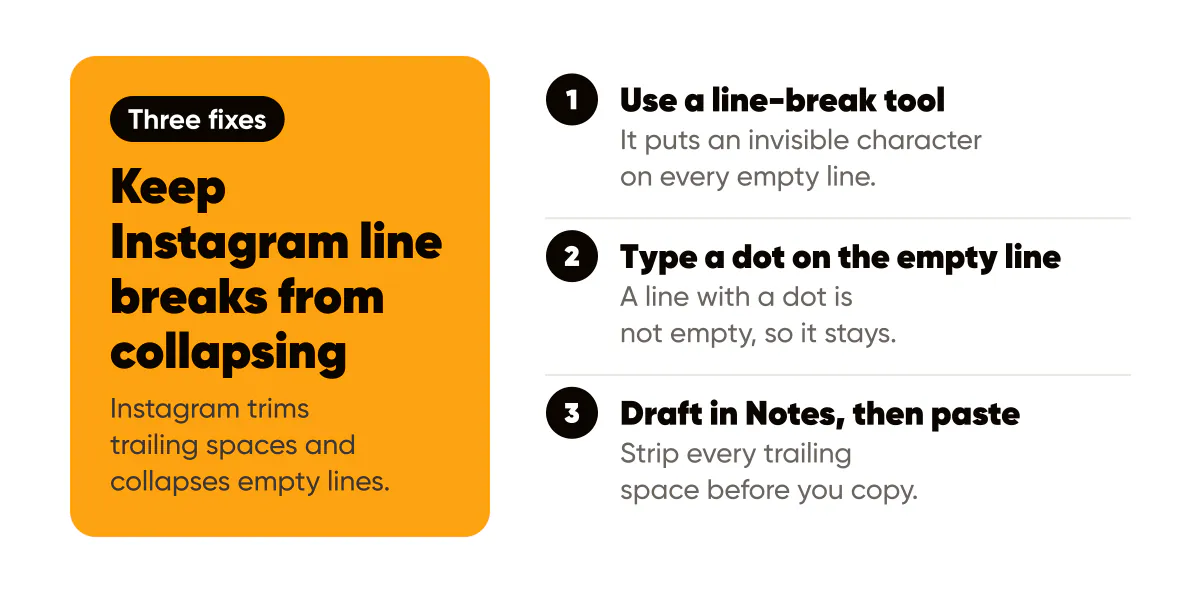
Instagram removes line breaks when a line ends with a trailing space, and it collapses blank lines that contain only spaces. Three fixes work: run the caption through a line-break tool that puts an invisible character on every empty line, type a dot on the empty line, or draft in Notes and strip every trailing space before you paste.
What does Instagram actually strip from a caption?
Two things, and both are whitespace.
First, spaces at the end of a line. If the last character before you hit return is a space, Instagram trims the space and treats the return as if it were not there. Your line runs straight into the next one. Second, empty lines. A line that holds nothing, or nothing but spaces, gets folded into the line break above it, so the paragraph gap you built disappears and everything becomes one block.
Neither rule is announced anywhere. You only meet them after posting, when a caption that looked like this in the editor:
Three things I learned launching on a Tuesday.
Nobody reads past the first line unless the first line earns it.
comes out as one paragraph in the feed.
The trailing space is the sneaky one, because your phone adds it for you. iOS and most Android keyboards insert a space after you accept an autocorrect suggestion or tap a predictive word. Type "Tuesday.", accept the correction, hit return, and there is a space you never saw sitting at the end of the line. Instagram sees it.
Why do line breaks work on the web but not in the app?
Mostly because of that keyboard. On a laptop, nothing inserts a space after your words, so a return is a clean return. When I write captions at my desk on instagram.com, the blank lines hold almost every time; the same caption typed on my phone loses one or two. The web editor is also a plain text box with none of the app's predictive typing, so what you see is closer to what gets stored. If you post from a scheduler, the caption goes to Instagram through the API instead of the app editor, which is why schedulers rarely have this problem.
Fix 1: the line-break tool (copy and paste)
The most reliable fix is to make sure no line is ever truly empty. Paste your caption into the Instagram caption line break tool, leave a blank line wherever you want space, and copy the fixed version. The tool does two things: it deletes trailing spaces on every line, and it drops a Braille pattern blank (U+2800) onto each empty line. Unicode's chart for that block notes the character is imaged as a fixed-width blank in many fonts but does not act as a space, which is exactly the property you want here. It draws as nothing, and because the line is no longer empty, Instagram keeps it.
Then paste into Instagram as usual. The spacing survives on iPhone, Android and web, and you can edit the caption later without the gaps collapsing, as long as you do not delete the invisible keepers by accident.
Two caveats. The keeper is a character, so each blank line costs one of your 2,200 caption characters. That is cheap, but a caption with twelve blank lines has spent twelve. And the tool counts hashtags and mentions while it works, so if you were about to paste 40 tags, you find out before Instagram tells you.
Fix 2: a dot on the empty line
No tool, no invisible characters. Where you want a gap, type a period on its own line, with no space after it, and hit return. The dot is visible, which is the whole point: a line with a dot is not empty, so it stays.
It looks like this in the feed:
Three things I learned launching on a Tuesday.
.
Nobody reads past the first line unless the first line earns it.
Plenty of accounts use a dot, a middle dot (·) or a small emoji this way and treat it as a house style. It is the right fix when you are typing straight into the app, or dropping a longer reply into a comment, and want to publish now.
The downside is not only visual clutter. Your paragraph gaps are structure, and a screen reader announces the dots rather than the structure, which is the thing the W3C's guidance on info and relationships asks you to keep available in text. Six dots down the side of a caption are six little noises that mean nothing. One or two gaps, fine. A dot between every sentence, no.
Fix 3: write in Notes, then paste
Apple Notes, Google Keep and any plain-text app will do. Draft the caption there, with blank lines where you want them. Before you copy, tap the end of each line and delete any space sitting before the return. Then select all, copy, and paste into the caption box.
This works because you are controlling the trailing spaces yourself, and because Notes does not add a space when you press return. In my testing on iOS the gaps hold as long as no line ends in a space. The weak spot is discipline: one missed space and that paragraph merges. If you draft in Notes anyway, running the finished text through Fix 1 before you paste removes the guesswork.
Avoid drafting in Word or Google Docs. Both convert quotes and dashes to typographic versions and can carry odd whitespace across on paste, and you end up debugging formatting instead of posting.
How do you add line breaks to an Instagram bio?
The bio follows the same rules with a tighter budget. You get 150 characters, and every line break you add is one of them, so a four-line bio spends three characters on structure and leaves 147 for words.
The bio editor is also less forgiving than the caption box. On some versions of the app the return key in the bio field acts as Done, so you cannot type a break at all. The workaround is the same as Fix 1 or Fix 3: write the bio elsewhere, with its breaks, and paste the whole thing in. If you are also styling the bio with Unicode letters, Instagram bio fonts explains how those behave, and the bio structure that actually converts is a good reason to want breaks in the first place.
Common questions about Instagram caption spacing
Do line breaks count toward the 2,200 character limit?
Yes. Each return is a character, and so is any invisible keeper or dot you put on a blank line. A well-spaced caption rarely spends more than 20 characters on spacing, so this only matters when you are already at the limit.
Why did my spacing disappear after I edited the post?
Editing runs the caption through the same trimming as publishing. If your original spacing relied on lines that happened to survive, an edit can collapse them. Re-paste the fixed version from the line-break tool when you edit, rather than repairing lines one by one in the app.
Does caption spacing affect reach?
There is no evidence that Instagram ranks captions by whitespace. What spacing changes is whether people read past the first line, and only the first 125 characters or so show before the "more" link, so the hook still matters more than the gaps. The caption frameworks that keep people reading assume you have working paragraphs to put them in.
Do this this week
Take your next caption, write it with the paragraph gaps you actually want, and run it through the line-break tool before you post. Then check the published post on your phone. If the spacing held, make that your default and stop fighting the editor. If you draft captions with an AI caption generator, paste its output through the same tool: generated text picks up the same trailing-space problem as typed text once it goes through the app.
Related reading: Instagram hashtags in 2026 settles where the tags go once the spacing works, and how to write in italic on Instagram handles the other formatting request the caption box cannot do on its own.

Put it into practice
Turn this into posts designed for your feed
Paste your website. Creobee reads what you sell, then plans, writes and designs your posts about it as one feed in your logo and colors, captions included, and on Autopilot it posts them for you.
How the AI Instagram post generator works