Sell Products on Social Media Without a Photoshoot
How to sell products on social media between product photos: branded text posts on benefits, FAQs, care tips and restocks, for Etsy, Shopify and market sellers.
Product sellers do not need a photoshoot for every post. One good product photo, reused as a background under branded text, plus a rotation of text-led posts (benefits, FAQs, care tips, restock notices, comparisons) fills the gaps between launches and sells more than another pretty picture, because it answers the questions that stop people from buying.
The photoshoot bottleneck
Every product seller I know has the same content problem. The grid is supposed to be full of beautiful product photos, the photos take a whole day to shoot and edit, so the account posts in bursts after each shoot and goes quiet for weeks in between. The quiet weeks are where sales leak.
The fix is to stop equating "post" with "photo." A shopper who is deciding whether to buy your candles does not need a twelfth angle of the candle. They need to know how long it burns, whether it is soy, how you ship it, what it smells like in words, and whether it comes back in stock. Every one of those is a text-led branded post that takes two minutes to make and needs no camera.
Shopify's guide to how to sell on Instagram covers the shop setup, product tagging and checkout side, and Instagram for Business has the official documentation for shopping features. This post is about what to put on the grid between the photos so the shop actually gets visits.
What should product sellers post between product photos?
Here are the seven post types I rotate for physical-product brands, each one a 4:5 branded graphic with a single line of text.
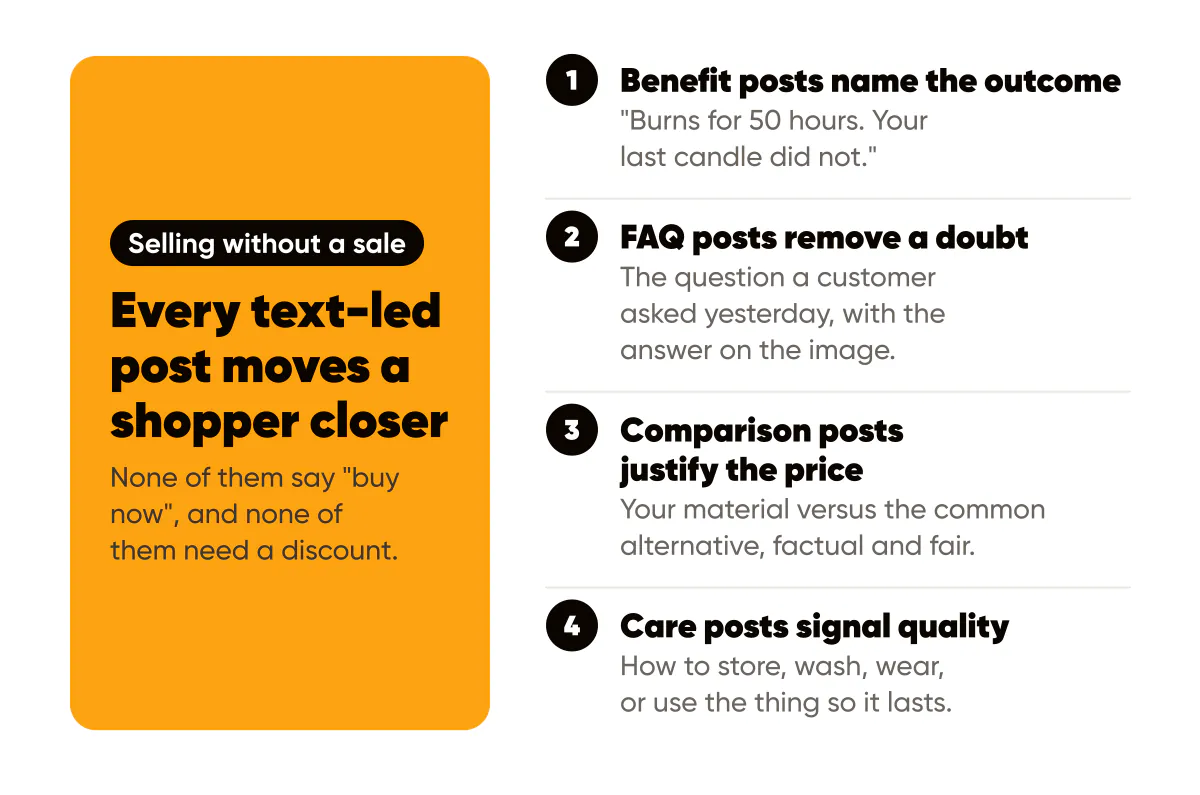
- Benefit posts: one outcome in plain words. "Burns for 50 hours. Your last candle did not."
- FAQ posts: the question a customer asked yesterday, with the answer on the image.
- Care and use tips: how to store, wash, wear, or use the thing so it lasts.
- Restock and low-stock notices: honest, specific, dated.
- Comparison posts: your material versus the common alternative, factual and fair.
- Process facts: where it is made, how long it takes, what it is made of.
- Offer posts: bundles, free shipping thresholds, seasonal sets, with a real deadline.
Every one of these answers a purchasing question or removes a purchasing doubt. That is why they sell while the twelfth product photo does not.
One photo, many posts
You still need product photos. You just need fewer than you think, because a single strong photo can be the background of ten different text posts.
The technique: take one clean product photo with space around the product (shoot slightly wider than feels natural). Use it as the background for a branded text overlay, with the product sitting in the lower third or off to one side and the headline in the clear area. Darken the photo slightly or add a soft color wash so the text reads. Change only the headline across the batch. Ten posts, one photo, one afternoon, and all ten are recognizably from the same shop.
In Creobee's AI Instagram post generator this is literally how I set up product-brand batches: upload the product photo, add the logo, and generate ten posts from that one photo, each with its own headline, some showing the photo full size and some framing it in your colors. The rules for choosing and preparing a photo so text stays legible on it are in choosing background images for branded posts. The short version: more empty space than you think, lower contrast in the photo than you think, and never text over the product itself.
How do you keep product posts looking like one brand?
Lock four things and vary everything else. Lock the palette (your brand color plus a neutral), the typeface, the logo position, and the layout family. Vary the headline, the photo, and the post type. A shopper who sees a benefit post on Monday, a FAQ post on Wednesday and a photo on Friday should recognize all three as yours before they read the name.
This matters most across launches. Sellers often redesign everything for each new collection, so the grid looks like five different shops stacked on top of each other. Keep the template family constant and let the new collection show up in the photos and the words. The audit for what to lock is in brand consistency on social media.
Selling without sounding like a sale
Text-led posts give you a way to sell every day without a discount. The benefit post sells by naming the outcome. The FAQ post sells by removing a doubt. The comparison post sells by justifying the price. The care post sells by signaling quality. None of them say "buy now" and all of them move a shopper closer.
When it is time for an actual offer, use the offer post format: who it is for, what is included, one price or bundle, one real deadline, one call to action. The anatomy is in how to write offer posts that convert without discounting. Product sellers get away with more offers than service businesses because the product is the point, but the same rule holds: one offer post per four or five non-offer posts, or the account becomes a catalog nobody follows.
For a launch, the text-led posts become the whole sequence: tease with a process fact, build with a benefit, answer objections with FAQ posts, open with an offer post, close with a low-stock notice. Batch all of them in one template family before day one. The day-by-day version is in the 14-day product launch content sequence.
Do text posts work for handmade and market sellers too?
Better, in my experience, because handmade buyers are buying the story and the maker as much as the object. "Each bowl takes 3 days: throw, trim, dry, fire, glaze, fire." is a post that sells a bowl without showing one. Market sellers can post the stall location and hours as a branded graphic every week, which is a text post that drives foot traffic. Etsy sellers can turn every question from a review or a message into a FAQ post.
A four-week grid for a small shop
Here is a plan that assumes one photo session per month and posts three times a week.
Week one: one new product photo, one benefit post on the photo background, one FAQ post on a flat brand-color background. Week two: one care tip on the photo background, one process fact, one photo from the same session with a different crop. Week three: one comparison post, one restock notice, one customer quote (with permission) on a branded card. Week four: one offer post with a real deadline, one benefit post, one photo.
Twelve posts, three photos, nine text-led graphics from one template family. The photo session took a morning; the nine graphics took an hour. Spread the same set to Pinterest with search-friendly titles, because product content has a long shelf life there, and the routine for that is in Pinterest for small businesses.
Do this this week
Write down the five questions customers ask most before buying from you. Turn each one into a 4:5 branded post: question as headline, answer in the caption or as a second line, logo in the corner, your brand color, no photo required. Then take your best existing product photo and make three benefit posts on top of it, changing only the headline. You now have eight posts, no shoot, and a grid that answers the questions your product photos never did.

Put it into practice
Turn this into posts designed for your feed
Paste your website or say what you do. Creobee plans, writes and designs your posts about it as one feed in your logo and colors, captions included, and on Autopilot it posts them for you.
How the AI Instagram post generator works