Repurpose a Blog Post for Instagram in 7 Posts
Repurpose a blog post for Instagram as seven posts: a headline post, three key points, a carousel, a quote card and a CTA post, batched in one template family.
One blog post becomes a week of Instagram content by extracting seven pieces: the headline as a text post, three key points as single posts, the structure as a carousel, the best sentence as a quote card, and a closing post that sends people to the article. The blog stays canonical and the bio link points there all week.
Why the blog post should be the source, not the other way round
A blog post is the most complete version of an idea you will make. It has the argument, the examples, the caveats. Instagram posts are fragments by design. Extracting fragments from a whole is easy; assembling a whole from fragments after the fact rarely works, and I have tried.
There is also a search reason. The article is what Google indexes, and the Instagram week is what sends warm readers to it. A growing share of searches end without any click to a website at all, as SparkToro's zero-click search study documented, which means owning a second discovery channel for the same article is not optional. I treat every Creobee blog post as a week of Instagram before it is even published.
Does repurposing count as duplicate content?
Not in any way that matters. The posts are short derivatives that point back to the source; nothing is copied wholesale. Google's guidance on creating helpful, reliable, people-first content is about whether each page serves the person reading it, and a carousel summarising your own article serves the person on Instagram while the article serves the person on Google. Two audiences, two formats, one idea.
The extraction method: seven posts from one article
Open the finished article and a blank document side by side. Work top to bottom.
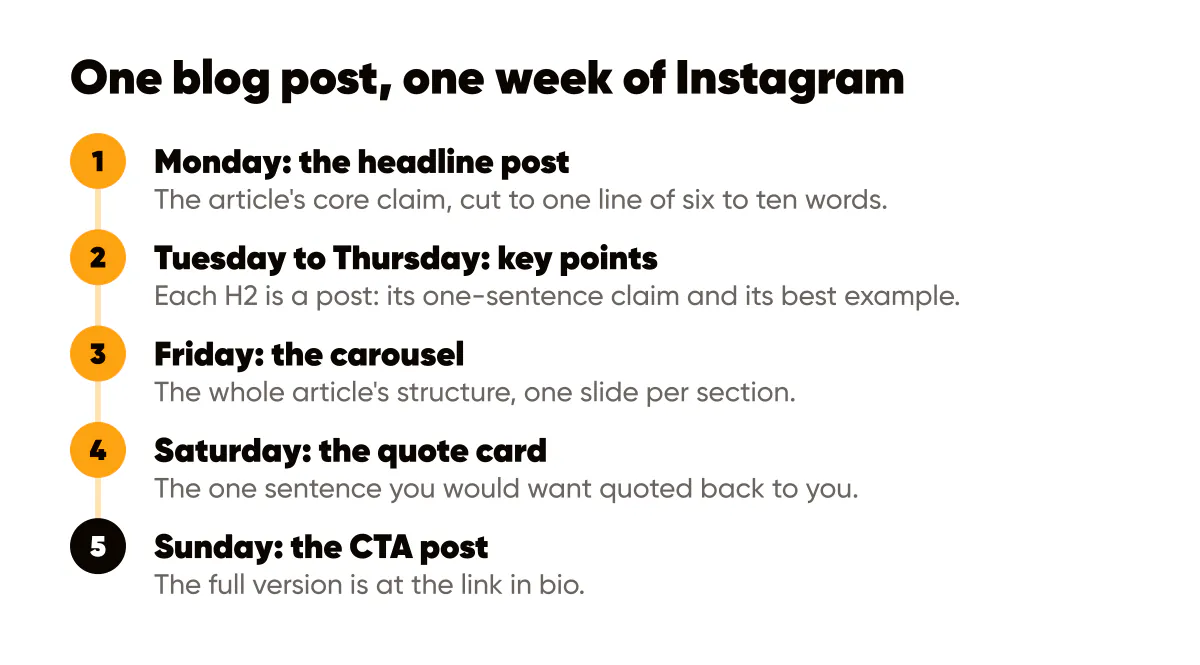
- The headline post: take the article title, or the opening paragraph's core claim, and cut it to one line of six to ten words. This is Monday's single 4:5 text post, and its caption is the article's opening paragraph reworded plus the link-in-bio pointer.
- Key point one, two and three: each H2 in the article is a post. Take the section's one-sentence claim as the headline and its best example as the caption. These fill Tuesday, Wednesday and Thursday.
- The carousel: the whole article's structure as slides, one slide per section, with the title on slide one and the takeaway on the last. This is Friday's post and usually the week's most saved, for the reasons covered in carousels that convert.
- The quote card: find the one sentence in the article you would want quoted back to you. Put it in your quote template with your name under it. Saturday.
- The CTA post: a short text post that names the problem the article solves and tells people the full version is at the link in bio. Sunday, or the following Monday if you rest on Sundays.
Seven posts, all from material you already wrote. The captions take longer than the images, because the images are one template family generated in a single batch.
How do you pick the three key points?
Use the audit question: which sections would a reader save? Usually those are the ones with a specific number, a mistake to avoid, or a step-by-step. Skip the sections that only make sense in context; a post that requires the whole article to understand is a teaser, not a key point, and you only need one teaser (the headline post).
If the article has five H2s and you can only use three, use the three that stand alone. Keep the other two for a second week later in the year; evergreen articles support more than one extraction.
Batching the seven images in one template family
The week only reads as a campaign if the images belong together. Same background family, same headline font, same logo corner, same brand color. The headline and key-point posts share one layout, the carousel adds slide numbers, the quote card is the same layout with an attribution line, and the CTA post is the inverted dark version so it stands out at the end of the week.
I generate the whole set in one sitting with an AI Instagram post generator that makes carousels too, usually right after publishing the article, so the images exist before the week starts. On a 1080x1350 canvas the headlines stay at six to ten words and the supporting line under them at one sentence, which is the discipline that keeps the text readable as a thumbnail. Making a quote card that people actually save, rather than one that looks like every other quote card, is a design problem I get into in quote posts that work.
The broader logic of turning one idea into many assets, including formats beyond Instagram, is in the content repurpose playbook. This article is the Instagram-only, one-week slice of that.
Pointing everything back to the article
For the whole week, the link in bio goes to the article, tagged so you can see in analytics which day's post sent the most readers. Every caption ends the same way: the full version is at the link. That repetition feels excessive when you write it and invisible when people read it, because nobody sees all seven posts.
The link in bio strategy is where I explain the UTM tagging, but the principle is one week, one link. Do not run two article weeks at once.
A worked example: an article on pricing for freelancers
Say you published "Why Freelancers Underprice and How to Stop" with four sections. Monday's headline post: "Your first price is a guess. Your third should not be." Tuesday: "Hourly rates punish you for getting faster," from section one. Wednesday: "Quote the outcome, not the hours," from section two. Thursday: "Raise prices with every third client," from section four. Friday: a five-slide carousel of the four sections plus a takeaway. Saturday: the quote card, "Underpricing is a marketing problem disguised as a math problem." Sunday: "If you have never raised a price, the full guide is at the link." One article, one week, one template family.
Do this this week
Pick your best-performing existing blog post and run the extraction on it: headline, three key points, carousel outline, one quote, one CTA. Write the seven captions in a single document, then generate the seven images in one template family in one sitting. Set the bio link to the article on Monday morning and leave it there all week. The article already did the hard thinking; this week it earns a second audience. And if you are wondering whether people will click through at all, the zero-click content strategy explains how to make the posts valuable even when they do not.
The same seven extractions work as text on Threads with almost no extra effort; whether that platform deserves your time is the question I answer in Threads for solopreneurs.

Put it into practice
Turn this into posts designed for your feed
Paste your website or say what you do. Creobee plans, writes and designs your posts about it as one feed in your logo and colors, captions included, and on Autopilot it posts them for you.
How the AI Instagram post generator works