AI vs Graphic Designer: The Real Cost per Post
AI vs graphic designer, priced per post: illustrative math for daily posts with a freelance designer, a DIY tool and an AI batch generator, and when each wins.
For daily social posts, an AI batch tool costs a fraction of a freelance designer and a fraction of your own DIY hours, and that gap is where the decision gets made. For the things that happen once, a logo, a brand identity, a launch campaign, a designer is still the better spend. Most solopreneurs need both, in that order.
The three ways to pay for social media design
You pay for social visuals with money, with time, or with a mix. There is no free option. A designer costs money and saves time. A DIY editor costs time and saves money. An AI generator sits in the middle: a subscription plus a review pass. The honest comparison is not "which is cheapest" but "which is cheapest for this kind of work."
I will use illustrative numbers throughout. They are assumptions I picked to make the math legible, not survey data. Swap in your own rates and the shape of the answer will usually hold.
What does a freelance designer cost per post?
Rates vary enormously by country, experience and scope, so I will not pretend there is a market number. For the exercise, assume a designer charges a flat 25 dollars per finished social graphic, working from your templates, and needs a day or two of turnaround. Some charge far less, some far more, and revision rounds change the picture. Treat 25 as a placeholder, not a quote.
At 12 posts a month, that is 300 dollars a month on the assumption above. At 20 posts, 500. Plus your time: writing the brief, sending copy, reviewing, requesting changes. Say two hours a month of coordination. A good designer will make each post better than you could, and that is worth paying for on posts that matter.
What does DIY actually cost?
DIY with a template editor is usually described as free or nearly free. It is not. It costs the hour you spend per batch of posts, and your hour has a price even if nobody invoices you for it. If your billable rate is 60 dollars an hour, again an assumption, then five hours a month of layout work is 300 dollars of opportunity cost, roughly the same as the designer in this example, except you did the work yourself and it is probably less polished.
The Canva vs AI generators comparison covers the tools side in detail. The short version: a manual editor gives you total control, and control has a time cost that scales with every post you make. Canva's own learning resources are excellent, which is part of why so many people underestimate how long they will spend inside the editor.
What does an AI batch generator cost?
Here I can use real numbers, because they are Creobee's prices. The Solo plan is 19 dollars a month for 40 posts. Autopilot is 39 for 100 plus scheduling straight to your accounts, and Pro is 79 for 300. A one-time top-up of 30 posts is 15 dollars. On Solo, that is about 48 cents per designed 1080 by 1350 post before you count your time. On Pro, around 26 cents.
The time cost does not disappear. You still write a brand brief once, pick angles, generate a batch, and review every post before it ships. My own routine for 20 posts runs about an hour including the edit pass. At the 60 dollar assumption above, that is 60 dollars of time plus 19 in subscription, so around 80 dollars for 20 posts. The batch workflow is what makes this hour possible; without it you are back to DIY economics.
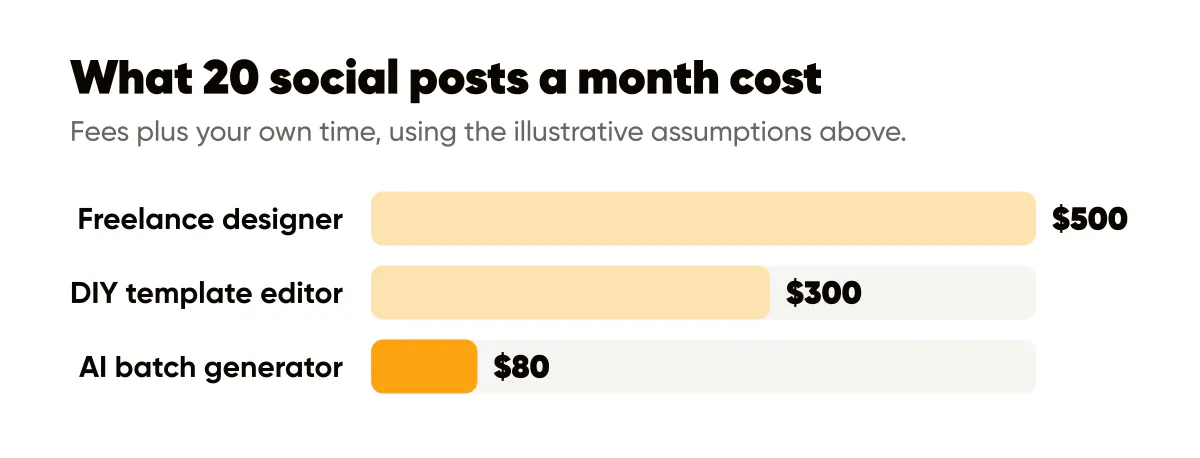
Using the assumptions above, 20 posts a month for a one-person brand come out roughly like this:
- Freelance designer: about 500 dollars in fees plus two hours of coordination, highest polish, slowest turnaround.
- DIY template editor: about 300 dollars of your own time, moderate polish, turnaround whenever you find the hours.
- AI batch generator: about 80 dollars combining subscription and your review hour, consistent polish, same-day turnaround.
Change any assumption and the totals move, but the ranking rarely does for repetitive daily posts. The AI option wins on cost because the expensive part of design, deciding on layout, type and color, happens once when you set up your brand and then gets reused 200 times. Designers and DIY both re-spend that decision on every post.
When a designer is worth every dollar
Cost per post is the wrong lens for work that happens once and lasts years. Your logo. Your color palette and type choices. The visual identity behind your templates. A launch campaign with a hero image everyone will see. Anything that will be printed. For these, a designer's judgment is the product, and the price is amortized over every post that uses the result.
This is also the honest limit of AI tools like mine. Creobee, a Canva alternative built for batches, turns your brief, your logo and your brand color into a designed feed of finished posts. It does not design your brand for you. If you hand it a weak logo and clashing colors, you get 30 consistently weak posts an hour. Pay a designer to fix the inputs, or at minimum build a one-page design system yourself, before you scale anything.
There is a second case for designers: when the post itself is the product. A course sales page graphic, an event poster, an infographic that will be shared for months. Volume tools are for volume. Bespoke work is for bespoke moments.
When AI batches win
Daily and weekly posts. Quote cards, tips, announcements, reminders, seasonal variations of the same message. Anything where the tenth post should look like the first. Here consistency is the goal, and consistency is exactly what a generator with locked brand settings does better than a human who is bored by post number 14.
There is a compounding benefit that the cost table misses. When posting is cheap and fast, you post. When every post costs 25 dollars or an evening, you skip weeks, and the account goes quiet. Shopify's social media marketing guide for small businesses frames consistency as the baseline, and I agree from experience: the cheapest post is the one that actually goes out. Recognition, the point of branded visuals in 2026, only builds if you show up. If showing up is the part you want to hand off, not just the design, done-for-you social media posts covers that version: the month is planned, written and designed for you, and you approve it before it goes out.
A hybrid budget that works
The split I recommend to most solopreneurs is uneven on purpose. Spend real money once on identity: a logo, a palette, two or three typefaces, and if you can afford it, a designer-built template family. Then run the daily volume through an AI batch tool or a template editor, whichever fits your skill and time. Bring the designer back for campaigns two or three times a year.
Under the illustrative assumptions, a year of that looks like one identity project up front, a subscription of about 230 to 470 dollars a year, and a couple of campaign engagements. Compare that to 6,000 dollars a year for 20 designer-made posts a month, or 60 hours of your own evenings, and the hybrid is not close. You can check current plan details on the pricing page if you want to run the math with real figures.
Do this this week
Write down three numbers: how many posts you actually published last month, what you think your hour is worth, and what you paid or would pay a designer per post. Multiply. If your posts are mostly repetitive daily content, trial a batch tool for one month and count the hours saved. If your inputs are the problem, a fuzzy logo or no palette, book a designer for the identity first. The design system checklist will tell you which one you are.
This comparison prices design only. If you are weighing a person who would also run the accounts, reply to comments and report on results, that is a different budget line, covered in how much a social media manager costs.

Put it into practice
Turn this into posts designed for your feed
Paste your website or say what you do. Creobee plans, writes and designs your posts about it as one feed in your logo and colors, captions included, and on Autopilot it posts them for you.
How the Done-for-you social media works