7 Best Social Media Tools for Solopreneurs in 2026
Seven social media tools for solopreneurs compared: what each makes, where it posts, its price and free plan, checked on each vendor site in October 2026.
The best social media tool for a solopreneur depends on what your posts look like. If you write text for your own X and LinkedIn profiles, Typefully, Taplio and Supergrow are built for exactly that. If you want one cheap scheduler for every network, Buffer and Metricool have free plans. If you design your own graphics, Canva is the editor most people already know. And if you want a branded, designed feed on Instagram and your LinkedIn page without designing it yourself, that is the job Creobee does. Below is a summary table, then each tool with its price, what it makes and where it wins.
This list is for one-person businesses: a founder running a SaaS or an app, a coach, a consultant, someone selling an online service. I build Creobee, so read its section with that in mind. I give no ratings or scores. Every fact about another tool comes from that vendor's own website. Prices checked on 9 October 2026; they change often, so check before you pay.
Summary table
| Tool | Best for | What it makes | Where it posts | Entry price | Free plan |
|---|---|---|---|---|---|
| Buffer | One simple scheduler for every network | Your own posts, with an AI assistant and Canva built in | 12 networks, X and LinkedIn included | Essentials $5/mo per channel | Yes, 3 channels, 10 scheduled posts each |
| Typefully | Writing on X, LinkedIn and Threads | Text posts and threads, LinkedIn PDF carousels | X, LinkedIn, Threads, Bluesky, Mastodon, Substack | Creator $99/year, annual billing only | Yes, 10 posts a month |
| Taplio | Growing a personal LinkedIn profile | AI LinkedIn posts, images, carousels | LinkedIn only | Starter $39/mo | No, 7-day trial |
| Supergrow | Turning what you know into LinkedIn posts | AI posts in your voice, carousels, posts from videos and articles | LinkedIn only | Pro $39/mo, or $31/mo billed yearly | No, 7-day trial |
| Canva | Designing every graphic yourself | Anything you design from templates | Through its own planner | Shown in your local currency | Yes |
| Metricool | Scheduling plus analytics on a budget | Your own posts, with an AI assistant | Instagram, Facebook, TikTok and more; LinkedIn from Starter, X as an add-on | Starter from $20/mo billed yearly | Yes, 1 brand, 20 posts a month |
| Creobee | A designed brand feed, written and posted for you | Planned, written and designed posts, carousels and animated versions | On Autopilot and Pro: Instagram, Facebook Pages, your LinkedIn page, Threads, Pinterest, Bluesky, TikTok, X | Solo $19/mo for 40 posts, no posting | No; first 3 posts free, no card needed |
Sources: Buffer pricing, Typefully pricing, Taplio pricing, Supergrow pricing, Canva pricing, Metricool pricing and Creobee's own pricing.
Two kinds of tools
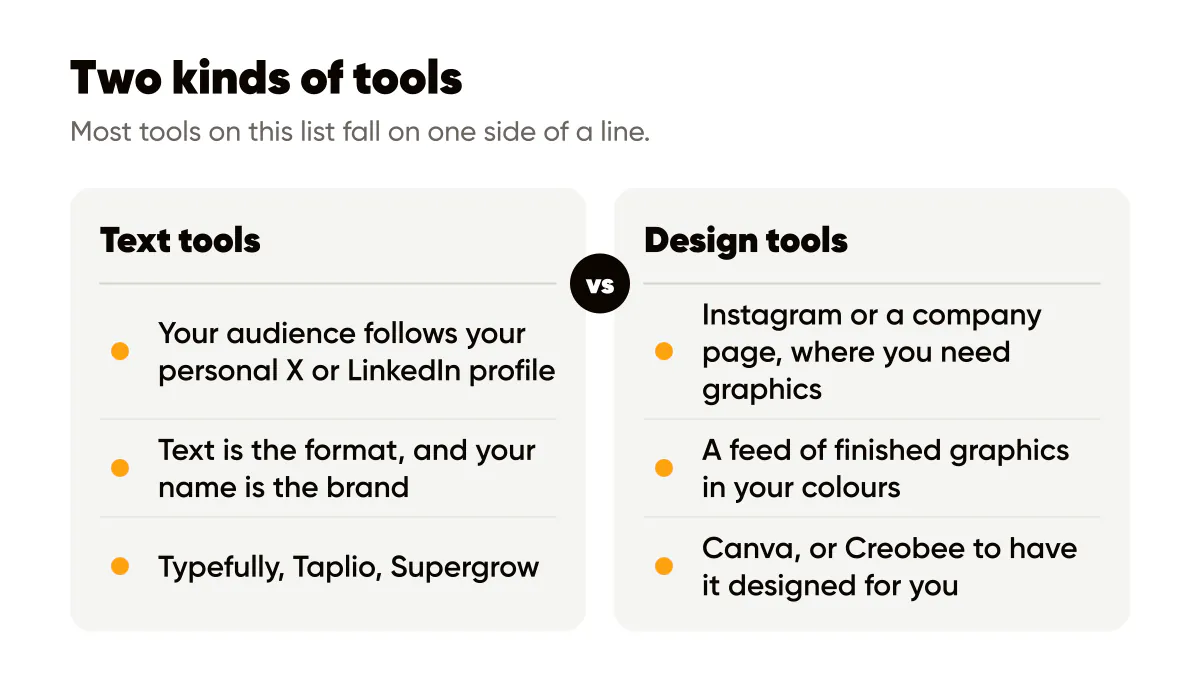
Most tools on this list fall on one side of a line. Text tools help you write: you bring the opinion, they help you phrase it, schedule it and see how it did. They live on X and LinkedIn, where a founder's own profile is the account people follow. Design tools help you look like a brand: a feed of finished graphics in your colours, which is what Instagram and a company page need.
A one-person business usually needs a bit of both, and no single tool here does both well. Decide which job costs you more time each week, and buy for that one first.
The seven tools, one by one
Buffer
Buffer is a scheduler. Its free plan connects up to 3 channels with 10 scheduled posts per channel, which you can refill at any time. Essentials is $5 a month per channel, or $60 a year per channel, and Team is $10 a month per channel. It posts to Instagram, Facebook, TikTok, LinkedIn, X, YouTube, Threads, Pinterest, Google Business Profile, Bluesky, Mastodon and Substack. Every plan has an AI assistant and a Canva integration, so you design in Canva and schedule in Buffer.
Where it wins: the widest network list here, X included, and a free plan that covers a solopreneur with three accounts. It does not design the posts for you.
Typefully
Typefully is a writing app for social posts. Its free plan gives 1 social set and 10 posts a month. Creator is $99 a year, annual billing only, with 1,000 posts a month, X analytics and AI writing features. Business is $18 a month per social set, billed yearly, for teams. It publishes to X, LinkedIn, Threads, Bluesky, Mastodon and Substack, and its LinkedIn features include a first comment and PDF carousels.
Where it wins: writing and threading on X. If your audience reads you on X and LinkedIn, it is the cleanest place to write, and the yearly price is low for what it does.
Taplio
Taplio calls itself "the all-in-one AI tool for LinkedIn growth and personal branding". It finds ideas, writes posts in your voice, generates images and carousels, schedules them and helps you engage with comments. It works on LinkedIn only. Starter is $39 a month, Growth $69 and Pro $199, each with a 7-day trial, and its page offers a 30-day money-back guarantee.
Where it wins: a founder whose growth channel is their own LinkedIn profile. The engagement tools go further than anything else on this list.
Supergrow
Supergrow's line is "Turn expertise into influence on LinkedIn", for "your own personal brand or building your team's". Pro is $39 a month, or $31 a month billed yearly, for 1 account, with scheduling, a carousel maker, an auto first comment, profile analytics and post repurposing from YouTube videos, articles and PDFs. Teams is $199 a month for 5 accounts. Every plan starts with a 7-day trial. It works on LinkedIn only.
Where it wins: if you talk better than you type, its AI interviews turn what you say into posts, and repurposing turns a video or an article into a week of LinkedIn posts.
Canva
Canva is a design editor. It has a free plan, and its paid plans add more templates and features. Canva showed me its prices in my local currency rather than in dollars, so check canva.com for the price where you are.
Where it wins: control. If you enjoy designing and want every graphic exactly as you see it, nothing on this list gives you more freedom. The cost is your time: you design every post yourself, and you still decide what to say.
Metricool
Metricool combines scheduling with analytics. Its free plan covers 1 brand and 20 scheduled posts a month on every network except LinkedIn and X, with 30 days of analytics and an AI assistant. Starter is from $20 a month billed yearly, or $25 billed monthly, for up to 5 brands, with LinkedIn, analytics with unlimited history and Google Drive and Canva integrations. X is an add-on at $10 a month per connected account.
Where it wins: analytics. Of the schedulers here, it shows the most about what worked, and the free plan is enough to start.
Creobee
Creobee is mine, so here I stop being neutral. You describe your business once, or paste your website, and it plans your week: a mix of single posts, carousels and 9:16 stories, written and designed as one branded feed in your colours and logo, with a layout for each kind of post. Single posts can also come as short animated versions with sound effects you can turn off. It generates no AI images; the art is a preset background, a photo you upload, or optional stock photos of real people. For a software or coaching business it writes about what you build and offer, and it never invents a figure.
Solo is $19 a month for 40 posts, and it does not post for you: you download the posts. Autopilot is $39 for 100 posts and posts what you schedule to Instagram, Facebook Pages, your LinkedIn page, Threads, Pinterest, Bluesky, TikTok and X, across up to 10 accounts; the social media on autopilot page explains how. Pro is $79 for 300 posts and up to 15 accounts. Every new account gets its first 3 posts free, no card needed. The social media posts for SaaS page shows an example feed for a one-person software business.
Its limits, because they matter for a solopreneur:
- On X it posts each post's image with the caption cut at a sentence (or a word) to fit 280 characters. It writes no threads.
- LinkedIn connects as a company page, never as your personal profile. If your audience follows you, not your company, a text tool fits better.
- Carousels go to Instagram as carousels. LinkedIn and every other network get the single-image version of the same post. There are no PDF carousels.
- Stories go to Instagram on Autopilot and Pro.
- No replies to comments or DMs, no analytics, no filmed or AI video.
- Solo makes posts but does not post them.
Where it wins: a feed that looks designed as a set, written and posted for you on Instagram and your LinkedIn page, for about $0.39 a post on Autopilot. If the visual feed is the part you never get to, this is the job it does.
How to choose
Answer three questions about your own week.
Where does your audience follow you? If it is your personal X or LinkedIn profile, start with Typefully, Taplio or Supergrow. Your name is the brand there, and text is the format. If it is Instagram or a company page, you need graphics, and a text tool will not make them.
Do you want to design, or to have it designed? Canva gives you full control and costs your evenings. Creobee designs the whole feed from your brief and costs you a review. Buffer and Metricool post what you made elsewhere.
What does a month actually cost you? Count the accounts and the posts you will really publish. Buffer charges per channel, Metricool per number of brands, Taplio and Supergrow per LinkedIn account, and Creobee per post. On Creobee that is $0.48 a post on Solo and $0.39 on Autopilot.
Many solopreneurs end up with two tools: a text tool for their own profile and a design tool for the brand. That is not waste; they do different jobs. For more on keeping one person's brand consistent, see one-page brand guidelines and behind-the-scenes content for solopreneurs. For a wider list aimed at local businesses, read the best AI social media managers for small business.
Frequently asked questions
What is the best free social media tool for a solopreneur?
Buffer's free plan covers 3 channels with 10 scheduled posts each, X and LinkedIn included. Metricool's free plan covers 1 brand and 20 posts a month, without LinkedIn or X. Typefully's free plan gives 10 posts a month on X, LinkedIn, Threads and more. Creobee gives your first 3 posts free with no card, then needs a plan.
Which tool is best for a SaaS founder?
It depends on where your users find you. For your own X and LinkedIn profile, Typefully, Taplio or Supergrow. For a branded feed on Instagram and your product's LinkedIn page, with carousels and short animated posts, Creobee on Autopilot.
Can one tool post to LinkedIn and Instagram?
Buffer and Metricool (from Starter) post to both, but they do not design the posts. Taplio and Supergrow work on LinkedIn only. Creobee posts to Instagram, a LinkedIn company page (not a personal profile) and X.
Do I need a scheduler if I post every day?
Yes, if you want to batch. Writing and designing a week in one sitting and letting a scheduler post it is what keeps one person consistent. Posting by hand every day works until the first busy week.
Put it into practice
Turn this into posts designed for your feed
Paste your website or say what you do. Creobee plans, writes and designs your posts about it as one feed in your logo and colors, captions included, and on Autopilot it posts them for you.
How the AI content calendar generator works