How to Schedule Instagram Stories (and Facebook Stories)
How to schedule Instagram stories in the app, in Meta Business Suite or with a scheduler, what each way keeps and drops, and how to plan them with your posts.
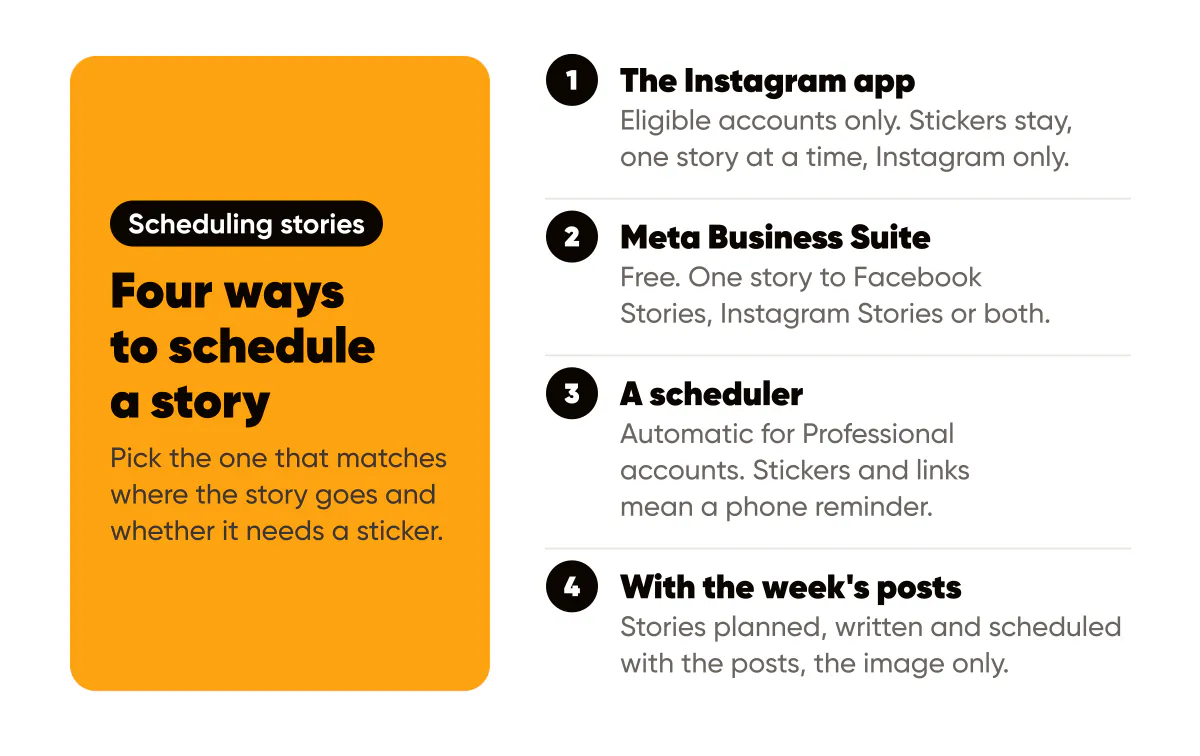
Yes, you can schedule an Instagram story. If your account is eligible, make the story in the Instagram camera, tap the three dots before you share it, choose Schedule and pick a date and time. You can also schedule stories in Meta Business Suite, which can send the same story to Facebook and Instagram at once, or with a third party scheduler. What changes between the three is what survives the scheduling: a poll, a link or music often has to be added by hand.
This guide walks through each way, what it keeps and drops, and how to stop scheduling stories one at a time by planning them with the week's posts. I checked every step below on October 9, 2026. Instagram and Meta rename menus often, so if a label reads differently on your phone, look for the same idea in the same place.
Can you schedule an Instagram story?
You can, in three places: inside the Instagram app, in Meta Business Suite, and in a scheduling tool connected to your account. The catch is that none of them is open to every account in the same way.
Instagram's own guide to Stories says scheduling is "currently available to accounts that meet Instagram's eligibility requirements". It does not list those requirements on the page. If you do not see a Schedule option, the other two routes are still open, and most business and creator accounts already use one of them.
A scheduled story behaves like any other story once it goes out. It stays up for 24 hours, lands in your private Stories Archive after that, and can be added to a Highlight if you want it to stay on your profile.
In the Instagram app (eligible accounts)
This is the shortest route when you are already on your phone.
- Open the story camera and make the story as usual: photo, video, text, stickers.
- Before you share, tap the three dots at the top.
- Tap Schedule, choose the date and time, and confirm.
The story waits in Instagram until its time and then goes out exactly as you made it. Because you built it in the app, everything Instagram offers is available, including polls, questions, countdowns and link stickers. That is the main reason to use this route when your account has it.
The downside is that it is one story at a time, on your phone, and on Instagram only. If you also post stories to a Facebook Page, you schedule them again somewhere else.
In Meta Business Suite
Meta Business Suite is Meta's free dashboard for a Facebook Page and the Instagram account linked to it. It works on desktop and in its mobile app, and it is the one built in way to schedule the same story to both networks.
Buffer's walkthrough of Meta Business Suite (May 23, 2024) lists the steps:
- Next to the Create post button, open the menu and choose Create Story.
- Add your media. You can select several images at once.
- Tap Edit to crop or add text and stickers.
- Choose where it goes: Facebook Stories, Instagram Stories or both.
- Tap Share to publish now, or Schedule to publish later.
This is the best free option for a business that posts stories to a Page as well as Instagram. It needs your Instagram account linked to a Facebook Page, and every story is still built and scheduled by hand. I could not confirm on Meta's own help pages how far ahead a story can be scheduled there, so check the date picker before you plan a month out.
With an Instagram story scheduler
Third party schedulers connect to Instagram through Meta's API, which is stricter than the app. Buffer's help article on scheduling Instagram posts, reels and stories (read October 9, 2026) is one of the clearest about the limits, and the pattern is similar across tools:
- Automatic publishing needs a Professional account. Buffer can publish a story by itself only for an Instagram Business or Creator account.
- Some features force a reminder instead. Music, story text, stickers and story links are things "Instagram does not allow third-party tools to publish automatically". Add one and Buffer switches the story to a phone notification, so you finish it in the Instagram app at the scheduled time.
- Several images can go out as one sequence. Buffer takes up to 10 images and videos in one Story post and publishes them in order.
- Facebook is a separate channel. Buffer notes that an Instagram post it publishes is not shared to Facebook automatically, so you connect the Page and schedule it there too.
So a scheduler is great for a story that is a finished picture, and less great for an interactive one. If the point of a story is the poll, a reminder that pings you at the right minute is the honest option, whichever tool you use.
What gets lost when a story is scheduled
Every route that publishes without you in the room publishes the image or the video, and not much else. Here is the rule of thumb that has held for me:
- A story that is a picture schedules well. An announcement, today's special, a tip, a quote, a reminder of your opening hours. Everything the viewer needs is in the image.
- A story that asks a question schedules badly. Polls, question boxes, quizzes and countdowns live as stickers, and stickers are what automatic publishing leaves out.
- A story with a link needs a plan. A link sticker is usually a manual step, so either post that story yourself, or put the next step in the picture: "Reply to this story to book".
The practical split for a small business is to schedule the picture stories, which are most of them, and post the one or two sticker stories of the week live. If you are short of picture stories to schedule, Instagram Stories vs feed posts has a weekly split, and Instagram story ideas for small business has seven story ideas, one for each day of the week.
Schedule the stories with the week's posts
The routes above all schedule stories the way most people write them: one at a time, after the posts are done, when there is time left. That is why stories are the first thing to go in a busy week.
I built the week in Creobee around the opposite order. You pick a pace for your social media posting schedule, and the week arrives planned: which days get a post, which get a carousel or an animated post, and which get a story. Every story is written for its day and designed as a 9:16 still, 1080 by 1920, in the same style and colors as your feed, with the words kept clear of the bands where Instagram's own buttons sit. By default a day's first post goes out at 10:00, its story at 12:30 and a second post at 17:00, and you can change any of those times.
On the Autopilot and Pro plans, the whole week, stories included, is scheduled in one confirm. Stories go to Instagram as stories. Networks without stories, such as LinkedIn or Threads, skip them and get only the week's posts. On the Solo plan you download the week, stories as their own images, and post them yourself. A story costs one post, the same as a feed post.
To be clear about the limits: a scheduled story from Creobee is the image only. It has no poll, link or music, the same as any automatic publishing. When a day's story needs a sticker, download that one and post it from the Instagram app with the sticker added. Creobee also does not film anything, so stories of you behind the counter are still yours to take. What it removes is the blank screen at 12:25 on a Tuesday. How Creobee publishes everything else is on the social media autopilot page.
Check before it goes out
Whichever way you schedule, look at each story once before its day. Five checks catch almost every problem:
- The size. A story is 9:16, ideally 1080 by 1920 pixels. Anything else gets cropped or padded. The Instagram Story size guide has the exact figures.
- The safe zones. Instagram puts your name at the top and the reply bar at the bottom. Keep words out of roughly the top 250 and bottom 340 pixels.
- The words. No "link in bio" or "vote below" on a story that will have no link or poll. Say what to do instead: reply, visit, call.
- The time. A story is up for 24 hours, so the hour matters less than the day. Put a lunch offer on the morning it applies, not the evening before.
- The network. If you post to a Facebook Page as well, check the story is scheduled there too, or that your tool sends it to both.
If you post on Facebook for a local audience, Facebook Page posts for small business covers what to put next to those stories on the Page itself.
FAQ
Why can't I schedule a story in the Instagram app?
Instagram says scheduling is available to accounts that meet its eligibility requirements, and it rolls features out gradually. If the Schedule option is not in the three dots menu before you share, use Meta Business Suite or a scheduler instead.
Can I schedule a story with a poll or a link sticker?
In the Instagram app, when your account can schedule there, yes, since you build the story in Instagram itself. Through a third party scheduler usually not: Buffer, for example, sends a phone reminder for stories with stickers or links so you finish them in the app.
Can I schedule Instagram and Facebook stories at the same time?
Yes. Meta Business Suite lets you pick Facebook Stories, Instagram Stories or both for the same story. Schedulers usually treat them as two channels. Creobee's Autopilot and Pro plans send a week's stories to Instagram in the one schedule.
Can I schedule several stories in a row?
Yes. Buffer publishes up to 10 images and videos in one Story post as a sequence. In Meta Business Suite you can add several images to one story. In Creobee each story is its own day, at most one a day.
Do scheduled stories get fewer views?
Instagram has shared no figure saying a scheduled story is treated differently from one posted live. What does change is that a scheduled story usually has no sticker, so judge it on replies and taps, not poll votes.
The short version
Use the Instagram app when your account can schedule and the story needs a sticker. Use Meta Business Suite when the same story goes to a Facebook Page too. Use a scheduler when stories are part of a bigger posting plan. And when stories keep falling off the week, plan them with the posts, so they are written, designed and scheduled at the same time as everything else.
Put it into practice
Turn this into posts designed for your feed
Paste your website or say what you do. Creobee plans, writes and designs your posts about it as one feed in your logo and colors, captions included, and on Autopilot it posts them for you.
How the Social media posting schedule works