AI Caption Generator: Captions That Sound Like You
An AI caption generator sounds like you only with the right inputs. What to feed it, a two-minute edit pass that strips the hype, and when to disclose.
An AI caption generator sounds like a robot when you feed it robot inputs. Give it your audience, your offer, your tone and one specific detail from your actual work, then spend two minutes editing: add a receipt, cut the hype words, keep one call to action. The output stops sounding generated.
Why AI caption generators produce generic captions
The model is not the problem. The prompt is. Ask for "an engaging Instagram caption about productivity for entrepreneurs" and you have described ten million posts, so you get the average of ten million posts: a rhetorical question, three generic tips, a line about consistency, a row of hashtags. The output is generic because the input was generic.
I build Creobee, an AI Instagram post generator that writes the captions too, and I have read a great many headlines and captions produced from real users' inputs. The pattern is consistent. Users who type "a coaching business" get mush. Users who type "I coach first-time managers at software companies who were promoted for being good engineers and now dread one-on-ones" get captions that sound like a person. Same tool, same day, different input.
What inputs does an AI caption generator actually need?
Four things, and the fourth is the one everybody skips.
- Audience: who exactly, described the way they would describe themselves, including the situation they are in right now.
- Offer or point: the one thing this post exists to do. Teach one idea, make one claim, invite one action.
- Tone: three words plus a few banned phrases. "Direct, warm, specific. Never say game-changer, unlock or elevate."
- One specific detail: a number, a date, a mistake, a client situation (anonymized), a thing you noticed this week. This is the receipt, and it is what separates you from every other account in your niche.
The tone section is worth building once and pasting forever. My brand voice guide for AI shows how to write a ten-sentence voice file that does this job. The other three inputs change per post, and the whole prompt still fits in five lines. If you want ready-made structures, the 25 caption prompt templates are all built on this four-input shape.
A mini walkthrough: bakery, Tuesday, slow morning
Say you run a small bakery and Tuesday mornings are dead. Generic prompt: "Write an Instagram caption for a bakery promoting our Tuesday specials." You will get something about treating yourself and starting the week right.
Specific prompt: "Audience: people who work from home within a fifteen-minute walk of a neighborhood bakery and default to instant coffee because leaving the house feels like a production. Point: Tuesday 9 to 11 is the quietest we get, and it is the best time to actually sit down. Tone: dry, friendly, no exclamation marks. Detail: last Tuesday we sold four croissants before eleven and the owner read a whole newspaper."
The second prompt produces a caption with a scene in it, and a scene is the thing readers stop for. The number is real, the detail is yours, and no competitor can generate it because they were not there.
The two-minute edit pass
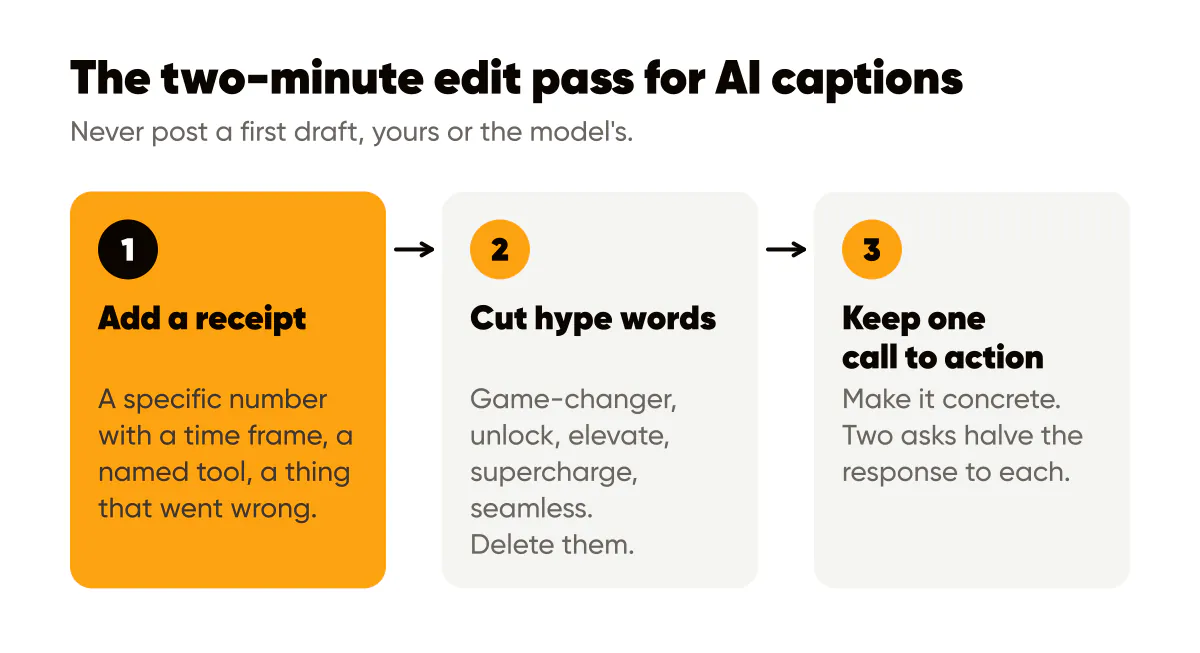
I never post a first draft, mine or the model's. The edit pass has three moves, in order, and it takes about two minutes per caption once it is habit.
First, add a receipt if the draft does not have one. A specific number with a time frame, a named tool, a thing that went wrong. If the draft says "consistency pays off", change it to what consistency actually did on your account and when.
Second, cut hype words. Every model has favorites: game-changer, unlock, elevate, supercharge, seamless, dive in, journey. Delete them. If a sentence collapses without its hype word, the sentence was empty; delete the sentence. This also removes most of the rhetorical questions and the "ready to take your business to the next level?" endings.
Third, keep one call to action and make it concrete. Not "engage below" but "reply with the one task you keep postponing". One ask per caption; two asks halve the response to each. The Instagram caption frameworks post covers structures that put the CTA where it gets read.
How do you know when an AI caption is good enough to post?
Read it out loud in your own voice. If you stumble, hear a phrase you would never say, or reach a sentence that could be about any business, it is not done. Then run the 12-point quality checklist for AI content, which formalizes this into checks for factual claims, specificity and voice match. Most captions pass in under a minute once the prompt inputs are right, because the edit work moved upstream.
Should you disclose that AI wrote the caption?
For a caption you prompted, edited and stand behind, the position I hold is that it is your writing with an assistant, the same as a draft from a copywriter you briefed, and the reader is not misled by the absence of a label. Google's guidance on AI-generated content in Search takes a similar line for web content: quality is judged regardless of how the content was produced, and disclosure is encouraged where readers would reasonably want to know.
Two exceptions. If the caption states an experience, a result or an opinion, it must be yours in fact, not just in voice; the model does not get to invent your client results. And if the post is a paid partnership or endorsement, the FTC's Disclosures 101 applies exactly as it would to a hand-written caption; using AI changes nothing about the disclosure duty. The AI disclosure post separates these cases from synthetic imagery, where the expectations are different.
Do this this week
- Write your tone block once: three words, five banned phrases. Save it where you can paste it.
- Before each generation, add one detail from the last seven days. Start a notes file of receipts so you never begin from nothing.
- Generate three variants, not one. Pick the best opening line from one and the best CTA from another.
- Run the two-minute edit pass: receipt, hype cut, one CTA.
- Read it aloud. Post only what sounds like you.
The human-plus-AI workflow is the longer version of the same principle: the machine drafts the middle, and you own the angle at the start and the judgment at the end. A caption generator is a very fast intern. Brief it like one. If you want the image made around the caption too, the best AI Instagram post generators compares the tools that design the whole post.

Put it into practice
Turn this into posts designed for your feed
Paste your website or say what you do. Creobee plans, writes and designs your posts about it as one feed in your logo and colors, captions included, and on Autopilot it posts them for you.
How the AI Instagram post generator works