Font Licensing Explained for Social Media Graphics
Font licensing explained for social media graphics: desktop vs web licenses, Google Fonts commercial use, what bundled fonts allow, and how to keep a record.
You can use a font in social media graphics when its license covers creating static images for commercial use. Most desktop licenses do, every Google Fonts family does, and fonts bundled inside a design tool usually do, but only inside that tool. Read the license once, save a copy, and note which fonts are cleared. This is not legal advice.
Font licensing explained for social media graphics
A font is two things. The typeface is the design of the letters. The font file is the software that draws them. In most places, what you license is the file, and the license is a software license with rules about how many computers it can live on and what you are allowed to make with it. Once you read it that way, the categories make sense.
A desktop license lets you install the file on a computer and use it in applications to make things: documents, print, and static images, which is what a social media graphic is. A web license lets you embed the font in a website so browsers render live text with it. An app or ebook license covers embedding the file inside software or a publication. Some foundries add a separate commercial or broadcast tier for large-scale advertising or video.
Social media graphics almost always fall under the desktop license, because you are rendering the text into a flat image and the font file itself never leaves your machine. But "almost always" is where people get into trouble, so the rest of this post is about the exceptions. It is not legal advice; I am a founder who reads licenses, not a lawyer.
Is a font free for commercial use if I downloaded it for free?
Not automatically. Free fonts come in at least three kinds. Some are released under open licenses that permit any use, including commercial. Some are free for personal use only, and the moment you put the output on a business account you are outside the license. Some are free trials of commercial fonts with the terms in a text file you did not open.
The tell is the license file that came with the download, or the license page on the site you got it from. If neither exists, treat the font as unusable for business and find an alternative. A brand built on a font you cannot prove you may use is a small liability that never goes away.
Google Fonts as the safe default
Every family in the Google Fonts library is released under an open source license that permits free use in commercial work, including rendering text into images you post for a business. That single fact makes it the safest default for a solopreneur who does not want to think about licensing. You can also download the files and install them locally, so the font works in any tool you use, not just in the browser.
The library is large enough to build a real brand from. Google Fonts Knowledge, the typography education section of the site, covers how to choose and pair families, and its glossary explains the terms you will meet in license files: weights, styles, variable fonts, and so on. The typography guide for social posts covers the design side, one display face and one text face at most, and every pairing in that post can be built from open fonts.
The trade-off is distinctiveness. Popular open fonts are everywhere, so a brand that uses one is leaning on color, layout and voice rather than type to be recognized. I think that is the right trade for most small businesses. The brand consistency guide argues that recognition comes from repeating a system, not from any single element being rare.
Fonts bundled in design tools
Design tools ship with font libraries, and the rule is usually simple: you may use those fonts inside the tool, in designs you export from the tool, for the purposes the tool's terms allow, which typically include commercial use. What you generally may not do is extract the font file and use it elsewhere. The tool's subscription is the license, and it ends when the subscription does.
That last part is the one to note. If a tool bundles a premium font and you build your brand on it, you are tied to that tool for as long as you want new posts in that font. Existing exported images stay fine, because they are flat pixels. Future ones depend on the subscription. This is not a reason to avoid bundled fonts; it is a reason to know which of your brand fonts are yours and which are rented.
The same logic applies to AI tools that render text for you. The tool is responsible for licensing the font it draws with; you are responsible for reading the tool's terms about what you may do with the output. The copyright basics for AI-generated content post covers the output side of that question. If an AI social media post generator sets the type on your posts, its terms are the page to read before your first batch.
What happens to the license when I export an image?
Usually nothing. A JPEG or PNG contains pixels, not the font file, so exporting a graphic does not distribute the font and does not need an embedding license. Under a standard desktop license, making and publishing static images is exactly the permitted use. This is why social graphics are the low-risk case.
Two situations change the answer. First, some licenses restrict specific uses, such as creating a logo, using the font as the core of a product you sell (like templates or merchandise), or advertising at a certain scale. If your social graphics are themselves the product, for instance you sell post templates, read that clause. Second, personal-use licenses exclude business use entirely, regardless of format. Exporting to an image does not launder a personal license into a commercial one.
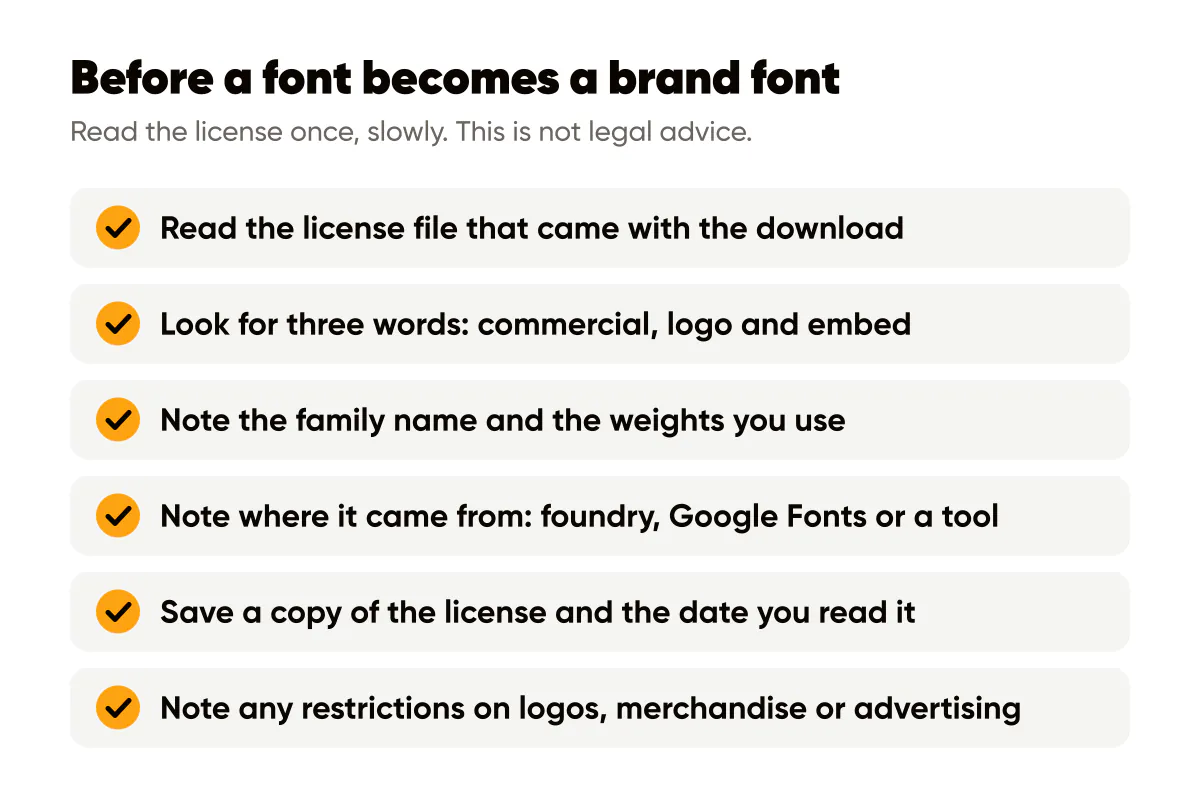
The rule I follow: before a font becomes a brand font, I read the license once, slowly, looking for three words: commercial, logo, and embed.
Keep a record
A brand's fonts outlive the memory of where they came from. Eighteen months in, you will not remember whether the display face came from a foundry purchase, a Google download or a tool bundle. So keep a record. Mine is a section in the one-page design system, the same sheet that holds the palette and logo rules; the design system guide for solopreneurs shows the format.
For each font, note four things:
- The exact family name and the weights you use, since licenses are sometimes per weight.
- Where it came from: foundry name and order number, Google Fonts, or the tool it is bundled in.
- The license type and the date you read it, with a saved copy of the license file or a screenshot of the page.
- Any restrictions you noticed, especially around logos, merchandise or advertising.
The same habit that protects you with fonts protects you with images. The stock photo licensing guide covers the parallel questions for backgrounds and photos, and the two records can live in the same document.
Do this this week
List every font currently appearing on your social posts. For each one, find its license and put it into one of three buckets: open and cleared, commercial and paid for, or unknown. Anything in the unknown bucket gets replaced, most simply by an open font with a similar feel, before your next batch of posts.
Then write the record. Four lines per font, saved next to your palette. It takes twenty minutes once and saves you from ever having to answer "can we use this?" from memory.

Put it into practice
Turn this into posts designed for your feed
Paste your website or say what you do. Creobee plans, writes and designs your posts about it as one feed in your logo and colors, captions included, and on Autopilot it posts them for you.
How the Instagram feed design works