Stock Photo Licensing for Social Media, Explained
Stock photo licensing for social media, in plain language: copyright, fair use, Creative Commons, what free stock sites allow, reposts and AI images.
Copyright attaches automatically to every photo, illustration and post the moment it is made, so the default answer to "can I use this?" is no unless you own it, have a license, or fall inside a narrow exception. This guide covers the licenses creators actually encounter. It is not legal advice.
Copyright basics every creator should know
The US Copyright Office's plain explanation of what copyright is makes one point that surprises most people: protection is automatic. Nobody registers their Instagram photo, and they do not need to. The person who pressed the shutter, drew the illustration or wrote the caption owns it from the moment it exists, in most countries, for a very long time.
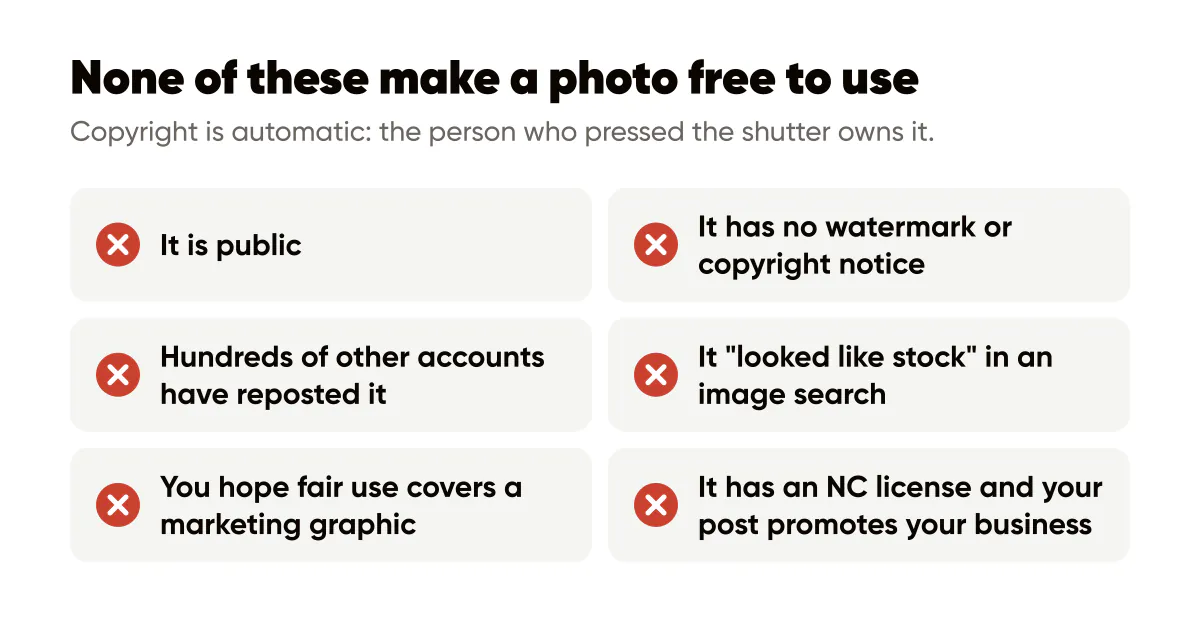
Three consequences follow. A photo being public does not make it free. A photo having no watermark or copyright notice does not make it free. And a photo that hundreds of other accounts have reposted is not free either; it is just widely infringed.
I learned this the boring way. Early on I grabbed a texture from an image search for a Creobee background because it "looked like stock". It was a photographer's portfolio piece. Nothing happened, but it could have, and I replaced it the same day. The fix was cheap: I now save the license link next to every background file, which is the habit I describe in choosing background images for branded posts.
Is using a photo for a small business post fair use?
Almost never, in the way creators hope. Fair use is a defense, decided case by case, that weighs purpose, nature of the work, amount used and market effect. The US Copyright Office fair use index collects actual court decisions, and reading even a few makes clear how narrow it is. Commentary, criticism, parody and education can qualify. Decorating a promotional post with someone else's photo is a commercial use of the whole image, which is the weakest possible position.
The practical rule: if you are asking whether fair use covers a marketing graphic, assume it does not and find a licensed image. The exceptions are rare enough that a one-person brand should not bet on them.
Creative Commons in one line each
Creative Commons licenses let creators pre-authorize certain uses. The Creative Commons license overview describes each variant, and the letters matter.
- BY means you must credit the creator in the way they specify. For a social post, that usually means a credit line in the caption at minimum.
- NC means non-commercial only. A post promoting your business is commercial, so NC images are out for brand content.
- ND means no derivatives. Cropping to 4:5, darkening for text contrast or placing a headline over the image are all derivatives, so ND images do not work as backgrounds.
- SA means share-alike: your derivative must carry the same license, which is rarely what a brand wants.
- CC0 means the creator has waived rights entirely and you can use the image freely, including commercially, without attribution.
For branded posts, CC0 and BY are the usable ones, and BY only if you are willing to credit every time.
Free stock sites and what their licenses actually allow
Free stock platforms write their own licenses, and they are broadly generous but not unlimited. The Pexels license is a good example of the pattern: free for commercial and personal use, no attribution required, modification allowed, with explicit exclusions such as selling unaltered copies, implying endorsement by identifiable people, or using the images in ways that portray people negatively.
Read the exclusions section of any free license once. The recurring limits across platforms are: no reselling the image as-is, no trademark or logo built from the photo, no implying that a recognizable person in the photo endorses your product, and no sensitive-context use of identifiable people. If your post is a testimonial or an offer, a stock photo of a smiling stranger next to it can drift into that endorsement problem, which is another reason social proof posts work better with real, consented material.
Can you repost someone else's Instagram post or screenshot?
The post is theirs. Downloading the image and re-uploading it to your own feed is reproducing their work, and the platform's terms do not give you a license to do it. Sharing to Stories with the built-in share button, or using the platform's own repost features, operates inside the platform's permission system, which is a different situation from a download and re-upload.
Screenshots of someone's post, review or message are the same thing in a different wrapper. Ask. In my experience people say yes almost every time, and the ask itself often turns into a relationship. The UGC prompts guide covers how to invite content you can use, with permission built in from the start.
Two adjacent issues: people's faces and trademarks. A person in your photo has rights over the commercial use of their likeness in many places, separate from copyright. Other companies' logos in your graphics raise trademark questions that no image license solves. Keep both out of promotional posts unless you have written permission.
AI-generated imagery: unsettled but not lawless
Images generated by AI tools sit in an evolving area. In the US, the Copyright Office has taken the position that purely machine-generated output without sufficient human authorship is not protectable, which cuts both ways: you may not be able to stop others from reusing your generated image, and you should check the tool's own terms for what you are allowed to do with it.
Two habits keep you on solid ground. Do not prompt for a specific living artist's style or a recognizable person. And be honest about what is synthetic when it matters to the viewer; my AI disclosure post separates the cases where a label is expected from the cases where it is noise. In Creobee, for what it is worth, the photos and logos in a post are ones you upload, pick from its preset backgrounds or, if you turn on people, take from its small library of licensed photos, so for anything you upload, the licensing question stays with you, where it belongs. AI writes the words in that AI social media post generator, but it makes no AI-generated images.
A licensing checklist for this week
- Audit the backgrounds in your current template folder. For each one, find the license or delete the file.
- Save the license URL in the filename or a sidecar note. Future you will not remember where it came from.
- Replace anything from an image search with a CC0 or free stock image, or with your own photo.
- Write a one-line repost policy: ask first, credit always, screenshot only with permission.
- Check the terms of any AI tool you use for imagery and note what they say about ownership and commercial use.
None of this requires a lawyer for routine posts, but if a license is ambiguous or money is on the line, get one. The E-E-A-T guide makes the broader case that your own photos and receipts are worth more than any stock image anyway, which makes the licensing problem shrink on its own.
Put it into practice
Turn this into posts designed for your feed
Paste your website or say what you do. Creobee plans, writes and designs your posts about it as one feed in your logo and colors, captions included, and on Autopilot it posts them for you.
How the Instagram feed design works