AI Content Brief Template: One Page for Every Tool
An AI content brief template on one page: audience, offer, pillars, voice, banned words, proof bank, visual rules and CTAs. Paste it into any tool once.
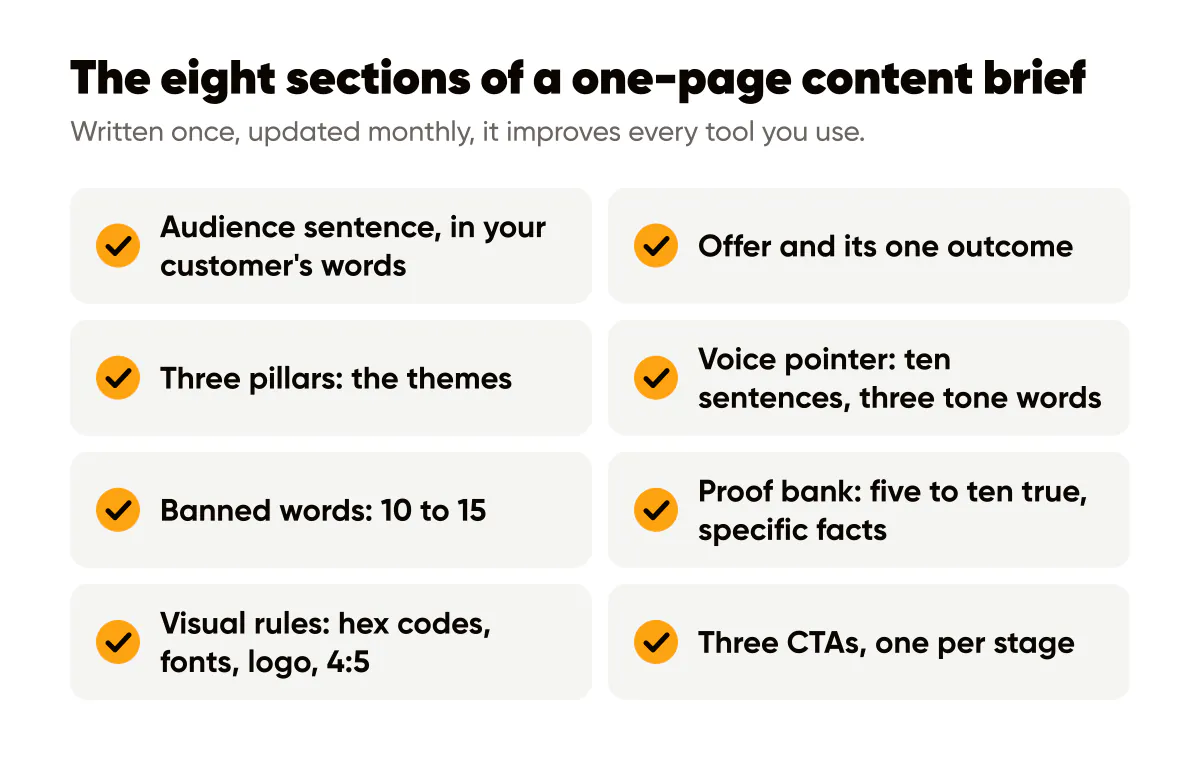
A one-page content brief is the single document you paste at the top of every AI prompt so the tool stops guessing who you are. Eight sections, no more than a page: audience, offer, three pillars, a pointer to your voice file, banned words, a proof bank, visual rules and your standard CTAs. Written once, updated monthly, it improves every tool you use.
Why the brief beats a better prompt
I used to write a fresh, careful prompt for every post. It worked, and it wasted about ten minutes each time re-explaining the same facts: who I sell to, what Creobee does, which words I refuse to use. The brief moved all of that into one document. Now a prompt is the brief plus three lines about today's post, and the quality went up because the fixed facts stopped drifting between sessions.
The brief also fixes the most common failure I see in AI content, which is generic output caused by generic input. The nine AI content mistakes post lists them; at least five are solved by this one page.
The eight sections
Keep each section short enough that the whole thing fits on one screen. If it runs long, the tool will weight the wrong parts.
- Audience sentence. One sentence, in the words your customer would use about themselves, including their current situation. "Independent bookkeepers with 15 to 40 clients who lose evenings to chasing receipts."
- Offer. What you sell, for whom, at what price point if you publish prices, and the one outcome it produces. Two sentences maximum.
- Three pillars. The themes every post falls under. Mine are branded design for non-designers, AI content that sounds human, and posting routines for one-person brands. The content pillars guide shows how to pick yours from audience problems, offer and proof.
- Voice pointer. A reference to your voice file, or the file itself if it is short: ten sentences you wrote, three tone words. The brand voice guide covers how to build it.
- Banned words. Ten to fifteen. Game-changer, unlock, elevate, seamless, dive in, journey, and whatever your niche overuses.
- Proof bank. Five to ten true, specific facts you are allowed to cite: numbers with dates, tools you use, mistakes you made, client situations with permission. This is the section that stops the model from inventing receipts.
- Visual rules. Palette hex codes, font names, logo position, image format (4:5 for feed), one sentence on the look. The one-page design system is the longer version; the brief needs only the summary line.
- CTAs. Three standard calls to action, one per funnel stage: save this, reply with X, book a call. The tool picks one per post instead of inventing "engage below".
What should go in the audience sentence?
Situation, not demographics. "Women 25 to 45 interested in wellness" tells a model nothing it can write from. "People who signed up for a gym in January, stopped going by March, and feel guilty every time the direct debit leaves" gives it a scene, a feeling and a moment. Write the sentence the way the customer would describe themselves to a friend, and the tool will write to that person.
How to use the brief in any tool
Paste the whole brief at the top of the prompt, then add three lines for the post at hand: the pillar, the point of this post, and one detail from the last week. That is it. In a chat tool, the brief can be the first message of a conversation you reuse. In tools with a custom instructions or project feature, it lives there permanently.
For hooks specifically, add the constraint lines from how to get AI to write hooks that are not clickbait underneath the brief; the proof bank feeds the specific claims those constraints demand.
How does Creobee's setup map to the brief?
Creobee, my AI social media post generator, does not have a paste-a-document field, and I want to be accurate about that. Its setup collects a subset of the brief: your business name and a short description first, then, if you take the longer route, your audience, a voice and a goal. When you make posts, the first screen sets the look of the feed (a style, a grid pattern, your brand color, a background and your logo), and an optional persuasion mode adds a copywriting framework whose questions ask for the audience, the promise and the problem in different words depending on the framework you picked (hook-first, Purple Cow, StoryBrand or Red Thread).
So the practical mapping is: paste your offer into the business description and your audience sentence into the audience field, pick the voice closest to your three tone words, answer the framework questions from the proof bank and pillars, and apply the visual rules through the style, your brand color, the background and your logo. The banned words are for your review pass: skip any post whose headline uses one, and fix a caption after you copy it. Any composer or caption tool will have a similar partial mapping; the brief is the source, the tool's fields are whatever slice of it fits.
A worked example: a wedding photographer
Audience sentence: "Couples planning a wedding of under eighty guests who want photos that look like a film still, not a catalogue, and who are nervous in front of cameras."
Offer: "Full-day documentary wedding photography, from 2,400, delivered as an edited gallery within six weeks."
Pillars: how to feel natural on camera; what a wedding day timeline actually looks like; small weddings done well.
Banned words: capture your special day, magical, timeless, stunning, dream wedding.
Proof bank: shot 31 weddings in 2025; average gallery 640 images; only one couple ever asked for a reshoot and it was because of rain; delivers in six weeks because editing happens Monday to Wednesday only.
Visual rules: cream background, near-black text, one serif display font, logo bottom right, 4:5 portrait.
CTAs: save this for your planning folder; reply with your date; book a free twenty-minute call.
With that brief pasted in, a prompt for a post is three lines: "Pillar: feel natural on camera. Point: the first ten minutes are always awkward and I plan for it. Detail: last Saturday the groom's brother told a joke and that became the cover shot." The output arrives already in the right register, with a real detail, and with one of the three CTAs.
Update it monthly
A brief that never changes goes stale in three ways: the proof bank fills with old numbers, the banned list misses the model's latest tics, and the offer drifts. I revise mine on the first Monday of the month, in fifteen minutes, right before planning the month's posts. Add two new proofs, retire one, check the offer line, and reread the audience sentence to see if it still describes the people who actually bought last month.
Google's people-first content guidance asks whether content shows first-hand expertise and depth of knowledge. The proof bank is how you make sure the answer is yes even when a tool drafts the words. If you keep the brief in a notes app, Notion's content calendar templates are a reasonable place to store it next to the schedule, but a plain text file works just as well.
Do this this week
- Block forty minutes and write all eight sections. Do not polish; a rough brief beats no brief.
- Paste it into your next three prompts and count how many edits each output needs compared with last week.
- Add five items to the proof bank from your last month of work: numbers, tools, mistakes, questions clients asked.
- Put a recurring monthly reminder in your calendar to revise it.
- Store it where you can reach it from every tool: notes app, project instructions, or a text file you keep open.
The brief is boring to write and dramatically unboring in effect. Every tool you touch afterwards, from a caption generator to a composer to a chat assistant, starts from your facts instead of the internet's average.
Put it into practice
Turn this into posts designed for your feed
Paste your website or say what you do. Creobee plans, writes and designs your posts about it as one feed in your logo and colors, captions included, and on Autopilot it posts them for you.
How the AI social media post generator works