AI Image Generator With Correct Text: What Works
Need an AI image generator with correct text? Generate the picture with no words in it and typeset the words on top. How to do it, and when to use both.
If you are looking for an AI image generator with correct text, the most reliable answer is not a better image model. It is to let the model make the picture with no words in it, and typeset the words on top. An AI image generator invents a picture, letters included, from a text description. A branded post composer places your logo, colors and a short headline into designed layouts that follow fixed rules, so the text comes out exactly as written. Creobee, the AI Instagram post generator I build, is a composer: it writes the words with AI and typesets them, and it generates no images. Solopreneurs who post weekly usually need a composer, and sometimes both.
Why AI image generators get text wrong
An image model does not write letters. It paints pixels that look like letters, the same way it paints pixels that look like fur or water. Most of the time a short word comes out right. A longer headline, a price, a date or a name it has rarely seen is where you get a doubled letter, a missing one, or a shape that is almost a letter.
Models have improved a lot on text, and some are sold on exactly that. But "usually right" is the wrong standard for a post whose whole job is the words. A misspelled headline on a feed post is the one error every follower notices, and you can only fix it by generating again and hoping, or by editing pixels by hand.
A typeset headline has none of those failure modes. The letters come from a font, so every word is spelled the way you typed it, at a size, contrast and position you can rely on, on every post.
How to get correct text on an AI-generated image
- Ask the model for the picture only: a scene, an object or a texture, with "no text, no letters, no logos" in the prompt.
- Leave room for the words. Ask for empty space in the top or bottom third, or crop to make some.
- Add the headline in an editor or a composer, in your own font and colors, over a dark or light overlay so it reads.
- Add the logo as a file, never as something the model draws.
- Read the finished post at thumbnail size before it goes out.
That is the same split a composer makes for you, which is why it works.
Why "AI image tool" is too vague a category
People lump these together because both have "AI" in the pitch and both produce a picture at the end. Under the hood they do opposite things. A generative model starts from noise and guesses pixels until they match your prompt. A composer starts from your assets and follows layout rules. One is a painter with no memory of your brand; the other is a layout assistant that only knows your brand.
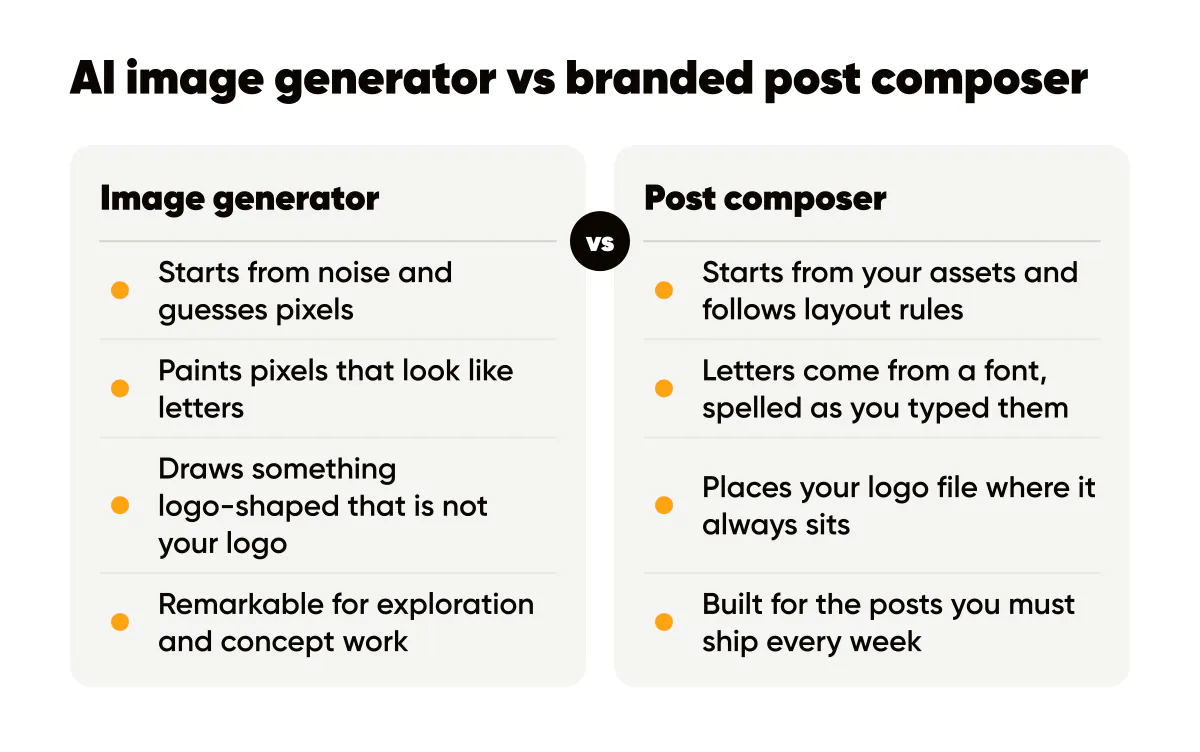
I use generative models several times a week for concept work, and I want to be fair about where each one wins. The mistake I see most often is a small business trying to run a weekly posting schedule on a generative model alone and quietly giving up after a month because nothing matches.
What a generative image model is good at
Generative models are remarkable at producing things you could never otherwise afford: an illustration of your product in a setting that does not exist, a mood board for a rebrand, ten wildly different visual directions in a lunch break. For exploration, nothing beats them.
They are weak in exactly the places a brand needs strength. Ask for the same scene twice and you get two slightly different color temperatures, two different lighting setups, two different "feels". Ask for your logo and you get something logo-shaped that is not your logo. And as above, ask for a headline rendered in the image and you may get misspelled words or letters that almost exist.
Can you build a consistent brand with a generative image model?
You can get closer with style references, fixed seeds, careful prompt libraries and a post-editing pass. In my own tests, a batch of ten images from one carefully written prompt still varied enough that I would not put them side by side on a grid without retouching. That variance is the product. It is what makes the tool creative, and it is what makes it a poor fit for the boring, recognizable repetition that brand consistency on social media depends on.
There is also the ownership question. The US Copyright Office has published guidance on copyright and artificial intelligence that treats purely machine-generated material as lacking the human authorship copyright protects, while leaving room for protection where a person made real creative choices. That is not a reason to avoid generative images, but it is a reason to think twice before making a purely generated picture the one asset your brand is built on. I cover the practical side in who owns AI-generated captions and images.
What a branded post composer does
A composer takes fixed inputs: your logo and where it sits, your background, your palette, and a headline. Every output follows the same rules, so every post shares the same grid, and the headline comes out exactly as written: spelled correctly, with contrast, size and alignment you can rely on. In Creobee the headline and caption are written by AI from your brief, and the design around them is drawn from your brand, a preset background or your own photo; no picture is generated.
The trade-off is real. You cannot get a hand-drawn illustration or a photoreal scene from a composer. The layouts are constrained on purpose and chosen by rules, not by you, and if you want to design a new layout every day, a composer will frustrate you. The Canva vs AI generators comparison covers the manual-editor side of this spectrum, which is a third category again.
Which one should a solopreneur use for weekly posts?
Ask four questions. How many posts do you need a month? Does each post carry text that must be exactly right? Does your logo need to appear? How much time do you have per post? If the answers are "twelve or more", "yes", "yes" and "under five minutes", you need a composer for the core of your feed. If the answers are "two or three", "no", "no" and "an hour is fine", a generative model plus a manual edit is a reasonable way to make each one special.
Most working solopreneurs land on the first set of answers for the base layer of their content and the second for occasional hero pieces: a launch, a campaign, a cover image.
Using both without making a mess
The combination that works is layered. Use the generative model for what it is good at, a background or an illustration with no text and no logo. Then bring that image into a composer as the background layer and let the template add the headline and logo. You get the visual variety of generation with the recognizable structure of a template. The AI image branding tips post goes deeper on keeping generated imagery inside your palette.
- Generate backgrounds, not finished posts. Ask for abstract textures, scenes or objects with no text at all.
- Darken or blur the generated image before placing text on it, so readability does not depend on luck.
- Keep one template family for the month so the generated variety sits inside a consistent frame.
- Check the provider's terms. OpenAI publishes usage policies that set out what you may and may not do with outputs, and other providers have their own.
- Keep a record of which images were generated, with which tool, on which date, in case a question comes up later.
If you want to skip the generation step entirely, most branded post tools ship with abstract backgrounds that do the same job. The background images guide explains how to choose between them.
Do this this week
- Count the posts you actually published last month. That number decides which tool is your base layer.
- Pick one template family and one palette. Lock the logo position.
- If you want variety, generate three text-free backgrounds with a generative model and drop them into your template. Compare them on the grid next to your flat-color posts.
- Read the usage policy of any generative tool you rely on, once, and save a one-line summary.
- Reserve generative images for the one post a month that deserves an hour.
The tools are not competitors so much as different jobs. A composer is a production line for the posts you must ship every week; a generative model is a studio for the posts you want to be unusual. Knowing which one you are holding is most of the battle. If you are picking a tool now, the best AI Instagram post generators sorts nine of them by which make AI images and which typeset the words.

Put it into practice
Turn this into posts designed for your feed
Paste your website or say what you do. Creobee plans, writes and designs your posts about it as one feed in your logo and colors, captions included, and on Autopilot it posts them for you.
How the AI social media post generator works