Batch Create Instagram Posts With AI: 30 in 1 Hour
Batch create Instagram posts with AI in one timed hour: a brief, 30 angles, captions and branded 4:5 images in one run, a human edit pass, then scheduling.
Batch-creating 30 Instagram posts in an hour works when the hour is split into fixed blocks: ten minutes on a brand brief and pillars, ten on angles, twenty generating captions and branded 4:5 images in one batch, fifteen editing every post by hand, five scheduling. The generation is fast. The review is not optional.
What batch-creating Instagram posts with AI actually looks like
I do this for Creobee's own account most Mondays, and the honest version is less glamorous than the headline. The AI part takes minutes. The human parts, deciding what to say and rejecting what is not good enough, take most of the hour. If you go in expecting to press a button and walk away with a month of content, you will publish thirty mediocre posts. If you go in expecting to make fifty decisions quickly, you will publish thirty decent ones and a handful of very good ones.
The hour below assumes you have a logo file, a brand color, and a rough idea of who you sell to. If you have none of those, spend the first hour writing a one-page design system instead and come back.
Minutes 0 to 10: brand brief and pillars
Write four lines. Who you serve, described in their words. What you sell, in one sentence. Three tone words and five banned phrases. Three to five content pillars, the themes you return to every week. A nutrition coach might run: myths, meal prep, mindset, client stories, offers. A web designer: pricing transparency, process, before and after, tools, offers.
This brief is the input to everything else. Every generation tool, whether it is a chat model or a purpose-built generator (I compare nine in the best AI Instagram post generators), produces output exactly as specific as its input. The content pillars guide covers how to choose pillars that never run dry; for the hour, three that you can talk about without notes are enough.
How many posts should a batch actually be?
Thirty is the number in the headline because it is a month at roughly one post a day, or two months at three posts a week, which is the cadence I recommend for most solopreneurs in how often to post on Instagram. It is also the batch ceiling in Creobee. But thirty is not magic. If your edit pass in minute 40 leaves you with twenty good posts, publish twenty. Volume you would not stand behind is not a win.
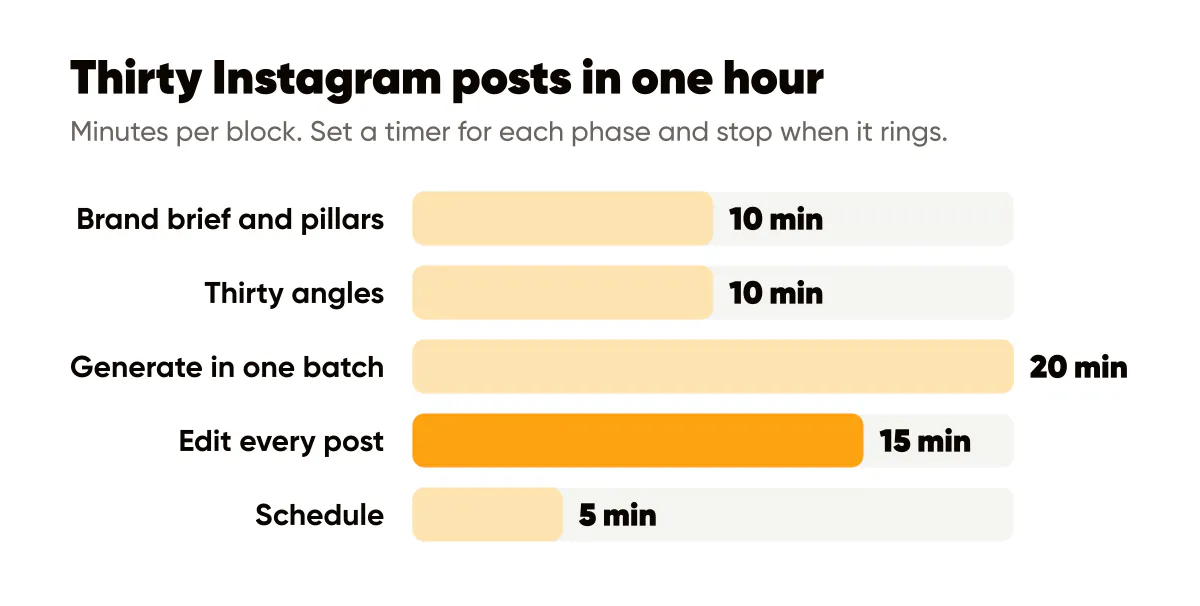
Minutes 10 to 20: thirty angles in ten minutes
An angle is one sentence stating what a single post will say. Not a topic ("meal prep") but a claim ("Sunday meal prep fails because you cook for the person you wish you were"). Six angles per pillar, five pillars, thirty angles. Write them fast and badly; you are making a list, not captions.
Two tricks keep this to ten minutes. First, draw from the last two weeks of your work: questions clients asked, mistakes you saw, a number that surprised you. Second, ask the model for angles, not captions, at this stage. "Give me eight one-sentence claims about meal prep for busy parents, each one slightly uncomfortable" produces raw material you can prune in a minute. Keep the ones that make you nod, cut the ones that make you shrug.
Minutes 20 to 40: generate captions and images in one batch
Now the fast part. Feed the brief to your tool and generate. In an AI Instagram post generator like Creobee this is a few choices on top of your saved brief: a style, a grid pattern, your brand color, an optional framework and the count, and it hands back the finished 1080x1350 images with headlines plus captions in a single run. Keep the posts that match your angles and drop the rest. In a general chat model plus a template editor, it is two steps: generate thirty headline and caption pairs, then drop each headline into your template. Both work; the second is slower and drifts more. A spreadsheet route such as Canva Bulk Create is a third option; the AI content calendar generator page shows the brief-based version.
Whatever the tool, lock the visual settings before you start and do not touch them mid-batch. Same logo corner, same palette, same type treatment for all thirty. The uniformity is the point; the variety comes from the angles. Output at the native feed size, 1080x1350 for 4:5, which Buffer's Instagram size guide lists as the recommended portrait size for feed posts.
Generate more than you need. I ask for thirty and expect to keep twenty to twenty-five. A batch tool that charges per image makes this a small cost; a chat model makes it free. Either way, having choices in the edit pass is what makes the edit pass fast.
What do you do while the batch generates?
Open your scheduler and your calendar. Map the next thirty slots against your pillars so that no two consecutive days hit the same pillar, and offers land no more than once a week. The 30-day AI content calendar method does this in an afternoon; in the hour, a simple rotation is enough. By the time the batch finishes, you know where each post will go.
Minutes 40 to 60: the human edit pass, then schedule
Fifteen minutes for thirty posts is thirty seconds each, which sounds brutal and is actually plenty when the decisions are binary. For each post: keep, fix, or kill.
Keep: the headline is specific, readable at thumbnail size, and something you would say. Move on.
Fix: the idea and the headline are right, but a word in the caption is off, it has a hype word, or the CTA is vague. Edit the caption before you paste it; that is faster than starting over. Add one receipt if the caption lacks one. If the headline on the image is what is wrong, treat the post as a kill. This is the same edit pass I describe in the AI caption generator guide.
Kill: the headline is generic, the claim is not true for you, or the post duplicates another in the batch. Delete without regret. A batch of thirty that yields twenty-two publishable posts is a normal, healthy result.
Run the 12-point quality checklist on the keepers if you have time; after a few weeks it becomes automatic. Two checks I never skip: is every factual claim true, and is the text on the image spelled correctly. AI headlines are occasionally confident about numbers you never gave them.
The last five minutes are scheduling. Upload the keepers in the order you mapped during generation. Write or paste the caption, add alt text that states the words on the image, and set the times. Instagram's own ranking explainer describes the signals ranking uses, and none of them reward a burst of five posts in one day followed by silence; steady, predictable publishing is what batching is for. Name files by date before you export and this step is drag, paste, confirm.
Run it once this week
Block one hour. Set a timer for each phase and stop when it rings, even if the phase is not finished; the constraint is what keeps the hour an hour. Expect the first run to take ninety minutes and the third run to take fifty. Track how many of your thirty survive the edit pass, because that number tells you whether your brief and angles are specific enough. Below fifteen means the brief needs work. Above twenty-five means you can trust the batch more and edit less.
The batching content workflows post is the wider weekly sprint this hour fits inside, and the one-hour batch is the piece of it most people can start tomorrow.
Put it into practice
Turn this into posts designed for your feed
Paste your website or say what you do. Creobee plans, writes and designs your posts about it as one feed in your logo and colors, captions included, and on Autopilot it posts them for you.
How the AI content calendar generator works